Open files in VS Code and Cursor / 3D and imaging
Open a DXF drawing in VS Code
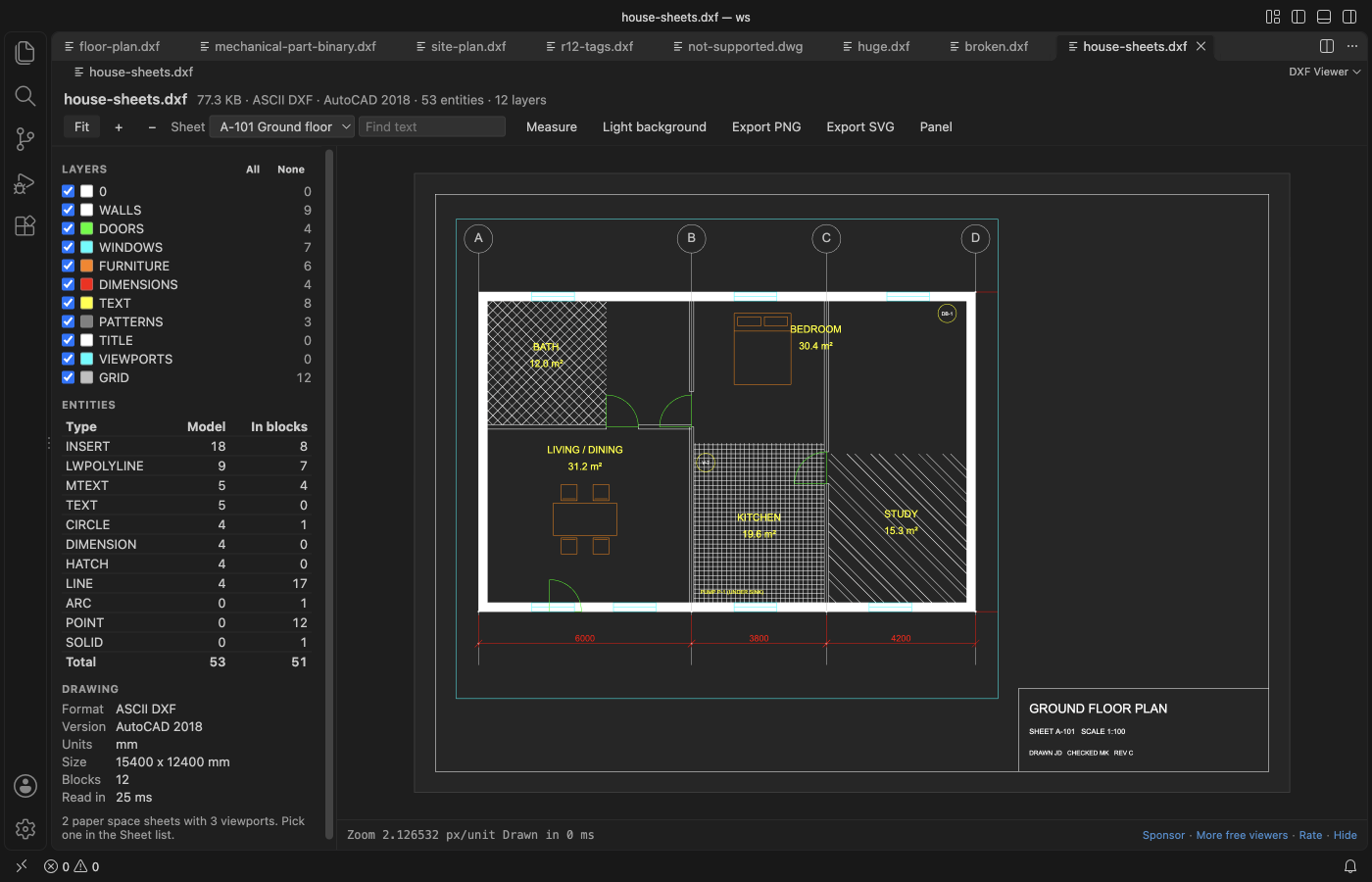
DXF Viewer opens a .dxf file in VS Code as a drawing, not as text. It reads ASCII and binary DXF from R12 to AutoCAD 2018, with blocks, text, dimensions, hatches and paper space sheets, and you can hide layers, find text and measure. DWG files are not read. A .dwg opens a short page with its version and the ways to save a DXF copy. Viewing is free. Zovo Pro (USD 19 once) adds a CSV inventory of a folder of drawings, CSV export of block attributes and text, and a compare of two revisions, with 3 free tries each.
Free, MIT license. Extension ID zovo.dxf-viewer, version 0.3.2. Needs VS Code 1.90.0 or newer.
Also free from Zovo: STL Viewer, OBJ, GLB & glTF Preview, VS Code Marketplace · Open VSX (Cursor, Windsurf).
This guide is also in Deutsch, Español, 日本語.
Steps in VS Code
- Install DXF Viewer from the Marketplace, or press Ctrl+P (Cmd+P on macOS) and run
ext install zovo.dxf-viewer. - Click a
.dxffile in the Explorer. It opens in DXF Viewer. The side panel lists the layers, the entity types and the drawing facts such as version, units and size. - Drag to pan, scroll to zoom at the pointer, and press F or double-click to fit the drawing. B switches between a dark and a white background.
- If the drawing has paper space, pick a layout in the Sheet list. It shows the way it prints, with the title block and the viewports at their scale.
- Untick a layer in the Layers panel to hide it. Press Ctrl+F (Cmd+F on a Mac) to find text, MTEXT or block attributes, and M to measure between two points.
- Click Export PNG or Export SVG to save the view. When you save the DXF again from your CAD program, the open view reloads with the same zoom, sheet and layers.
- If you click a
.dwgfile, a page shows its DWG version and how to save it as DXF in AutoCAD, BricsCAD, LibreCAD, QCAD or the free ODA File Converter. Then open the.dxf.
Where Zovo Pro saves time
Opening DXF files, sheets, layers, find text, measure, live reload and PNG or SVG export are free and stay free. It needs no sign-in, makes no network calls and never changes the drawing.
When you get a folder of DXF drawings and need to know what is in it, the inventory reads every .dxf in the folder and its subfolders. It saves one CSV row per drawing with the DXF version, units, width and height, layers, entities, blocks, text and title block fields such as TITLE, DWG_NO, REV and DATE. The other two Pro tools extract block attributes, text or layers to CSV, and compare two revisions of a drawing.
With Inventory of a Folder of Drawings to CSV (Zovo Pro)
- Right-click a folder in the Explorer and pick Inventory of a Folder of Drawings to CSV (Zovo Pro). Or run "DXF Viewer: Inventory of a Folder of Drawings to CSV (Zovo Pro)" from the Command Palette and choose the folder.
- Pick where to save the CSV. A try counts only when the file is saved, so Cancel or Escape costs nothing.
Inventory of a Folder of Drawings to CSV works 3 times on your computer before it asks for a license, and a try counts only when you get a result. Opening a file shows no popup and no countdown.
Zovo Pro costs USD 19 once. It is not a subscription, and it turns on the Pro tools in every Zovo extension, not only DXF Viewer. After a card payment (Stripe) your license key shows on the next page. In VS Code, run "Zovo Pro: Enter Zovo Pro license key" from the Command Palette and paste it. The key is checked on your computer, with no network call. With GitHub Sponsors, pick the "$19 one time" tier, then run "Zovo Pro: I already paid: unlock with GitHub Sponsors" and sign in with the same GitHub account. With PayPal, send USD 19 with "Zovo Pro" in the note and the key comes by email within a day.
A team of 5: USD 59 once, by card or by PayPal. Every rule and every Pro tool is on the Zovo Pro page.
Steps in Cursor, Windsurf or VSCodium
- Open the Extensions view with Ctrl+Shift+X (Cmd+Shift+X on macOS).
- Search for
zovo.dxf-viewerand click Install. Cursor, Windsurf and VSCodium install from Open VSX, where it is published aszovo/dxf-viewer. - If your editor has no gallery, download the .vsix from the Open VSX page and run "Extensions: Install from VSIX...".
- Then use it the same way as in VS Code.
What DXF Viewer handles
- ASCII and binary DXF, from R12 to AutoCAD 2018.
- Lines, arcs, circles, ellipses, polylines with bulges, splines, pattern hatches, TEXT, MTEXT, block attributes, nested blocks and dimensions.
- Paper space layouts, with each viewport at its own scale and twist and the layers it freezes left out.
- Big files, read in a worker thread. A 24 MB drawing with 600,000 lines loads in about one second.
What it does not do
- DWG files are not read. Save them as DXF first.
- 3D entities are drawn flat, as a top view, and 3DSOLID, REGION and BODY are not drawn.
- Text uses a sans-serif font, not the SHX or TrueType font of the file, and line weights are not used.
- Files over 500 MB are not read (setting
dxfViewer.maxFileMB, up to 2048).
Other options
- Autodesk DWG TrueView. A free Windows viewer from Autodesk that opens DWG and DXF files, outside VS Code.
- LibreCAD. A free, open source 2D CAD program for Windows, macOS and Linux that opens and edits DXF files.
- ODA File Converter. A free tool that converts a folder of DWG files to DXF in one go.
Install counts and Open VSX status were checked on 12 November 2026. Descriptions in quotes are the extensions' own.
Questions
Can it open DWG files?
No. DWG is a closed format. A .dwg file opens a short page with its version and the steps to save a DXF copy in AutoCAD, BricsCAD, LibreCAD, QCAD or the ODA File Converter.
Can I edit the drawing?
No. The viewer is read-only. The only files it writes are the PNG, SVG or CSV exports you pick, and it refuses to write over a drawing.
Do I need AutoCAD?
No. The extension reads the DXF file itself, with no CAD program installed.
Does it work in Cursor or Windsurf?
Yes. Cursor, Windsurf and VSCodium install extensions from Open VSX. Search for the extension in their Extensions view and install it there.
More about DXF Viewer
Read the DXF Viewer page for every feature and setting, or the source code on GitHub.
Related guides
- STL Viewer, OBJ, GLB & glTF Preview on the VS Code Marketplace (also on Open VSX). Opens STL, OBJ, PLY, GLB and glTF models in VS Code, beside the code.
- DXF to CSV in VS Code
- Measure a distance in a DXF drawing in VS Code
- View STL files in VS Code
- Open DICOM and NIfTI files in VS Code
Support this work
If this extension saves you time, you can support the work on GitHub Sponsors. Monthly tiers start at $5, and one-time tiers start at $15. Sponsorship is optional, and the tool works the same without it.
Need your format supported?
Open a format request with a sample file, and I reply there whether it can be done. For USD 299 once, through this GitHub Sponsors tier, I add your file format or a missing feature to this extension, with tests, within 7 days.