Open files in VS Code and Cursor / 3D and imaging
Play GLB and glTF animations in VS Code
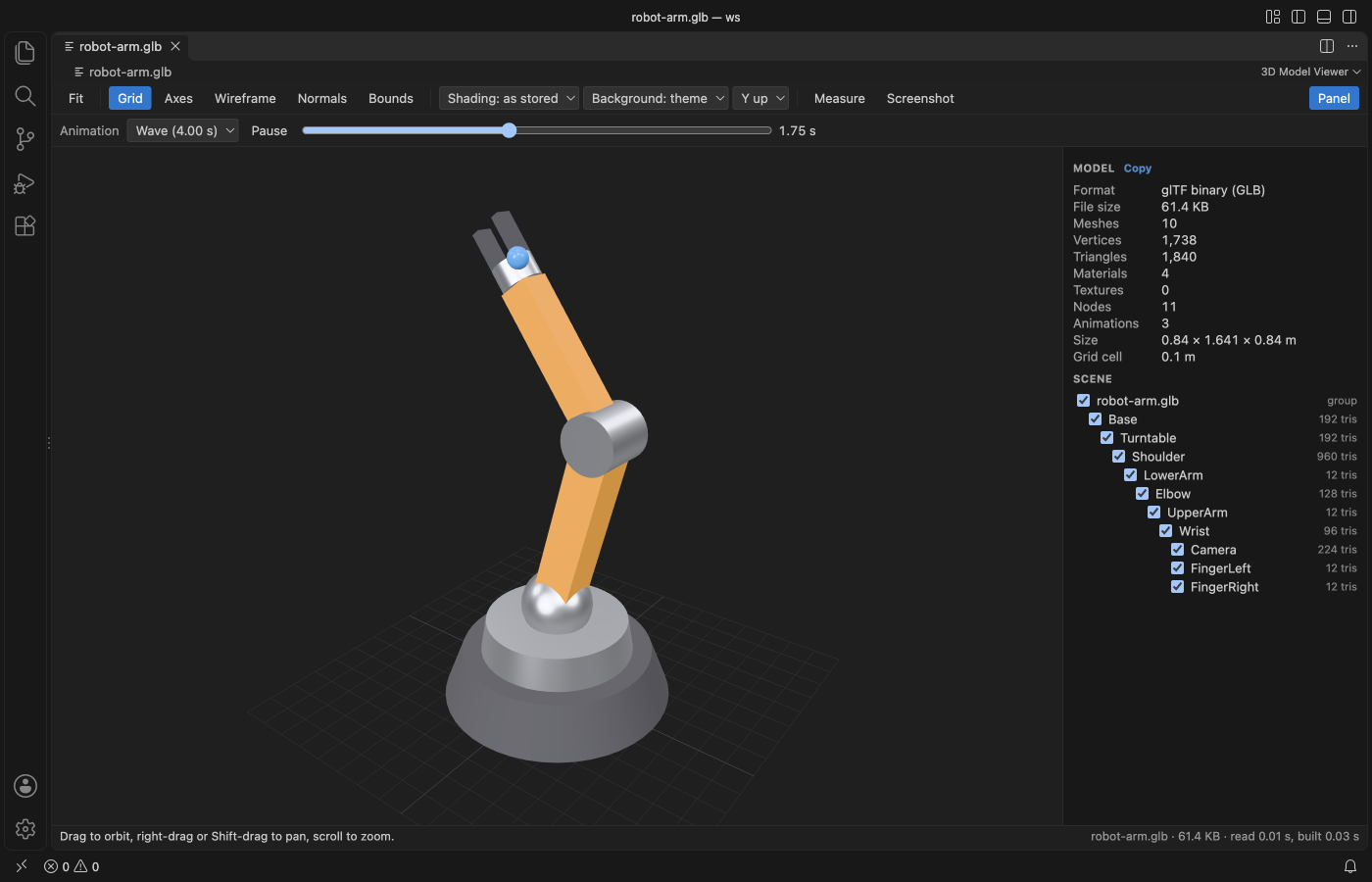
3D Model Viewer plays the animations stored in a .glb or .gltf file inside VS Code. An Animation bar lists every clip with its length, plays the first one when the file opens, and has Play and Pause (Space) and a time slider you can drag to any pose. The panel counts the animations, and the scene tree lets you hide a node and its children. All of that is free. Zovo Pro (USD 19 once) adds a turntable GIF export, a print check and a section view, with 3 free tries each.
Free, MIT license. Extension ID zovo.3d-model-viewer, version 0.2.5. Needs VS Code 1.90.0 or newer.
Steps in VS Code
- Install 3D Model Viewer from the Marketplace, or press Ctrl+P (Cmd+P on macOS) and run
ext install zovo.3d-model-viewer. - Click the
.glbor.gltffile in the Explorer. If another viewer opens, right-click it and pick "Open in 3D Model Viewer". - If the file has animations, the Animation bar shows above the model and the first clip starts. The panel on the right gives the number of animations.
- Pick another clip from the list. Each one shows its name and length, or Clip 1, Clip 2 when it has no name.
- Press Pause (or Space) and drag the time slider to step through the clip and stop at any pose.
- Uncheck a node in the scene tree to hide it and its children, and press F to frame the model again if a clip moves it out of view.
Where Zovo Pro saves time
Opening GLB, glTF, STL, OBJ, PLY and 3MF files, animations, the scene tree, Measure, wireframe, normals, bounds and Screenshot as PNG are free, with no network use.
To show a model in a pull request or a chat, Turntable Export saves a GIF of 480 x 480, 640 x 480 or 800 x 600 pixels that turns 360 degrees in 3 to 6 seconds, or 72 numbered PNG frames for a video tool. It uses the view, lights and background you set. The animation is paused while it records, so the model turns in the pose you stopped at. The other Pro tools are a print check with volume, weight and a watertight test, and a section view that cuts the model and measures the cut.
With Turntable Export (Zovo Pro)
- Pause the clip at the pose you want with the time slider.
- Press Turntable in the toolbar. It has a small PRO badge.
- Pick a size and where to save. Esc stops it, and a stopped export uses no try.
Turntable Export works 3 times on your computer before it asks for a license, and a try counts only when you get a result. Opening a file shows no popup and no countdown.
Zovo Pro costs USD 19 once. It is not a subscription, and it turns on the Pro tools in every Zovo extension, not only 3D Model Viewer. After a card payment (Stripe) your license key shows on the next page. In VS Code, run "Zovo Pro: Enter Zovo Pro license key" from the Command Palette and paste it. The key is checked on your computer, with no network call. With GitHub Sponsors, pick the "$19 one time" tier, then run "Zovo Pro: I already paid: unlock with GitHub Sponsors" and sign in with the same GitHub account. With PayPal, send USD 19 with "Zovo Pro" in the note and the key comes by email within a day.
A team of 5: USD 59 once, by card or by PayPal. Every rule and every Pro tool is on the Zovo Pro page.
Steps in Cursor, Windsurf or VSCodium
- Open the Extensions view with Ctrl+Shift+X (Cmd+Shift+X on macOS).
- Search for
zovo.3d-model-viewerand click Install. Cursor, Windsurf and VSCodium install from Open VSX, where it is published aszovo/3d-model-viewer. - If your editor has no gallery, download the .vsix from the Open VSX page and run "Extensions: Install from VSIX...".
- Then use it the same way as in VS Code.
What 3D Model Viewer handles
- glTF 2.0 animations, skins and morph targets.
- Embedded or external
.binbuffers and textures, and PBR materials. - A scene tree of up to 3,000 nodes with a visibility check box each.
- STL, OBJ, PLY and 3MF in the same viewer.
What it does not do
- One clip plays at a time, and there is no speed control.
- Draco or meshopt compressed glTF and KTX2 textures are not decoded yet. A message names the missing extension.
- FBX, DAE, USD and glTF 1.0 files do not open.
- Fit uses the pose on screen, so an animated model can move out of the frame during a clip. Press F again.
Other options
- glTF Viewer by Don McCurdy. A free web viewer where you drop a GLB and pick its animation clips.
- Blender. Free. It imports glTF with its actions, for when you need to change the animation, not just check it.
Install counts and Open VSX status were checked on 12 November 2026. Descriptions in quotes are the extensions' own.
Questions
My GLB plays in another tool but shows no Animation bar here. Why?
The bar shows only when the file holds glTF animations. Check that the exporter wrote them, and that the file is not Draco or meshopt compressed.
Can I export the animation as a video?
No. Turntable Export turns the model in one pose. It does not record the clip.
Is it free?
Yes. Playing animations and the scene tree are free. Only Print check, Section view and Turntable Export are Pro, with 3 free tries each.
Does it work in Cursor or Windsurf?
Yes. Cursor, Windsurf and VSCodium install extensions from Open VSX. Search for the extension in their Extensions view and install it there.
More about 3D Model Viewer
Read the 3D Model Viewer page for every feature and setting, or the source code on GitHub.
Related guides
- STL Viewer, OBJ, GLB & glTF Preview on the VS Code Marketplace (also on Open VSX). Opens STL, OBJ, PLY, GLB and glTF models in VS Code, beside the code.
- View STL files in VS Code
- Calculate the volume of an STL file
- Open DICOM and NIfTI files in VS Code
- DICOM to NIfTI in VS Code
Zovo Pro and support
Zovo Pro: USD 19 once, every Zovo viewer. It turns on the Pro tools in this extension and in the other Zovo extensions you use. The free features stay free.
After a card payment your license key shows on the next page. Paste it with the command "Zovo Pro: Enter a key".
You can also support the work with no Pro:
Need your format supported?
Open a format request with a sample file, and I reply there whether it can be done. For USD 299 once, through this GitHub Sponsors tier, I add your file format or a missing feature to this extension, with tests, within 7 days.