Open files in VS Code and Cursor / Media
Play audio files in VS Code
VS Code's built-in Chromium has no Opus decoder, so a .opus file does not play in VS Code alone. The free Audio Player & WAV Player plays WAV, MP3, FLAC, Ogg and Opus files with a waveform for each channel, a spectrogram, an A-B loop and speeds from 0.25x to 2x with the pitch kept. It ships its own Opus decoder, and M4A and AAC files play after one click if you have ffmpeg. Zovo Pro (USD 19 once) adds a CSV report of every audio file in a folder, with 3 free tries.
Free, MIT license. Extension ID zovo.audio-preview-vscode, version 0.2.2. Needs VS Code 1.90.0 or newer.
This guide is also in Deutsch, Español, 日本語.
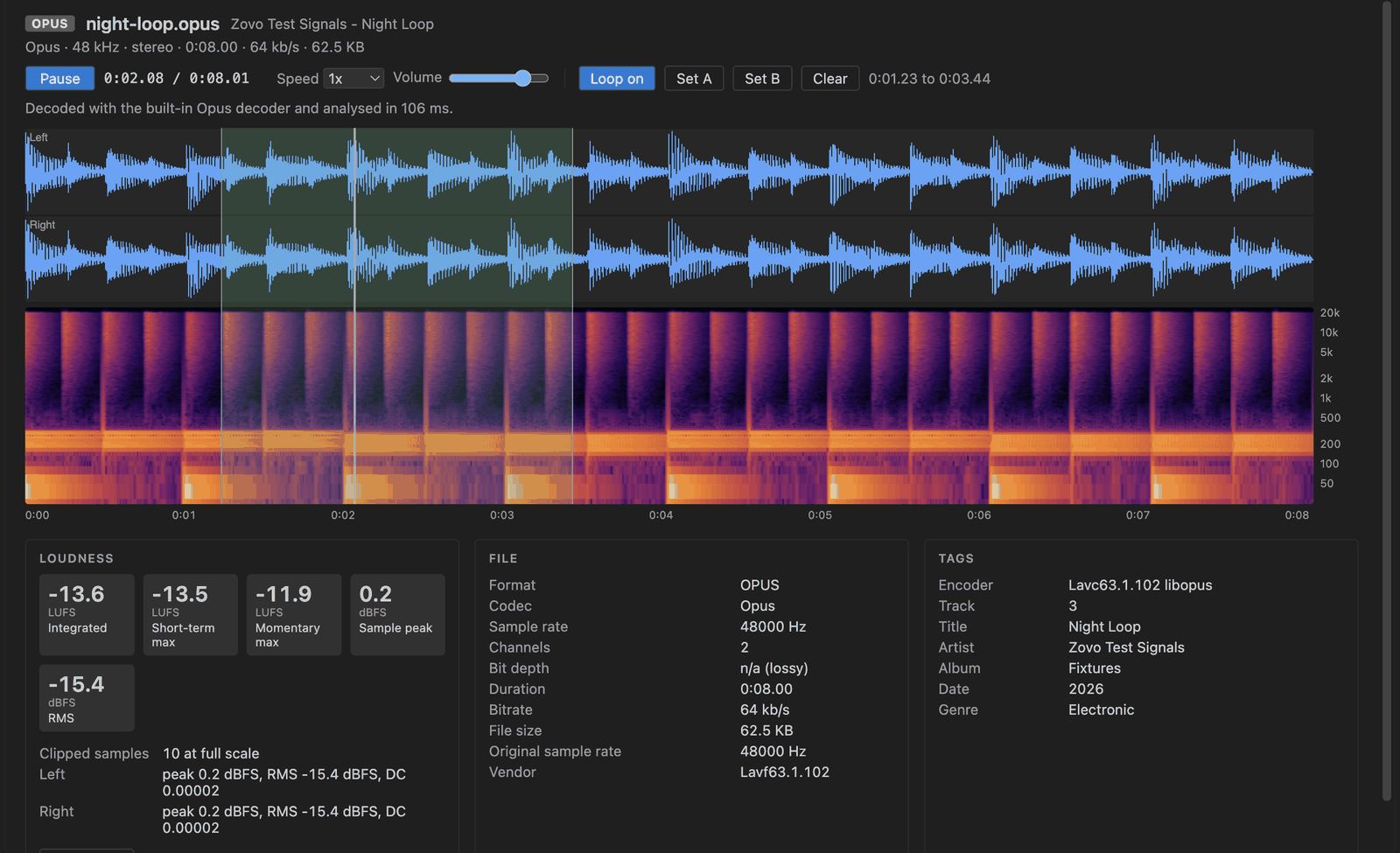
Steps in VS Code
- Install Audio Player & WAV Player from the Marketplace, or press Ctrl+P (Cmd+P on macOS) and run
ext install zovo.audio-preview-vscode. - Click a
.wav,.mp3,.flac,.ogg,.opusor.m4afile in the Explorer. If another player opens, right-click the file and pick "Open in Audio Preview". - Press Space to play or pause. Left and Right jump 5 seconds (1 second with Shift). Click the waveform to seek.
- Drag across the waveform to loop that part, or press
[and]to set the loop start and end at the playhead. L turns the loop on or off. - Pick a speed from 0.25x to 2x. The pitch stays the same, so slow speech is still clear.
- Read the header for the codec, sample rate, channels, bit depth, duration and bitrate, and the Tags panel for title, artist, album and the other tags.
Where Zovo Pro saves time
Playback of every supported format, the waveform, the spectrogram, the A-B loop, speed, the File and Tags panels, the loudness numbers and Copy stats are free. Nothing is written back to the audio file.
When you get a folder of recordings, Folder Loudness Report writes one CSV row per file with its format, duration, sample rate, bit depth, title, artist, loudness, peak and clipped samples, so you can sort and check them in a spreadsheet instead of opening each file. WAV is read by the extension. MP3, FLAC, Ogg, Opus and M4A rows need your own ffmpeg. The other Pro tool is Normalize Loudness.
With Folder Loudness Report (Zovo Pro)
- Right-click a folder in the Explorer and pick "Folder Loudness Report (CSV, Pro)", or use the "..." menu of the player.
- Pick "This folder and its subfolders" or "This folder only", then where to save
loudness-report.csv. - Open the CSV in a spreadsheet. A try counts only when the file is written.
Folder Loudness Report works 3 times on your computer before it asks for a license, and a try counts only when you get a result. Opening a file shows no popup and no countdown.
Zovo Pro costs USD 19 once. It is not a subscription, and it turns on the Pro tools in every Zovo extension, not only Audio Player & WAV Player. After a card payment (Stripe) your license key shows on the next page. In VS Code, run "Zovo Pro: Enter Zovo Pro license key" from the Command Palette and paste it. The key is checked on your computer, with no network call. With GitHub Sponsors, pick the "$19 one time" tier, then run "Zovo Pro: I already paid: unlock with GitHub Sponsors" and sign in with the same GitHub account. With PayPal, send USD 19 with "Zovo Pro" in the note and the key comes by email within a day.
A team of 5: USD 59 once, by card or by PayPal. Every rule and every Pro tool is on the Zovo Pro page.
Steps in Cursor, Windsurf or VSCodium
- Open the Extensions view with Ctrl+Shift+X (Cmd+Shift+X on macOS).
- Search for
zovo.audio-preview-vscodeand click Install. Cursor, Windsurf and VSCodium install from Open VSX, where it is published aszovo/audio-preview-vscode. - If your editor has no gallery, download the .vsix from the Open VSX page and run "Extensions: Install from VSIX...".
- Then use it the same way as in VS Code.
What Audio Player & WAV Player handles
- WAV (PCM, float, A-law, mu-law, RF64), read in chunks so a 173 MB file does not freeze the editor.
- MP3, FLAC and Ogg Vorbis with the decoder VS Code already has.
- Opus in
.opusor.ogg, with the bundled libopus decoder. - Up to 8 channels, each in its own waveform lane.
What it does not do
- M4A and AAC need ffmpeg. Without it you see the codec, duration, bitrate and tags, and a message.
- ALAC, AC-3 and other codecs VS Code cannot decode also need the ffmpeg button.
- Compressed files are decoded whole. Above about 28 minutes of 44.1 kHz stereo they only play (setting
audioPreview.maxDecodedMB). - It plays and checks files. It does not cut or edit them.
Other options
- VLC. A free desktop player that plays Opus, MP3, FLAC, M4A and almost any other audio file, outside VS Code.
- ffplay.
ffplay file.opusplays a file from the terminal. Free, comes with ffmpeg. - VS Code's own preview. Plays common formats such as MP3 and WAV in a plain player, with no waveform, and does not play Opus.
Install counts and Open VSX status were checked on 12 November 2026. Descriptions in quotes are the extensions' own.
Questions
Why does my .opus file not play in VS Code?
VS Code ships Chromium without an Opus decoder. This extension carries libopus compiled to WebAssembly, so Opus plays with nothing else to install.
Why does my M4A show a message instead of playing?
VS Code has no AAC decoder either. With ffmpeg installed, a Decode with ffmpeg button makes a WAV copy in the extension's storage and the file plays.
Is it free?
Yes. Playing, the waveform, the spectrogram and the loop are free. Only Folder Loudness Report and Normalize Loudness are Pro, with 3 free tries each.
Does it work in Cursor or Windsurf?
Yes. Cursor, Windsurf and VSCodium install extensions from Open VSX. Search for the extension in their Extensions view and install it there.
More about Audio Player & WAV Player
Read the Audio Player & WAV Player page for every feature and setting, or the source code on GitHub.
Related guides
- Audio Player & WAV Player on the VS Code Marketplace (also on Open VSX). Plays WAV, MP3 and FLAC files in VS Code and shows the waveform.
- Normalize audio loudness to a LUFS target
- Why VS Code plays MP4 with no sound, and how to fix it
- Extract frames from a video in VS Code
- Play MOV, MKV and WebM videos in VS Code
Support this work
If this extension saves you time, you can support the work on GitHub Sponsors. Monthly tiers start at $5, and one-time tiers start at $15. Sponsorship is optional, and the tool works the same without it.
Need your format supported?
Open a format request with a sample file, and I reply there whether it can be done. For USD 299 once, through this GitHub Sponsors tier, I add your file format or a missing feature to this extension, with tests, within 7 days.