Open files in VS Code and Cursor / Binary, network and hardware
Compare two .hex or .s19 firmware images by address
A text diff of two .hex files shows changed lines, not changed memory, and one moved record makes every line after it look different. Intel HEX Viewer compares the two images by address. It lists each range of changed bytes, and the data only in one of them, with the old and new bytes. One file can be Intel HEX and the other an S-record file. Compare is a Zovo Pro tool (USD 19 once) with 3 free tries. The memory map and hex view of each file are free.
Free, MIT license. Extension ID zovo.zovo-intel-hex-viewer, version 0.1.1. Needs VS Code 1.90.0 or newer.
Steps in VS Code
- Install Intel HEX Viewer from the Marketplace, or press Ctrl+P (Cmd+P on macOS) and run
ext install zovo.zovo-intel-hex-viewer. - Open the first image in Intel HEX Viewer. For a
.hexfile, click the board icon in the editor title. S-record files open in the viewer when you click them. - Click Compare… at the top, or run "Intel HEX Viewer: Compare two firmware images (Pro)" from the Command Palette.
- Pick the second image. It can be Intel HEX or S-record.
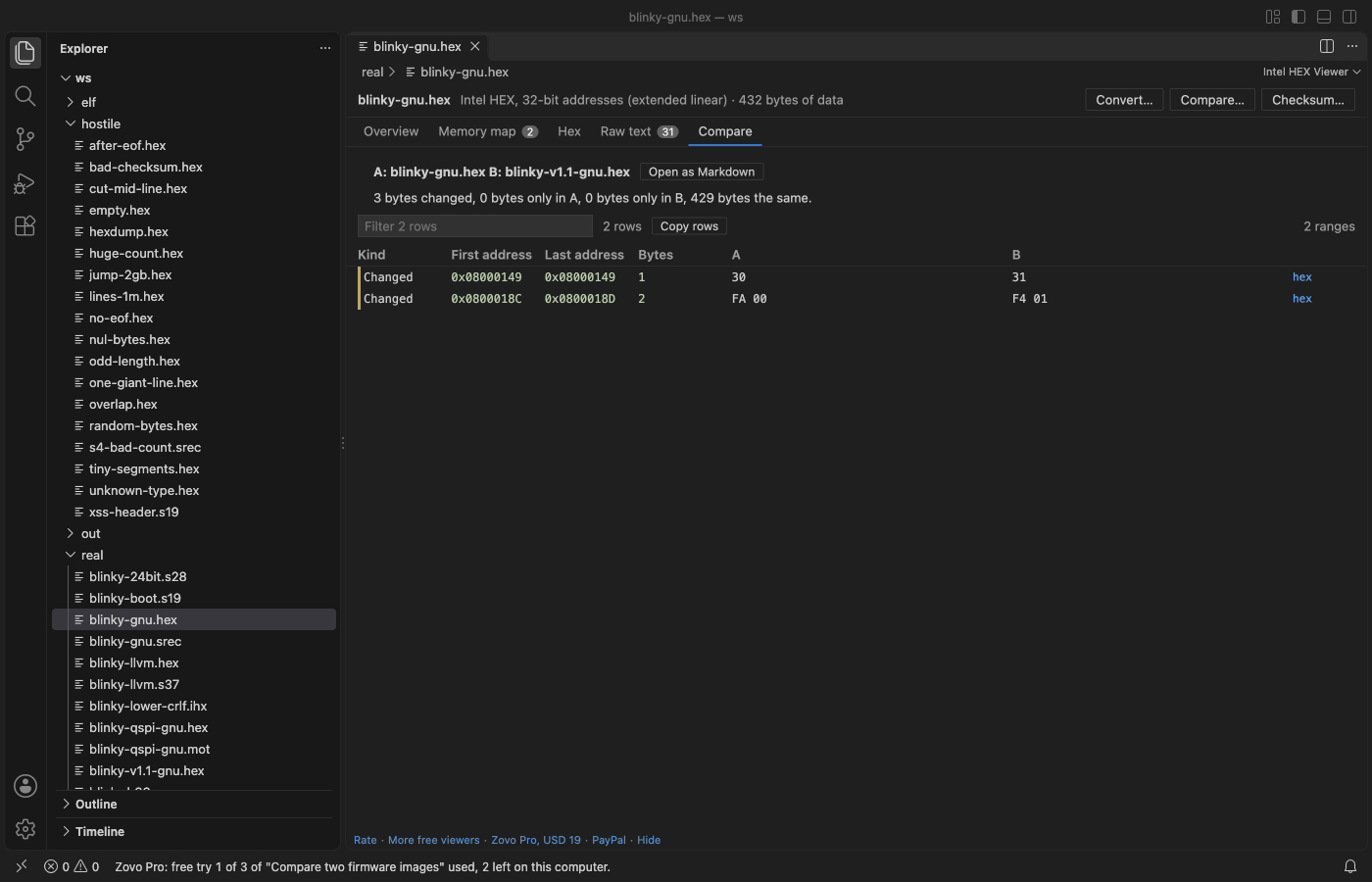
- The Compare tab lists each range as Changed, Only in A or Only in B, with the first and last address, the size and the bytes. Click hex on a row to see those bytes.
- Click Open as Markdown to get the report as a document you can save or paste into a review.
Where Zovo Pro saves time
Opening each image, the memory map, the Problems tab, the hex view by address and the data inspector are free, with no limit. Compare is a Pro tool with 3 free tries on your computer.
After a rebuild, a compiler change or a patch, Compare two firmware images tells you exactly which addresses changed, and confirms that two builds hold the same bytes. It reads each file into memory by address, so line length, record order and file format do not matter. The other two Pro tools convert an image to Intel HEX, S-record or binary, and compute a checksum or CRC over an address range.
With Compare two firmware images (Zovo Pro)
- Click Compare… in the viewer and pick the second file.
- A try counts only when the result is shown. Cancel in the file picker uses none.
- Click Open as Markdown to keep the report.
Compare two firmware images works 3 times on your computer before it asks for a license, and a try counts only when you get a result. Opening a file shows no popup and no countdown.
Zovo Pro costs USD 19 once. It is not a subscription, and it turns on the Pro tools in every Zovo extension, not only Intel HEX Viewer. After a card payment (Stripe) your license key shows on the next page. In VS Code, run "Zovo Pro: Enter Zovo Pro license key" from the Command Palette and paste it. The key is checked on your computer, with no network call. With GitHub Sponsors, pick the "$19 one time" tier, then run "Zovo Pro: I already paid: unlock with GitHub Sponsors" and sign in with the same GitHub account. With PayPal, send USD 19 with "Zovo Pro" in the note and the key comes by email within a day.
A team of 5: USD 59 once, by card or by PayPal. Every rule and every Pro tool is on the Zovo Pro page.
Steps in Cursor, Windsurf or VSCodium
- Open the Extensions view with Ctrl+Shift+X (Cmd+Shift+X on macOS).
- Search for
zovo.zovo-intel-hex-viewerand click Install. Cursor, Windsurf and VSCodium install from Open VSX, where it is published aszovo/zovo-intel-hex-viewer. - If your editor has no gallery, download the .vsix from the Open VSX page and run "Extensions: Install from VSIX...".
- Then use it the same way as in VS Code.
What Intel HEX Viewer handles
- Intel HEX against Intel HEX, S-record against S-record, or one of each.
- Images with gaps and blocks at different addresses.
- Changed bytes, bytes only in the first file and bytes only in the second file.
- A summary of changed bytes, bytes only in A, bytes only in B and bytes that are the same.
What it does not do
- The list stops at 20,000 ranges.
- It compares bytes. It does not tell you which function or variable changed, since it has no disassembly and reads no map file.
- Plain
.binfiles are not read.
Other options
- srec_cmp from SRecord. A free command-line tool that compares two HEX or S-record files by address.
- The intelhex Python package. Free. Its hexdiff.py script prints a diff of two Intel HEX files.
- objcopy and cmp. Convert both to binary and compare them with cmp. Gaps are filled, so the offsets are not addresses.
Install counts and Open VSX status were checked on 12 November 2026. Descriptions in quotes are the extensions' own.
Questions
Why not use a text diff?
Two images with the same bytes can have different line lengths or record order. A text diff then shows changes where memory is the same. This compare reads the bytes by address.
Can I compare a .hex file with a .s19 file?
Yes. Each file is read as memory by address, so the two can be in different formats.
Is Compare free?
It is a Zovo Pro tool with 3 free tries on your computer. The memory map and hex view of each file are free.
Does it work in Cursor or Windsurf?
Yes. Cursor, Windsurf and VSCodium install extensions from Open VSX. Search for the extension in their Extensions view and install it there.
More about Intel HEX Viewer
Read the Intel HEX Viewer page for every feature and setting, or the source code on GitHub.
Related guides
- See what an Intel HEX or S19 file puts in memory
- Use a hex editor in VS Code
- Open a binary file in VS Code
- Open a PCAP file in VS Code
Zovo Pro and support
Zovo Pro: USD 19 once, every Zovo viewer. It turns on the Pro tools in this extension and in the other Zovo extensions you use. The free features stay free.
After a card payment your license key shows on the next page. Paste it with the command "Zovo Pro: Enter a key".
You can also support the work with no Pro:
Need your format supported?
Open a format request with a sample file, and I reply there whether it can be done. For USD 299 once, through this GitHub Sponsors tier, I add your file format or a missing feature to this extension, with tests, within 7 days.