Open files in VS Code and Cursor / Developer files
Convert an EDI file to JSON or CSV
EDI Viewer saves an X12 or EDIFACT file as JSON or CSV in VS Code. The JSON is a tree per transaction, with the name, value and code meaning of every element. The CSV has one row per line item for 850, 855, 810, 856, ORDERS, ORDRSP, INVOIC and DESADV, and one row per segment for other types. Export is a Zovo Pro tool (USD 19 once) with 3 free tries. Reading the file as a tree is free.
Free, MIT license. Extension ID zovo.zovo-edi-viewer, version 0.1.1. Needs VS Code 1.90.0 or newer.
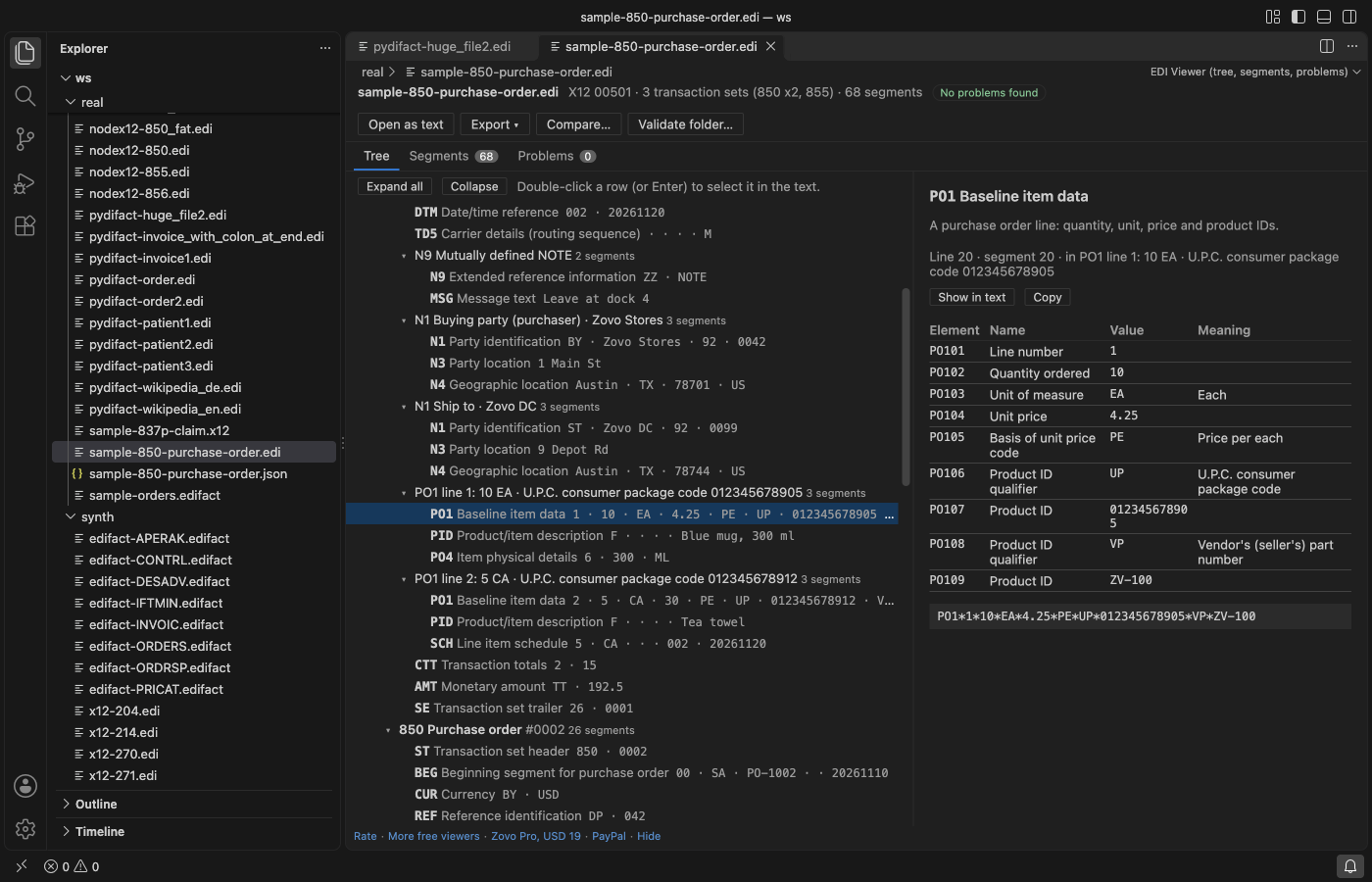
Steps in VS Code
- Install EDI Viewer from the Marketplace, or press Ctrl+P (Cmd+P on macOS) and run
ext install zovo.zovo-edi-viewer. - Open the file in EDI Viewer. Click Open in EDI Viewer in the editor title bar, or right-click the file in the Explorer.
- Look at the Problems tab first. The export uses the same reader, and the JSON lists the first 1,000 problems.
- Click Export at the top and pick As JSON or As CSV. From the Command Palette, run "EDI Viewer: Export EDI to JSON (Pro)" or "EDI Viewer: Export EDI to CSV (Pro)".
- Pick where to save. The new file opens beside the viewer.
Where Zovo Pro saves time
Reading the file as a tree, the Segments table, the Problems tab, names on hover, Format EDI and Minify EDI are free, with no limit. Only the export, the compare and the folder check are Pro tools.
To load EDI data into a script, a database or a spreadsheet, the export turns the file into JSON or CSV with no mapping to write. The JSON keeps the envelopes, loops and segments in file order, with the sender, receiver and control numbers. The CSV line items have the document number, line, quantity, unit, unit price, product ID and description. The other two Pro tools compare two EDI files segment by segment and check a whole folder.
With Export EDI to JSON or CSV (Zovo Pro)
- Click Export and pick As JSON or As CSV.
- Pick where to save. A try counts only when the file is written.
- Escape or Cancel uses no free try.
Export EDI to JSON or CSV works 3 times on your computer before it asks for a license, and a try counts only when you get a result. Opening a file shows no popup and no countdown.
Zovo Pro costs USD 19 once. It is not a subscription, and it turns on the Pro tools in every Zovo extension, not only EDI Viewer. After a card payment (Stripe) your license key shows on the next page. In VS Code, run "Zovo Pro: Enter Zovo Pro license key" from the Command Palette and paste it. The key is checked on your computer, with no network call. With GitHub Sponsors, pick the "$19 one time" tier, then run "Zovo Pro: I already paid: unlock with GitHub Sponsors" and sign in with the same GitHub account. With PayPal, send USD 19 with "Zovo Pro" in the note and the key comes by email within a day.
A team of 5: USD 59 once, by card or by PayPal. Every rule and every Pro tool is on the Zovo Pro page.
Steps in Cursor, Windsurf or VSCodium
- Open the Extensions view with Ctrl+Shift+X (Cmd+Shift+X on macOS).
- Search for
zovo.zovo-edi-viewerand click Install. Cursor, Windsurf and VSCodium install from Open VSX, where it is published aszovo/zovo-edi-viewer. - If your editor has no gallery, download the .vsix from the Open VSX page and run "Extensions: Install from VSIX...".
- Then use it the same way as in VS Code.
What EDI Viewer handles
- X12 and EDIFACT, with the separators read from the file.
- CSV line items for 850, 855, 810, 856, ORDERS, ORDRSP, INVOIC and DESADV.
- One CSV row per segment for every other transaction set or message.
- Values that start with = + - or @ get a leading apostrophe in the CSV, so a spreadsheet does not run them as formulas.
What it does not do
- The CSV has line items only when every transaction in the file is one of the line item types. A mixed file gets one row per segment.
- It exports one file at a time, not a whole folder.
- Files up to 64 MB are read.
- It exports to JSON and CSV only. It does not write EDI from JSON.
Other options
- node-x12. A free JavaScript library that parses X12 into objects you can save as JSON from your own code.
- pydifact. A free Python library that reads EDIFACT messages into segments.
- EDI translation services. Paid services and APIs turn EDI into JSON and back, with mapping. The file goes to their servers.
Install counts and Open VSX status were checked on 12 November 2026. Descriptions in quotes are the extensions' own.
Questions
Is the export free?
It is a Zovo Pro tool with 3 free tries on your computer. A try counts only when the file is written. Reading the file is free.
What is in the JSON?
The standard, version, separators and a summary, the problems, and a tree of interchanges, groups, transactions, loops and segments. Each element has its value, and its name and code meaning when the viewer knows them.
Can it turn JSON or CSV back into EDI?
No. It exports from EDI only.
Does it work in Cursor or Windsurf?
Yes. Cursor, Windsurf and VSCodium install extensions from Open VSX. Search for the extension in their Extensions view and install it there.
More about EDI Viewer
Read the EDI Viewer page for every feature and setting, or the source code on GitHub.
Related guides
- Validate a folder of X12 or EDIFACT files in VS Code
- Read an X12 or EDIFACT file in VS Code
- Read a HAR file offline in VS Code
- Read your Claude Code history in VS Code
Zovo Pro and support
Zovo Pro: USD 19 once, every Zovo viewer. It turns on the Pro tools in this extension and in the other Zovo extensions you use. The free features stay free.
After a card payment your license key shows on the next page. Paste it with the command "Zovo Pro: Enter a key".
You can also support the work with no Pro:
Need your format supported?
Open a format request with a sample file, and I reply there whether it can be done. For USD 299 once, through this GitHub Sponsors tier, I add your file format or a missing feature to this extension, with tests, within 7 days.