Open files in VS Code and Cursor / Developer files
Preview a font file in VS Code
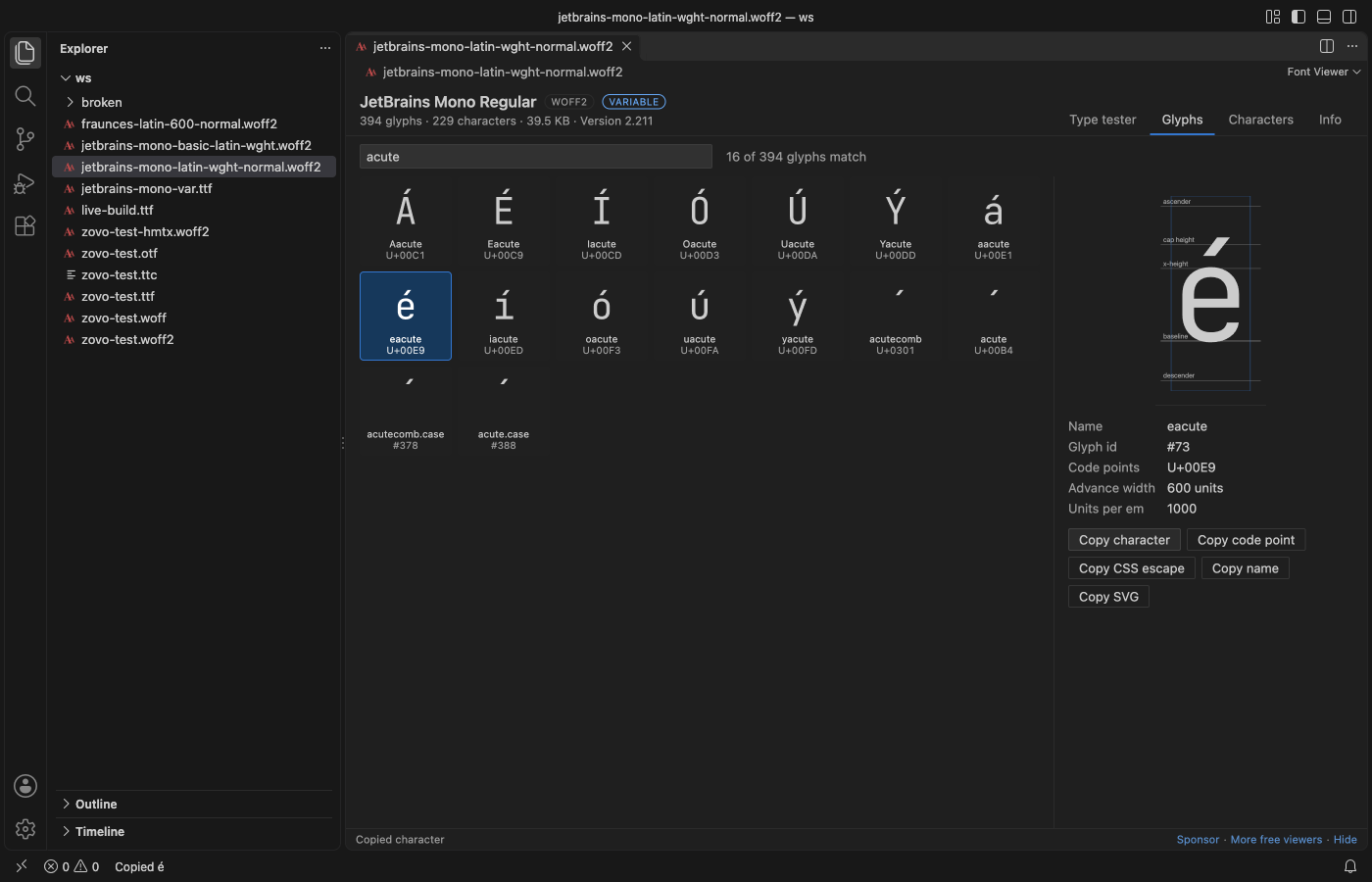
VS Code shows a font file as binary. The free Font Viewer opens .ttf, .otf, .woff, .woff2 and .ttc files with your own sample text, a waterfall of sizes, a glyph grid you can search and the license and embedding rights, without installing the font on your system. WOFF2 files are unpacked by its own decoder, so a web font from your build shows too. Zovo Pro (USD 19 once) adds a report of every font in a folder with its license, with 3 free tries.
Free, MIT license. Extension ID zovo.font-viewer-vscode, version 0.2.2. Needs VS Code 1.90.0 or newer.
This guide is also in Deutsch, Español, 日本語.
Steps in VS Code
- Install Font Viewer from the Marketplace, or press Ctrl+P (Cmd+P on macOS) and run
ext install zovo.font-viewer-vscode. - Click a
.ttf,.otf,.woff,.woff2,.ttcor.otcfile in the Explorer. Font Viewer is the default editor for these files, and it never changes the font. - On the Type tester tab, type your own text, drag the size from 8 to 200 px and read the waterfall from 12 to 96 px.
- On the Glyphs tab, search by name, character,
U+20ACor glyph id. Click a glyph to see it large with the baseline, x-height and cap height, and copy the character, its code point or its outline as SVG. - On the Characters tab, see the coverage of each Unicode block, such as "Basic Latin 95/128". Turn off "Only characters in the font" to see what is missing.
- On the Info tab, read the license, designer, copyright and embedding rights, and copy a ready
@font-facerule.
Where Zovo Pro saves time
Opening every supported font, the type tester, the glyph grid, the character map, the Info tab and Copy CSS @font-face are free. You need no sign-in, and nothing goes over the network.
Before you ship a folder of fonts in an app or a website, you need to know what each one may be used for. Font Folder Report lists every font in a folder with family, style, weight, variable axes, version, glyph count, license, license URL and embedding rights, as a CSV file, a Markdown table or one fonts.css with an @font-face rule for each font. The other Pro tool is Convert Font.
With Font Folder Report (Zovo Pro)
- Right-click a folder of fonts in the Explorer and pick "Font Folder Report: CSV, Markdown or @font-face CSS… (Pro)", or run it from the Command Palette.
- Pick CSV, Markdown table or CSS @font-face rules.
- Open
fonts-report.csv,fonts-report.mdorfonts.css. A try counts only when the file is written.
Font Folder Report works 3 times on your computer before it asks for a license, and a try counts only when you get a result. Opening a file shows no popup and no countdown.
Zovo Pro costs USD 19 once. It is not a subscription, and it turns on the Pro tools in every Zovo extension, not only Font Viewer. After a card payment (Stripe) your license key shows on the next page. In VS Code, run "Zovo Pro: Enter Zovo Pro license key" from the Command Palette and paste it. The key is checked on your computer, with no network call. With GitHub Sponsors, pick the "$19 one time" tier, then run "Zovo Pro: I already paid: unlock with GitHub Sponsors" and sign in with the same GitHub account. With PayPal, send USD 19 with "Zovo Pro" in the note and the key comes by email within a day.
A team of 5: USD 59 once, by card or by PayPal. Every rule and every Pro tool is on the Zovo Pro page.
Steps in Cursor, Windsurf or VSCodium
- Open the Extensions view with Ctrl+Shift+X (Cmd+Shift+X on macOS).
- Search for
zovo.font-viewer-vscodeand click Install. Cursor, Windsurf and VSCodium install from Open VSX, where it is published aszovo/font-viewer-vscode. - If your editor has no gallery, download the .vsix from the Open VSX page and run "Extensions: Install from VSIX...".
- Then use it the same way as in VS Code.
What Font Viewer handles
- TTF and OTF, also variable fonts.
- WOFF and WOFF2 web fonts.
- TTC and OTC collections, with a list to pick the face.
- CJK fonts with 20,000 glyphs, loaded in pages as you scroll.
What it does not do
- WOFF2 collections, SVG fonts,
.dfontand Type 1 fonts are not supported. - Color fonts are drawn in color in the type tester, but the glyph grid shows their plain outlines.
- Files over 64 MB show a message instead of opening (setting
fontViewer.maxFileMB). - It is a viewer. It does not edit or install fonts.
Other options
- Font Book on macOS, the font preview on Windows. Free and built in for TTF and OTF files, but they do not open WOFF or WOFF2.
- FontDrop!. A free web page that shows the glyphs and the name table of a font you drop into the browser.
Install counts and Open VSX status were checked on 12 November 2026. Descriptions in quotes are the extensions' own.
Questions
Do I have to install the font?
No. The font is read from the file and shown only inside the Font Viewer tab. Your system font list does not change.
Can it open a WOFF2 from my build folder?
Yes. WOFF2 is unpacked by the extension's own decoder, and the view reloads when you save a new build of the font.
Is viewing free?
Yes. Viewing, the glyph grid, the character map and the license info are free. Only Convert Font and Font Folder Report are Pro, with 3 free tries each.
Does it work in Cursor or Windsurf?
Yes. Cursor, Windsurf and VSCodium install extensions from Open VSX. Search for the extension in their Extensions view and install it there.
More about Font Viewer
Read the Font Viewer page for every feature and setting, or the source code on GitHub.
Related guides
- Font Viewer, TTF & WOFF Viewer on the VS Code Marketplace (also on Open VSX). Previews TTF, OTF and WOFF fonts in VS Code.
- TTF to WOFF2 in VS Code
- Test a variable font and its OpenType features
- Read a HAR file offline in VS Code
- Read your Claude Code history in VS Code
Support this work
If this extension saves you time, you can support the work on GitHub Sponsors. Monthly tiers start at $5, and one-time tiers start at $15. Sponsorship is optional, and the tool works the same without it.
Need your format supported?
Open a format request with a sample file, and I reply there whether it can be done. For USD 299 once, through this GitHub Sponsors tier, I add your file format or a missing feature to this extension, with tests, within 7 days.