Open files in VS Code and Cursor / Developer files
Test a variable font and its OpenType features
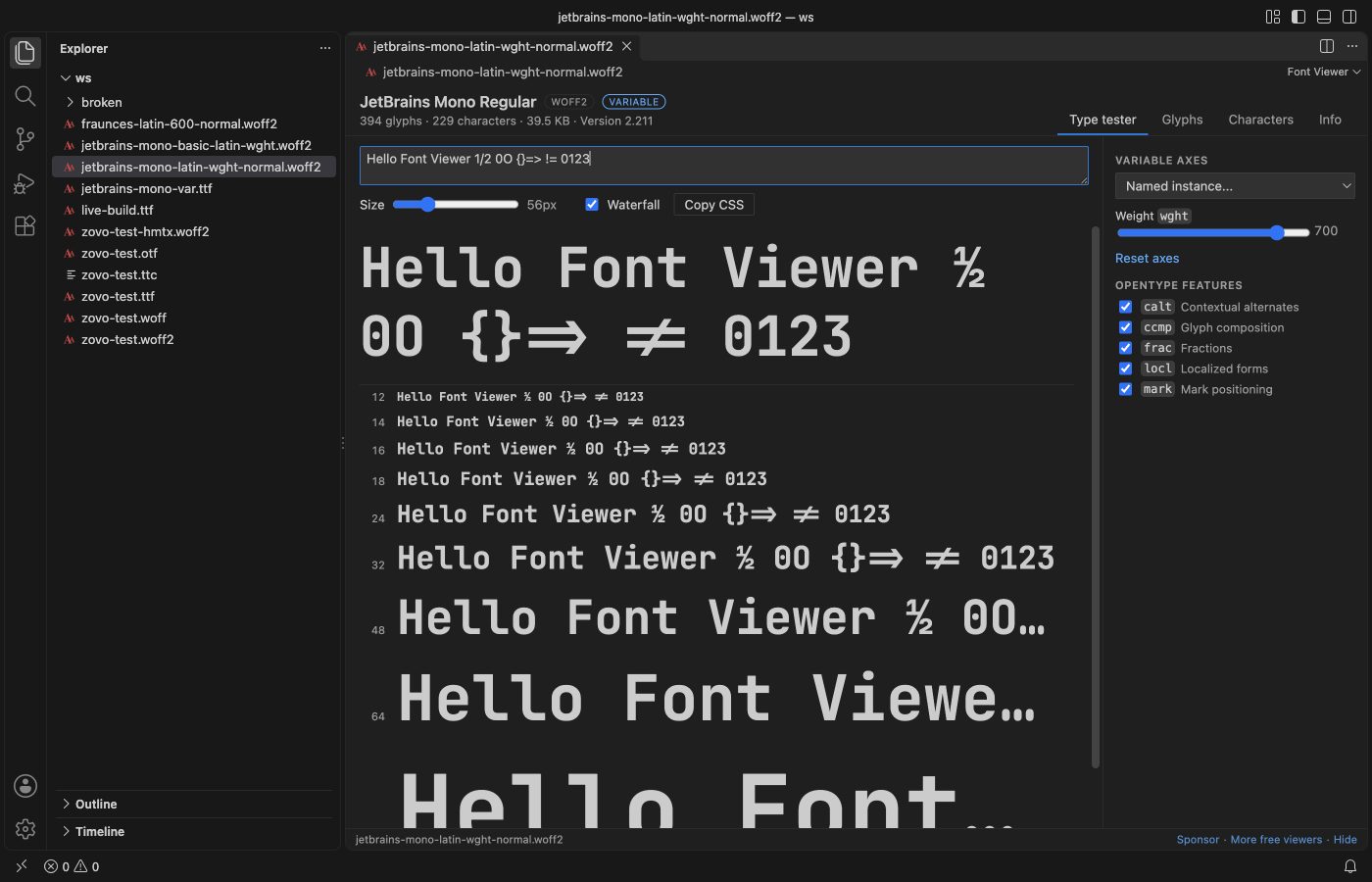
Font Viewer shows a slider for every variable axis of a font, a list of its named instances, and a check box for each OpenType feature the font has, such as liga, frac or ss01. Your sample text and the size waterfall change as you move them, drawn by the same engine as Chromium, so the result matches a browser. Copy CSS gives the @font-face rule with the matching font-variation-settings and font-feature-settings, for free. Zovo Pro (USD 19 once) adds a folder report that lists the axes, version and license of every font, with 3 free tries.
Free, MIT license. Extension ID zovo.font-viewer-vscode, version 0.2.2. Needs VS Code 1.90.0 or newer.
Steps in VS Code
- Install Font Viewer from the Marketplace, or press Ctrl+P (Cmd+P on macOS) and run
ext install zovo.font-viewer-vscode. - Click the
.ttf,.otf,.woffor.woff2file. A variable font shows a VARIABLE badge in the header. - On the Type tester tab, type text that uses the features you care about, such as
1/2forfracorfiforliga. - Under Variable axes, move the slider of each axis, or pick a named instance from the list. Reset axes goes back to the default.
- Under OpenType features, turn each feature on or off and watch the sample and the waterfall change.
- Click Copy CSS to get the
@font-facerule with thefont-variation-settingsandfont-feature-settingsyou picked. The Info tab lists the axes with their minimum, default and maximum, the named instances and every GSUB and GPOS feature tag.
Where Zovo Pro saves time
The axis sliders, named instances, feature check boxes, waterfall, Copy CSS, the glyph grid and the Info tab are free, with no sign-in and no network use.
When a project has many font files, Font Folder Report lists each one in a folder with family, style, weight, width, variable axes, version, glyph count, license and embedding rights, as a CSV file, a Markdown table or a fonts.css with one @font-face rule for each font. The other Pro tool is Convert Font.
With Font Folder Report (Zovo Pro)
- Right-click the folder in the Explorer and pick "Font Folder Report: CSV, Markdown or @font-face CSS… (Pro)".
- Pick CSV, Markdown table or CSS @font-face rules.
- Read the Variable axes column to see which files are variable. A try counts only when the file is written.
Font Folder Report works 3 times on your computer before it asks for a license, and a try counts only when you get a result. Opening a file shows no popup and no countdown.
Zovo Pro costs USD 19 once. It is not a subscription, and it turns on the Pro tools in every Zovo extension, not only Font Viewer. After a card payment (Stripe) your license key shows on the next page. In VS Code, run "Zovo Pro: Enter Zovo Pro license key" from the Command Palette and paste it. The key is checked on your computer, with no network call. With GitHub Sponsors, pick the "$19 one time" tier, then run "Zovo Pro: I already paid: unlock with GitHub Sponsors" and sign in with the same GitHub account. With PayPal, send USD 19 with "Zovo Pro" in the note and the key comes by email within a day.
A team of 5: USD 59 once, by card or by PayPal. Every rule and every Pro tool is on the Zovo Pro page.
Steps in Cursor, Windsurf or VSCodium
- Open the Extensions view with Ctrl+Shift+X (Cmd+Shift+X on macOS).
- Search for
zovo.font-viewer-vscodeand click Install. Cursor, Windsurf and VSCodium install from Open VSX, where it is published aszovo/font-viewer-vscode. - If your editor has no gallery, download the .vsix from the Open VSX page and run "Extensions: Install from VSIX...".
- Then use it the same way as in VS Code.
What Font Viewer handles
- Weight, width, slant and any custom axis of a variable font.
- Named instances from the font.
- Every OpenType feature tag in the GSUB and GPOS tables.
- TTF, OTF, WOFF, WOFF2 and TTC files.
What it does not do
- The glyph grid draws outlines at the default instance. The type tester, waterfall and character map follow the sliders.
- CFF2 variable fonts show their text and metadata, but the glyph grid draws them with the font instead of from outlines.
- Shaping comes from VS Code's Chromium engine, so other apps can shape some text differently.
Other options
- Wakamai Fondue. A free web page that lists the features and axes of a font you drop in, with CSS to copy.
- Firefox DevTools. The Fonts panel of the Inspector has sliders for the axes of a variable font used on a page. Free.
- fontTools.
ttx -t fvar font.ttfdumps the axes and named instances as XML. Free, with no preview.
Install counts and Open VSX status were checked on 12 November 2026. Descriptions in quotes are the extensions' own.
Questions
Why is a feature I expect missing from the list?
The list shows only the features the font itself has. If ss01 is not there, the font has no ss01 stylistic set.
Does the glyph grid show the weight I picked?
No. Glyph outlines show the default instance. The sample text, the waterfall and the character map follow the sliders.
Is it free?
Yes. Testing axes and features and Copy CSS are free. Only Convert Font and Font Folder Report are Pro, with 3 free tries each.
Does it work in Cursor or Windsurf?
Yes. Cursor, Windsurf and VSCodium install extensions from Open VSX. Search for the extension in their Extensions view and install it there.
More about Font Viewer
Read the Font Viewer page for every feature and setting, or the source code on GitHub.
Related guides
- Font Viewer, TTF & WOFF Viewer on the VS Code Marketplace (also on Open VSX). Previews TTF, OTF and WOFF fonts in VS Code.
- TTF to WOFF2 in VS Code
- Preview a font file in VS Code
- Read a HAR file offline in VS Code
- Read your Claude Code history in VS Code
Support this work
If this extension saves you time, you can support the work on GitHub Sponsors. Monthly tiers start at $5, and one-time tiers start at $15. Sponsorship is optional, and the tool works the same without it.
Need your format supported?
Open a format request with a sample file, and I reply there whether it can be done. For USD 299 once, through this GitHub Sponsors tier, I add your file format or a missing feature to this extension, with tests, within 7 days.