Open files in VS Code and Cursor / Code and APIs
Run a JavaScript or TypeScript snippet in VS Code
JavaScript Playground & TypeScript Scratchpad runs a snippet as you type and shows the value of each line, console.log output and errors at the end of their lines. Run "New JavaScript Scratchpad" or "New TypeScript Scratchpad" and start typing. There is no package.json, tsconfig or install, and each run is a fresh Node.js process with a 5 second time limit. Zovo Pro (USD 19 once) adds Benchmark Selected Code and Save as Snapshot Test, with 3 free tries each.
Free, MIT license. Extension ID zovo.zovo-js-ts-scratchpad, version 0.2.2. Needs VS Code 1.90.0 or newer.
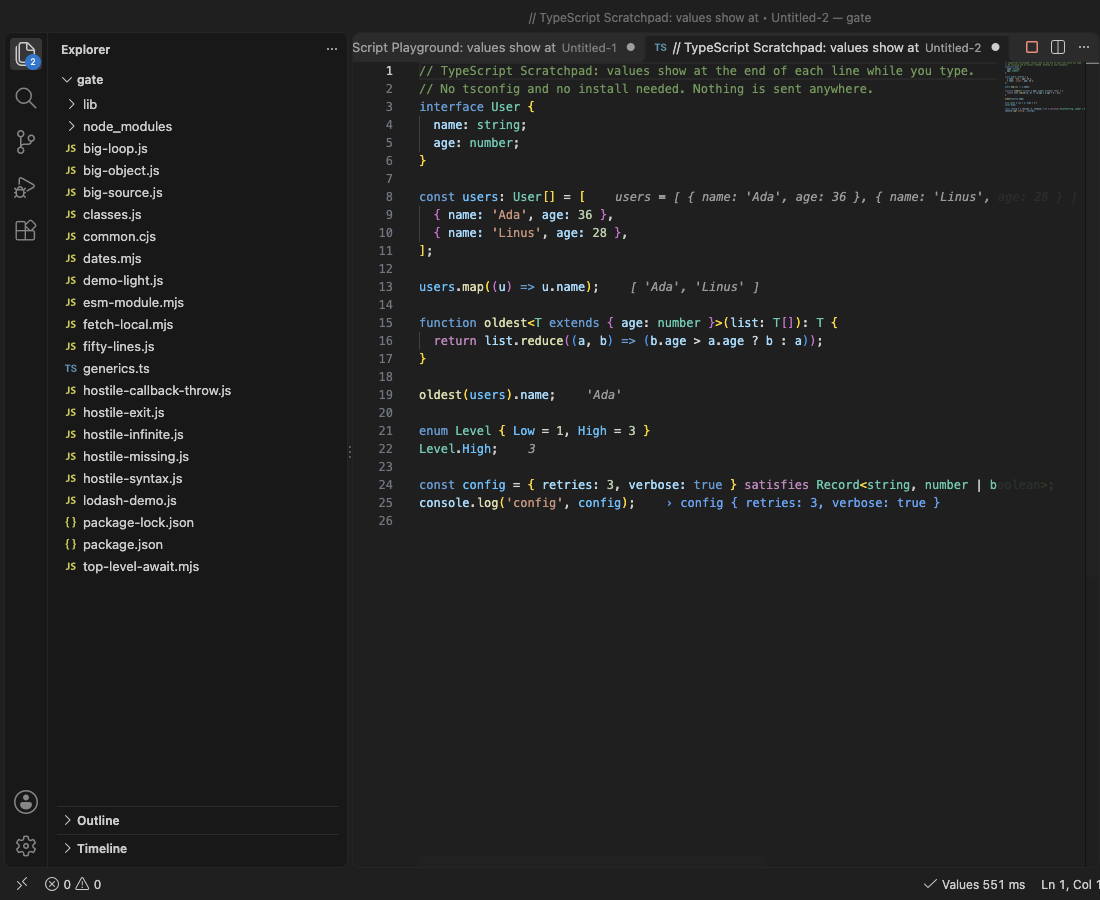
Steps in VS Code
- Install JavaScript Playground & TypeScript Scratchpad from the Marketplace, or press Ctrl+P (Cmd+P on macOS) and run
ext install zovo.zovo-js-ts-scratchpad. - Open the Command Palette and run "JavaScript Playground: New JavaScript Scratchpad" or "JavaScript Playground: New TypeScript Scratchpad". A new tab opens with values already showing.
- Type code. About 300 ms after you stop typing, each expression and new variable shows its value at the end of its line, for example
total = 42. - For a file you already have, open any
.js,.mjs,.cjs,.ts,.mtsor.ctsfile and click Inline Values in the status bar. Imports andrequireresolve from the file's folder and yournode_modules. - Hover a value to see more of it. Click the status bar item for the full console output and the stack of each error.
- Run "Show All Values of This Line" for every value a loop line took, or "Copy Code with Values as Markdown" to paste the result into an issue.
Where Zovo Pro saves time
Inline values, the runner, TypeScript with no setup, value history, Copy Code with Values as Markdown and Show Which Lines Ran are free, with no account and no network calls from the extension.
When you want to know which of two ways is faster, select the lines and Benchmark Selected Code runs them thousands of times in the same sandboxed process. The lines above run once as setup. You get runs per second, the time per run and the spread, and after a change, how many times faster or slower it got. The other Pro tool is Save as Snapshot Test. It saves a copy of the file with an assert.deepStrictEqual line for each top-level variable that holds plain data, to run with node --test.
With Benchmark Selected Code (Zovo Pro)
- Select one or more lines in a scratchpad or a JavaScript or TypeScript file.
- Right-click the selection, or run "JavaScript Playground: Benchmark Selected Code (Zovo Pro)" from the Command Palette.
- Change the code and run it again to see the difference. A try counts only when you get a result.
Benchmark Selected Code works 3 times on your computer before it asks for a license, and a try counts only when you get a result. Opening a file shows no popup and no countdown.
Zovo Pro costs USD 19 once. It is not a subscription, and it turns on the Pro tools in every Zovo extension, not only JavaScript Playground & TypeScript Scratchpad. After a card payment (Stripe) your license key shows on the next page. In VS Code, run "Zovo Pro: Enter Zovo Pro license key" from the Command Palette and paste it. The key is checked on your computer, with no network call. With GitHub Sponsors, pick the "$19 one time" tier, then run "Zovo Pro: I already paid: unlock with GitHub Sponsors" and sign in with the same GitHub account. With PayPal, send USD 19 with "Zovo Pro" in the note and the key comes by email within a day.
A team of 5: USD 59 once, by card or by PayPal. Every rule and every Pro tool is on the Zovo Pro page.
Steps in Cursor, Windsurf or VSCodium
- Open the Extensions view with Ctrl+Shift+X (Cmd+Shift+X on macOS).
- Search for
zovo.zovo-js-ts-scratchpadand click Install. Cursor, Windsurf and VSCodium install from Open VSX, where it is published aszovo/zovo-js-ts-scratchpad. - If your editor has no gallery, download the .vsix from the Open VSX page and run "Extensions: Install from VSIX...".
- Then use it the same way as in VS Code.
What JavaScript Playground & TypeScript Scratchpad handles
- JavaScript and TypeScript, ES modules and CommonJS, with top-level
await. - Types, interfaces, generics, enums and
satisfies, with no tsconfig. - Promises, shown with their value once they settle.
- Loops that log a million times, cut to the first 100 values per line and a count.
What it does not do
- Values show for expression statements and new variables, not inside every sub-expression.
.jsxand.tsxfiles are not run.- A
.tsfile that imports another.tsfile needs Node 22.6 or newer as your node (settingjsScratchpad.runtime). - It is Node.js, so browser APIs such as
documentdo not exist. - Each run stops after 5 seconds (setting
jsScratchpad.timeoutSeconds). Your code runs on your computer, so only run code you trust.
Other options
- Quokka.js. A popular scratchpad extension with inline values. Some Marketplace reviews complain about notifications and a what's new page that advertise.
- The Node.js REPL. Run
nodein a terminal and type lines one at a time. Free, with no inline values. - Browser DevTools console. Free, and it has browser APIs such as document. The code is gone when you close the tab.
Install counts and Open VSX status were checked on 12 November 2026. Descriptions in quotes are the extensions' own.
Questions
Do I need a package.json or tsconfig?
No. New scratchpads are untitled tabs, and TypeScript types are removed on the fly.
Which Node.js runs my code?
By default the Node.js inside VS Code, so nothing needs installing. Set jsScratchpad.runtime to node to use the node on your PATH.
What if my code has an endless loop?
Each run is a separate process with a 5 second time limit and a memory limit. The run is stopped and VS Code stays responsive.
Does it work in Cursor or Windsurf?
Yes. Cursor, Windsurf and VSCodium install extensions from Open VSX. Search for the extension in their Extensions view and install it there.
More about JavaScript Playground & TypeScript Scratchpad
Read the JavaScript Playground & TypeScript Scratchpad page for every feature and setting, or the source code on GitHub.
Related guides
- Open a SARIF file in VS Code
- Preview a Swagger or OpenAPI file in VS Code
- Preview an HTML file with its CSS and images in VS Code
- Test a regex in VS Code
Zovo Pro and support
Zovo Pro: USD 19 once, every Zovo viewer. It turns on the Pro tools in this extension and in the other Zovo extensions you use. The free features stay free.
After a card payment your license key shows on the next page. Paste it with the command "Zovo Pro: Enter a key".
You can also support the work with no Pro:
Need your format supported?
Open a format request with a sample file, and I reply there whether it can be done. For USD 299 once, through this GitHub Sponsors tier, I add your file format or a missing feature to this extension, with tests, within 7 days.