Open files in VS Code and Cursor / Code and APIs
Open a SARIF file in VS Code
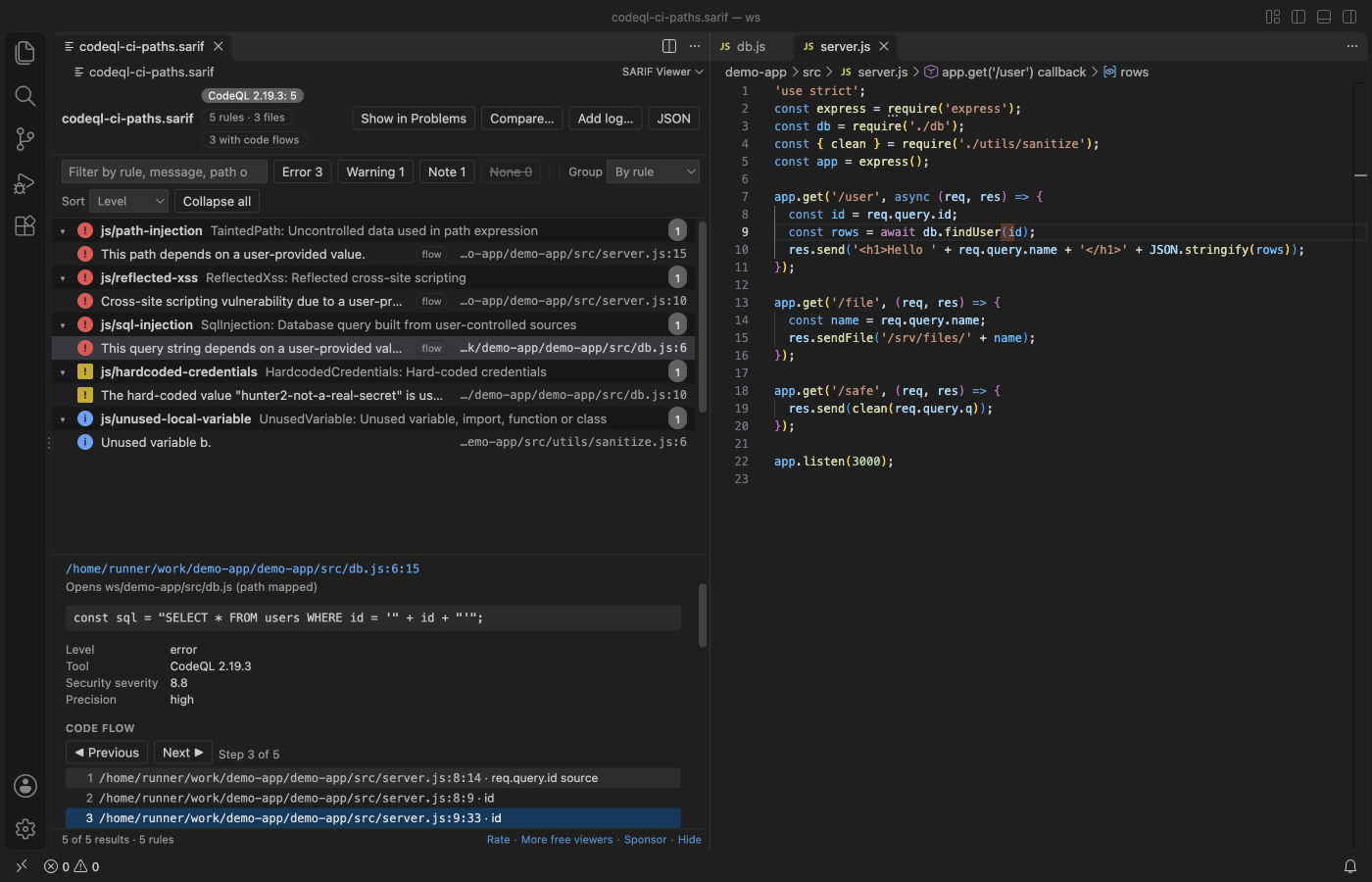
Install the free SARIF Viewer by Zovo and click the .sarif file. The results open as a table grouped by rule, worst first. Click a result to open its line. Paths from CI such as /home/runner/work/app/app/src/db.js are matched to your workspace. You can step through code flows, show only new results against a baseline, and compare two logs.
Free, MIT license. Extension ID zovo.zovo-sarif-viewer, version 0.2.1. Needs VS Code 1.90.0 or newer.
Steps in VS Code
- Install SARIF Viewer from the Marketplace, or press Ctrl+P (Cmd+P on macOS) and run
ext install zovo.zovo-sarif-viewer. - Click a
.sarifor.sarif.jsonfile. No log at hand? Run "SARIF: Open a Sample SARIF Log". - Pick how to group results: by rule, file, level, tool or baseline state.
- Click a result to open its line. Use Previous and Next (Alt+Up and Alt+Down) to walk through a code flow.
- Click "Compare..." to mark each result new, unchanged or fixed against an older log, or "Show in Problems" to list the results in the Problems panel.
Steps in Cursor, Windsurf or VSCodium
- Open the Extensions view with Ctrl+Shift+X (Cmd+Shift+X on macOS).
- Search for
zovo.zovo-sarif-viewerand click Install. Cursor, Windsurf and VSCodium install from Open VSX, where it is published aszovo/zovo-sarif-viewer. - If your editor has no gallery, download the .vsix from the Open VSX page and run "Extensions: Install from VSIX...".
- Then use it the same way as in VS Code.
What SARIF Viewer handles
- SARIF 2.1.0 from CodeQL, Semgrep, ESLint, Bandit, Trivy, Checkov, Gitleaks and other tools. 2.0 files open with a note.
- Filters for level, baseline state, suppressions with their justification, tool and text.
- Rule help rendered from Markdown, CWE links, security severity and fingerprints in the details pane.
- In the release check, a 150 MB log with 313,079 results showed its first rows after 1.5 s.
What it does not do
- It reads logs. It does not run a scanner or fetch alerts from GitHub.
- Logs over 300 MB ask before they open, and logs over 500 MB show a message.
- Raw HTML in rule help shows as text, and only http and https links can be clicked.
In JetBrains IDEs (IntelliJ IDEA, PyCharm, WebStorm, CLion and others)
- SARIF-viewer. Zovo has no JetBrains plugin for SARIF. This plugin (4,166 downloads) shows static analysis results from GitHub Advanced Security or from a local SARIF file.
- Qodana. JetBrains' own code quality platform, with 54,196 downloads.
Other options
- SARIF Viewer (Microsoft) (
MS-SarifVSCode.sarif-viewer, 619,935 installs, on Open VSX). Its own description: "Adds support for viewing SARIF logs". The most installed SARIF extension, also on Open VSX. - SARIF Explorer (
trailofbits.sarif-explorer, 5,996 installs, on Open VSX). A SARIF extension from Trail of Bits for going through static analysis results. - GitHub code scanning. If you upload SARIF to GitHub, the results show as alerts in the Security tab of the repository.
Install counts and Open VSX status were checked on 9 November 2026. Descriptions in quotes are the extensions' own.
Questions
Why does a result from CI not open the file?
The log holds paths from the CI machine. SARIF Viewer maps them to your workspace with a few file checks and remembers the match. If a file is not found, "Locate file" asks you once.
Can I see only the new results?
Yes. Filter by baseline state to show only new results, or compare the log with an older one by fingerprint.
Is it safe to open a log someone else made?
Yes. Rule help is escaped before it is shown, results outside your workspace ask before they open, and the viewer makes no network requests.
More about SARIF Viewer
Read the SARIF Viewer page for every feature and setting, or the source code on GitHub.
Related guides
- Preview a Swagger or OpenAPI file in VS Code
- Preview an HTML file with its CSS and images in VS Code
- Test a regex in VS Code
- Take a screenshot of code in VS Code
Support this work
If this extension saves you time, you can support the work on GitHub Sponsors. Monthly tiers start at $5, and one-time tiers start at $15. Sponsorship is optional, and the tool works the same without it.
Need your format supported?
Open a format request with a sample file, and I reply there whether it can be done. For USD 299 once, through this GitHub Sponsors tier, I add your file format or a missing feature to this extension, with tests, within 7 days.