Open files in VS Code and Cursor / Binary, network and hardware
Open a BLF CAN log and decode it with a DBC file
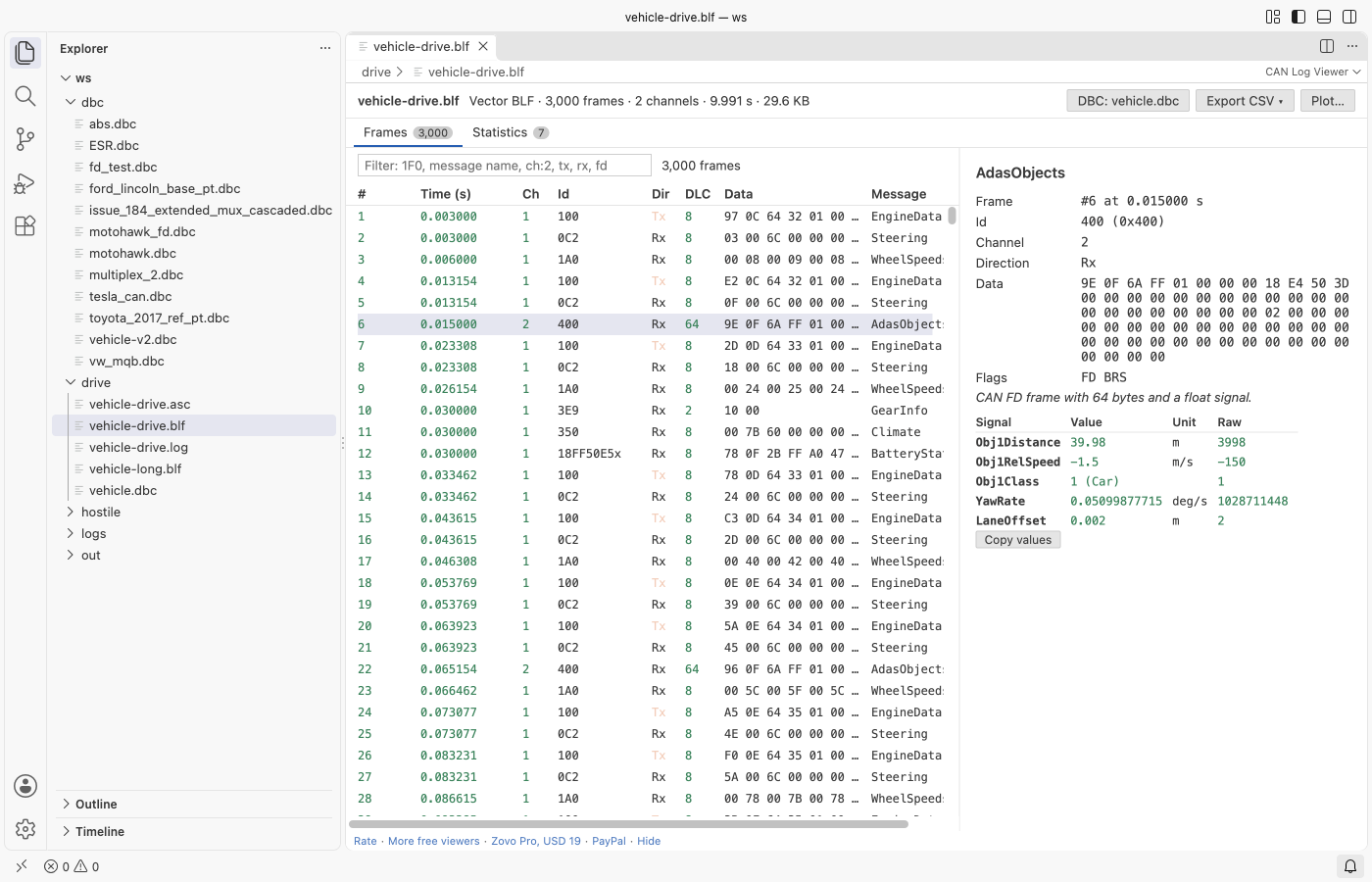
DBC Viewer & CAN Log Viewer opens Vector .blf and .asc logs, PCAN .trc files and candump logs in VS Code, with no CANoe or CANalyzer. Put the .dbc file next to the log, or pick it with the DBC button, and every frame decodes into signal values with units and value-table labels. The frame table, filters, per-id statistics and the DBC viewer are free. Zovo Pro (USD 19 once) adds CSV export of the decoded signals, a signal plot and a compare of two DBC files, with 3 free tries each.
Free, MIT license. Extension ID zovo.zovo-can-dbc-viewer, version 0.1.1. Needs VS Code 1.90.0 or newer.
Steps in VS Code
- Install DBC Viewer & CAN Log Viewer from the Marketplace, or press Ctrl+P (Cmd+P on macOS) and run
ext install zovo.zovo-can-dbc-viewer. - Click a
.blf,.ascor.trcfile in the Explorer. It opens in the CAN Log Viewer. For a candump.logfile, right-click it and pick Open in CAN Log Viewer. - If a
.dbcfile sits in the same folder, the log is decoded with it. If not, click Pick a DBC… at the top and choose one. The choice is kept for this workspace. - Click a frame to see each signal with its value, unit, label and raw value. Copy values puts them on the clipboard.
- Type in the filter box to narrow the frames.
1F0finds an id, part of a name finds a message, andch:2,tx,rxandfdfilter by channel, direction and CAN FD. Terms combine. - Open the Statistics tab for the count, mean cycle time, jitter and shortest and longest gap of each id, next to the cycle time in the DBC.
Where Zovo Pro saves time
The DBC viewer with bit layout and value tables, the log viewer, decoding, filters, statistics, and the DBC checks and outline in the text editor are free, with no limit. It needs no sign-in and makes no network calls.
To work with the values in a spreadsheet, Python or MATLAB, Export decoded signals to CSV decodes the whole log in one go. You get one line per value (time, message, signal, value, unit), or one file per message with a column per signal. It shows progress and you can cancel it. The other two Pro tools plot up to 8 signals over time, saved as PNG or CSV, and compare two DBC files as a Markdown report.
With Export decoded signals to CSV (Zovo Pro)
- Open the log, then click Export CSV at the top, or run "CAN Viewer: Export decoded signals to CSV (Pro)" from the Command Palette. If the log has no DBC yet, it asks for one first.
- Pick one line per value or one file per message, then pick where to save.
- Cancel stops the export and removes the partial file. A stopped export uses no free try.
Export decoded signals to CSV works 3 times on your computer before it asks for a license, and a try counts only when you get a result. Opening a file shows no popup and no countdown.
Zovo Pro costs USD 19 once. It is not a subscription, and it turns on the Pro tools in every Zovo extension, not only DBC Viewer & CAN Log Viewer. After a card payment (Stripe) your license key shows on the next page. In VS Code, run "Zovo Pro: Enter Zovo Pro license key" from the Command Palette and paste it. The key is checked on your computer, with no network call. With GitHub Sponsors, pick the "$19 one time" tier, then run "Zovo Pro: I already paid: unlock with GitHub Sponsors" and sign in with the same GitHub account. With PayPal, send USD 19 with "Zovo Pro" in the note and the key comes by email within a day.
A team of 5: USD 59 once, by card or by PayPal. Every rule and every Pro tool is on the Zovo Pro page.
Steps in Cursor, Windsurf or VSCodium
- Open the Extensions view with Ctrl+Shift+X (Cmd+Shift+X on macOS).
- Search for
zovo.zovo-can-dbc-viewerand click Install. Cursor, Windsurf and VSCodium install from Open VSX, where it is published aszovo/zovo-can-dbc-viewer. - If your editor has no gallery, download the .vsix from the Open VSX page and run "Extensions: Install from VSIX...".
- Then use it the same way as in VS Code.
What DBC Viewer & CAN Log Viewer handles
- Vector BLF with CAN, CAN FD (64 bytes) and zlib-compressed containers. Error frames are counted.
- Vector ASC with absolute or relative time stamps, hex or decimal, Rx and Tx and channels.
- PCAN
.trcversions 1.0 to 2.1, and candump-land-Llogs. - DBC files with Intel and Motorola byte order, multiplexed signals, float signals and value tables.
What it does not do
- It is read-only. You cannot edit frames or write a log.
- Logs stop at 10 million frames, and BLF containers inflate to 64 MB at most.
- The DBC next to the log is found only for local files. On a remote file system, pick it with the DBC button. Logs there are read up to 256 MB.
- Only DBC files are read for decoding. ARXML, LDF and SYM files are not.
Other options
- Vector CANoe or CANalyzer. The Vector tools that record BLF and ASC logs. They need a paid licence.
- python-can and cantools. Free Python libraries. python-can reads BLF and ASC logs and cantools decodes them with a DBC, in your own script.
- SavvyCAN. A free, open source desktop app for CAN logs and DBC files, outside VS Code.
Install counts and Open VSX status were checked on 12 November 2026. Descriptions in quotes are the extensions' own.
Questions
Do I need CANoe or a Vector licence?
No. The extension reads BLF and ASC files itself. Nothing from Vector is installed or needed.
Why are my frames not decoded?
The log needs a DBC. Put the .dbc file in the same folder as the log, or click the DBC button at the top of the viewer and pick it.
Is my log uploaded?
No. The log is read on your computer in a worker thread, and the extension makes no network calls.
Does it work in Cursor or Windsurf?
Yes. Cursor, Windsurf and VSCodium install extensions from Open VSX. Search for the extension in their Extensions view and install it there.
More about DBC Viewer & CAN Log Viewer
Read the DBC Viewer & CAN Log Viewer page for every feature and setting, or the source code on GitHub.
Related guides
- Use a hex editor in VS Code
- Open a binary file in VS Code
- Open a PCAP file in VS Code
- View VCD waveforms in VS Code
Zovo Pro and support
Zovo Pro: USD 19 once, every Zovo viewer. It turns on the Pro tools in this extension and in the other Zovo extensions you use. The free features stay free.
After a card payment your license key shows on the next page. Paste it with the command "Zovo Pro: Enter a key".
You can also support the work with no Pro:
Need your format supported?
Open a format request with a sample file, and I reply there whether it can be done. For USD 299 once, through this GitHub Sponsors tier, I add your file format or a missing feature to this extension, with tests, within 7 days.