Open files in VS Code and Cursor / Tables and data
Open an Excel .xlsx file in VS Code
VS Code can't read .xlsx files on its own. Install the free Table Viewer extension, then click the workbook in the Explorer. It opens as a sortable, filterable table, with a sheet picker for workbooks that have several sheets and the workbook's own number formats. It is read-only and needs no Python.
Free, MIT license. Extension ID zovo.table-viewer-vscode, version 0.3.3. Needs VS Code 1.90.0 or newer.
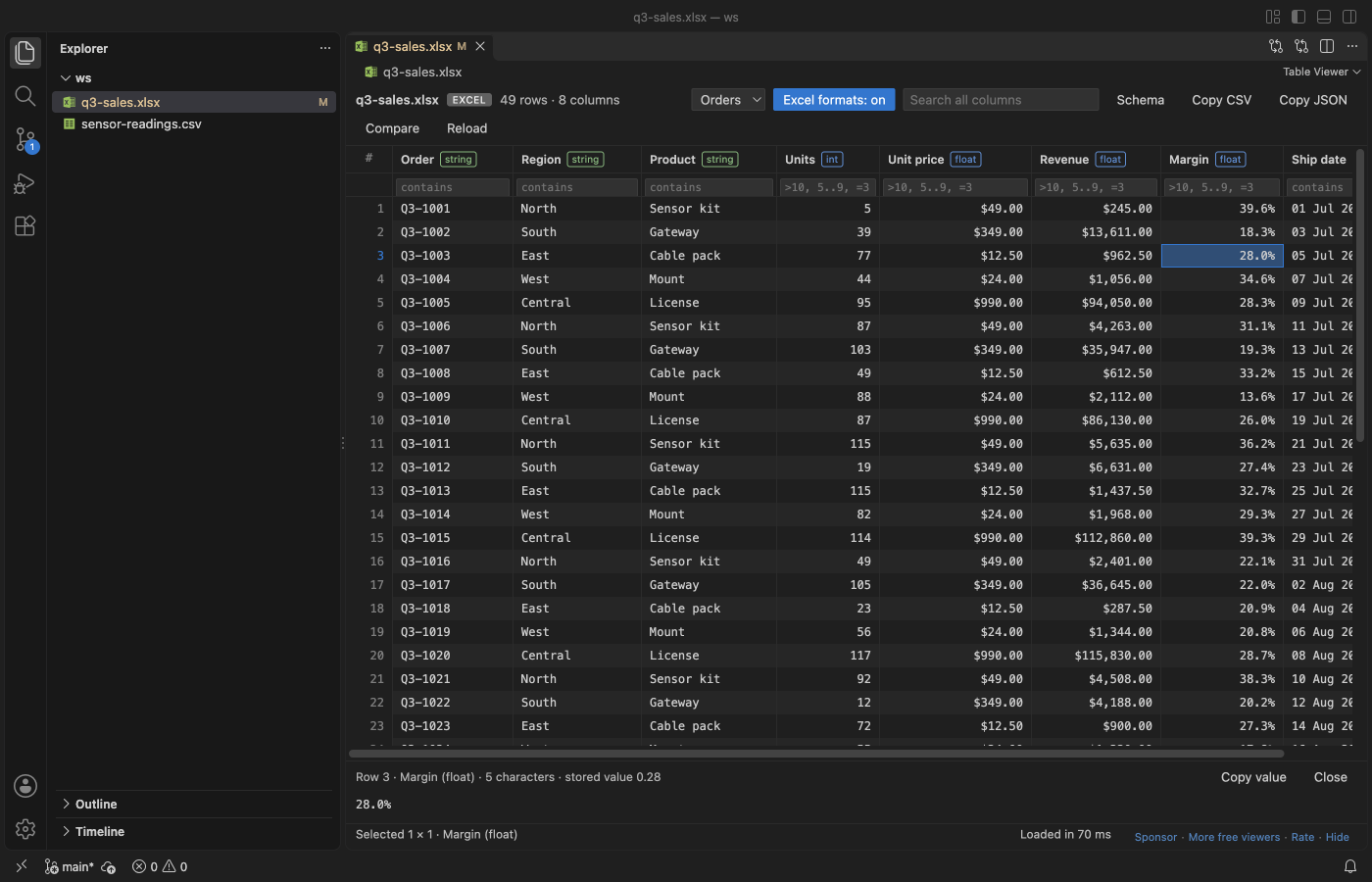
Steps in VS Code
- Install Table Viewer from the Marketplace, or press Ctrl+P (Cmd+P on macOS) and run
ext install zovo.table-viewer-vscode. - Click any
.xlsx,.xlsm,.xlsb,.xlsor.odsfile. It opens as a table. - Pick a sheet from the sheet picker if the workbook has more than one.
- Click a column header to sort. Type in the filter row:
>10,5..9,=word,!wordorempty. - Select cells and copy them as CSV or JSON.
Steps in Cursor, Windsurf or VSCodium
- Open the Extensions view with Ctrl+Shift+X (Cmd+Shift+X on macOS).
- Search for
zovo.table-viewer-vscodeand click Install. Cursor, Windsurf and VSCodium install from Open VSX, where it is published aszovo/table-viewer-vscode. - If your editor has no gallery, download the .vsix from the Open VSX page and run "Extensions: Install from VSIX...".
- Then use it the same way as in VS Code.
What Table Viewer handles
- Number formats such as 25.0% and $1,234.50. Sorting and copying use the stored values.
- Compare a workbook with Git HEAD, or with another file, as CSV in the diff view.
- Reloads when the file changes on disk and keeps the sort, filters and sheet.
- Also opens CSV, TSV and Parquet files.
What it does not do
- It's read-only. It doesn't edit or save workbooks.
- Excel files over 50 MB show a message instead of loading. You can raise the limit in settings.
- It loads up to 1,000,000 rows per sheet and shows a banner when there are more.
- m/d/yy dates show in ISO form.
Other options
- Spreadsheet Viewer (
GrapeCity.gc-excelviewer, 6.8 million installs, on Open VSX). Its own description: "Edit XLSX spreadsheets and CSV files in Visual Studio Code and VS Code for the Web." - Data Wrangler (
ms-toolsai.datawrangler, 2.4 million installs, not on Open VSX). A data-cleaning tool from Microsoft. It needs a Python environment with pandas and runs a kernel. Use it when you need to transform data in Python. - Office Viewer (
cweijan.vscode-office, 1.6 million installs, on Open VSX). Views Word, Excel and PowerPoint files.
Install counts and Open VSX status were checked on 8 November 2026. Descriptions in quotes are the extensions' own.
Questions
Can I edit the cells?
Not in Table Viewer. Spreadsheet Viewer says it edits XLSX files. For full editing, use Excel or LibreOffice Calc.
Do I need Python or Jupyter?
No. Table Viewer is plain JavaScript inside VS Code. There is no kernel to start and no pandas to install.
Does it work in Cursor?
Yes. It is on Open VSX, which is where Cursor, Windsurf and VSCodium get extensions. See Open an Excel file in Cursor.
More about Table Viewer
Read the Table Viewer page for every feature and setting, or the source code on GitHub.
Related guides
- Open an Excel file in Cursor
- See a CSV file as a table in VS Code
- Open a Parquet file in VS Code
- Open a SQLite database in VS Code
Support this work
If this extension saves you time, you can support the work on GitHub Sponsors. Monthly tiers start at $5, and one-time tiers start at $15. Sponsorship is optional, and the tool works the same without it.