Open files in VS Code and Cursor / Code and APIs
Run a C++ file in VS Code with one click
Run C++ and C Code compiles the open .cpp or .c file with the gcc, g++, clang or clang++ already on your computer and runs it in the terminal, where cin and scanf work. Click Run in the editor title or press Ctrl+Alt+Enter (Cmd+Alt+Enter on Mac). Compiler errors land in the Problems panel at the right line, and an Input & Tests panel keeps test cases with pass or fail. Zovo Pro (USD 19 once) adds a sanitizer check, a compare of -O0, -O2 and -O3 and a test report, with 3 free tries each.
Free, MIT license. Extension ID zovo.zovo-run-cpp, version 0.2.2. Needs VS Code 1.90.0 or newer.
This guide is also in Deutsch, Español, 日本語.
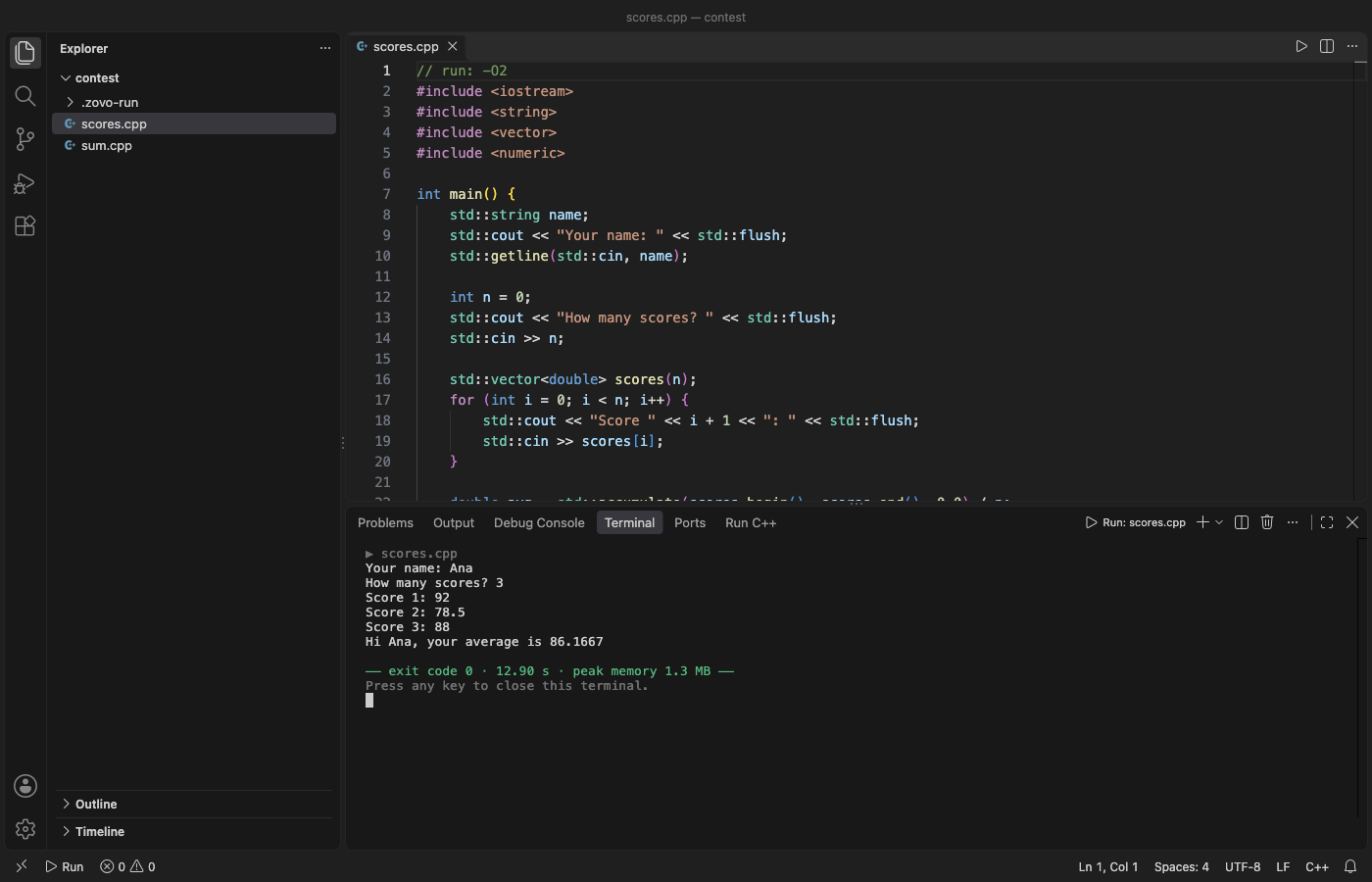
Steps in VS Code
- Install Run C++ and C Code from the Marketplace, or press Ctrl+P (Cmd+P on macOS) and run
ext install zovo.zovo-run-cpp. - Make sure a compiler is installed. "Run C++: Pick Compiler" lists what it finds. If there is none, a setup page shows the official steps for your system (Xcode Command Line Tools, MSYS2 or WinLibs, or your Linux package manager).
- Open a
.cpp,.cc,.cxxor.cfile and click the Run button in the editor title, or press Ctrl+Alt+Enter (Cmd+Alt+Enter on Mac). - The program runs in a terminal named "Run: file.cpp". Type its input there. At the end you see the exit code, the run time and the peak memory. Stop ends an endless loop.
- For flags or arguments, put
// run: -O2 -lmand// args: "Hello World" 3in the first 40 lines of the file. The C++ defaults are-std=c++20 -Wall -Wextra -g -O0. - To test with saved input, run "Run C++: Run with Input & Test Cases". Paste input, press Run with input, then Save as test case. Run all tests shows pass or fail with a line diff.
Where Zovo Pro saves time
Run, Build Only, Run Last Build, Debug, folder builds, the Input & Tests panel, the stress test and the benchmark are free, with no sign-in and no network.
A program that passes your tests can still read past the end of an array or overflow an int. Sanitizer check builds a second copy with AddressSanitizer and UndefinedBehaviorSanitizer, runs it on the panel input and every saved test case, and puts each overflow, use after free or other undefined behavior in the Problems panel at its line. The other Pro tools are Compare -O0, -O2 and -O3 (median time, peak memory, program size and whether the output changes) and Test report (JUnit XML and Markdown).
With Sanitizer check (Zovo Pro)
- Save at least one test case in the Input & Tests panel.
- Run "Run C++: Sanitizer Check: AddressSanitizer and UBSan on the Input and Test Cases (Zovo Pro)" from the Command Palette.
- Click a finding in the Problems panel to jump to its line. A build error, Stop or Cancel uses no free try.
Sanitizer check works 3 times on your computer before it asks for a license, and a try counts only when you get a result. Opening a file shows no popup and no countdown.
Zovo Pro costs USD 19 once. It is not a subscription, and it turns on the Pro tools in every Zovo extension, not only Run C++ and C Code. After a card payment (Stripe) your license key shows on the next page. In VS Code, run "Zovo Pro: Enter Zovo Pro license key" from the Command Palette and paste it. The key is checked on your computer, with no network call. With GitHub Sponsors, pick the "$19 one time" tier, then run "Zovo Pro: I already paid: unlock with GitHub Sponsors" and sign in with the same GitHub account. With PayPal, send USD 19 with "Zovo Pro" in the note and the key comes by email within a day.
A team of 5: USD 59 once, by card or by PayPal. Every rule and every Pro tool is on the Zovo Pro page.
Steps in Cursor, Windsurf or VSCodium
- Open the Extensions view with Ctrl+Shift+X (Cmd+Shift+X on macOS).
- Search for
zovo.zovo-run-cppand click Install. Cursor, Windsurf and VSCodium install from Open VSX, where it is published aszovo/zovo-run-cpp. - If your editor has no gallery, download the .vsix from the Open VSX page and run "Extensions: Install from VSIX...".
- Then use it the same way as in VS Code.
What Run C++ and C Code handles
- C and C++ files (
.c,.cpp,.cc,.cxx) with gcc, g++, clang and clang++. - MSYS2, WinLibs, MinGW, TDM-GCC and LLVM in their usual Windows folders, and Homebrew names such as
g++-14. - Paths with spaces,
&or non-ASCII letters, because no shell parses them. - Programs that print a million lines. The panel shows the first 2,000 and counts the rest.
What it does not do
- It needs a compiler on your computer and never downloads one.
- Runs in the Input panel and test cases stop after 10 seconds (setting
zovoRun.timeLimitSeconds). Programs in the terminal have no limit. - Output past 32 MB per run is counted, not kept (setting
zovoRun.maxCapturedOutputMB). - The sanitizer check needs a compiler with the sanitizer runtime. MinGW gcc on Windows has none, so use clang from LLVM there.
Other options
- C/C++ Runner. A popular free runner extension. Its open issues ask for flags per file and for program arguments with spaces.
- C/C++ Compile Run. Another free runner. Its issues report garbled non-ASCII folder names in the Problems panel.
- A terminal.
g++ -std=c++20 main.cpp -o main, then./main, works anywhere. Free, with no test cases and no Problems panel.
Install counts and Open VSX status were checked on 12 November 2026. Descriptions in quotes are the extensions' own.
Questions
Can my program read input with cin?
Yes. It runs in a real terminal, so cin and scanf wait for what you type, and prompts without a newline show first.
Does it change my settings.json or tasks.json?
No. It never writes your settings files. Debug adds one entry to .vscode/launch.json, and only when you press Debug.
Where do the built programs go?
To .zovo-run/bin in the workspace, with a .gitignore inside, or to the system temp folder (setting zovoRun.outputFolder).
Does it work in Cursor or Windsurf?
Yes. Cursor, Windsurf and VSCodium install extensions from Open VSX. Search for the extension in their Extensions view and install it there.
More about Run C++ and C Code
Read the Run C++ and C Code page for every feature and setting, or the source code on GitHub.
Related guides
- Run C++ and C Code on the VS Code Marketplace (also on Open VSX). Compiles and runs a C or C++ file with one click, with an input panel.
- Open a SARIF file in VS Code
- Preview a Swagger or OpenAPI file in VS Code
- Preview an HTML file with its CSS and images in VS Code
- Test a regex in VS Code
Zovo Pro and support
Zovo Pro: USD 19 once, every Zovo viewer. It turns on the Pro tools in this extension and in the other Zovo extensions you use. The free features stay free.
After a card payment your license key shows on the next page. Paste it with the command "Zovo Pro: Enter a key".
You can also support the work with no Pro:
Need your format supported?
Open a format request with a sample file, and I reply there whether it can be done. For USD 299 once, through this GitHub Sponsors tier, I add your file format or a missing feature to this extension, with tests, within 7 days.