Open files in VS Code and Cursor / Developer files
Read your Claude Code history in VS Code
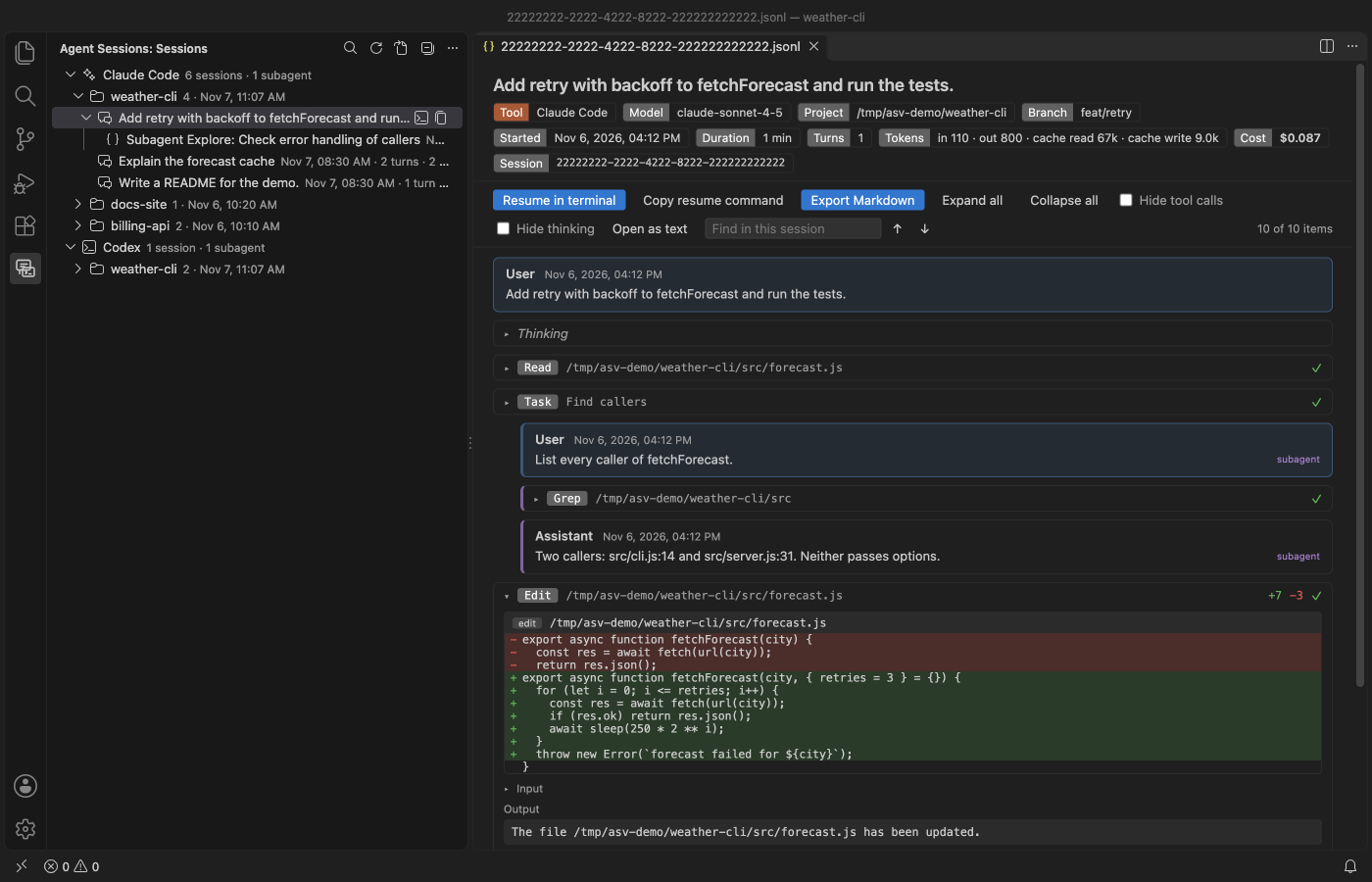
Claude Code saves every session as a JSONL file under ~/.claude/projects. claude --resume lists them in the terminal. The free Agent Session Viewer shows the same sessions in a VS Code side view, grouped by project with subagents nested. Each opens as a readable transcript with edits as diffs and token counts, and one click resumes it in a terminal. It reads Codex sessions too.
Free, MIT license. Extension ID zovo.agent-session-viewer, version 0.2.3. Needs VS Code 1.90.0 or newer.
Steps in VS Code
- Install Agent Session Viewer from the Marketplace, or press Ctrl+P (Cmd+P on macOS) and run
ext install zovo.agent-session-viewer. - Click the Agent Sessions icon in the activity bar.
- Click a session to read it. Tool calls are folded, and failed ones are marked in red.
- Click the search icon to search all sessions. Results open at the match.
- Click the terminal icon next to a session to resume it with
claude --resume(orcodex resume).
Steps in Cursor, Windsurf or VSCodium
- Open the Extensions view with Ctrl+Shift+X (Cmd+Shift+X on macOS).
- Search for
zovo.agent-session-viewerand click Install. Cursor, Windsurf and VSCodium install from Open VSX, where it is published aszovo/agent-session-viewer. - If your editor has no gallery, download the .vsix from the Open VSX page and run "Extensions: Install from VSIX...".
- Then use it the same way as in VS Code.
What Agent Session Viewer handles
- Header chips with the model, folder, branch, duration, turns, tokens and the cost when the file records it.
- Export a session to Markdown, with an option to leave tool outputs out.
- Codex sessions from
~/.codex/sessions, listed under their Codex thread names.
What it does not do
- It reads Claude Code and Codex only. Cursor, Copilot and Gemini CLI sessions are not supported yet.
- It only reads your session files. It never changes, moves or deletes them.
- Search is plain text and stops at 300 results. Files over 256 MB open with the first part.
Other options
- The Claude Code CLI.
claude --resumeopens a picker of past sessions in the terminal, andclaude --continuereopens the last one. - Session Trail (
doorsofperception.claude-code-history, 4,201 installs, on Open VSX). A chat history extension for Claude Code, also on Open VSX. - Codex History Viewer (
hiztam.codex-history-viewer, 9,244 installs, on Open VSX). Its own description: "Browse, search, tag, import/export, and manage local Codex CLI / Claude Code session history."
Install counts and Open VSX status were checked on 8 November 2026. Descriptions in quotes are the extensions' own.
Questions
Where does Claude Code store chat history?
In ~/.claude/projects, one folder per project and one .jsonl file per session. If CLAUDE_CONFIG_DIR is set, it is under that folder instead.
Can I delete old sessions from the viewer?
No. It is read-only by design, so a click can never lose history.
Is it made by Anthropic?
No. It is an independent free extension, not affiliated with Anthropic or OpenAI. It makes no network calls and has no telemetry.
More about Agent Session Viewer
Read the Agent Session Viewer page for every feature and setting, or the source code on GitHub.
Related guides
- Read a HAR file offline in VS Code
- Open a .docx Word file in VS Code
- Open an Excel .xlsx file in VS Code
- Open an Excel file in Cursor
Support this work
If this extension saves you time, you can support the work on GitHub Sponsors. Monthly tiers start at $5, and one-time tiers start at $15. Sponsorship is optional, and the tool works the same without it.