Open files in VS Code and Cursor / Office files
Open a .docx Word file in VS Code
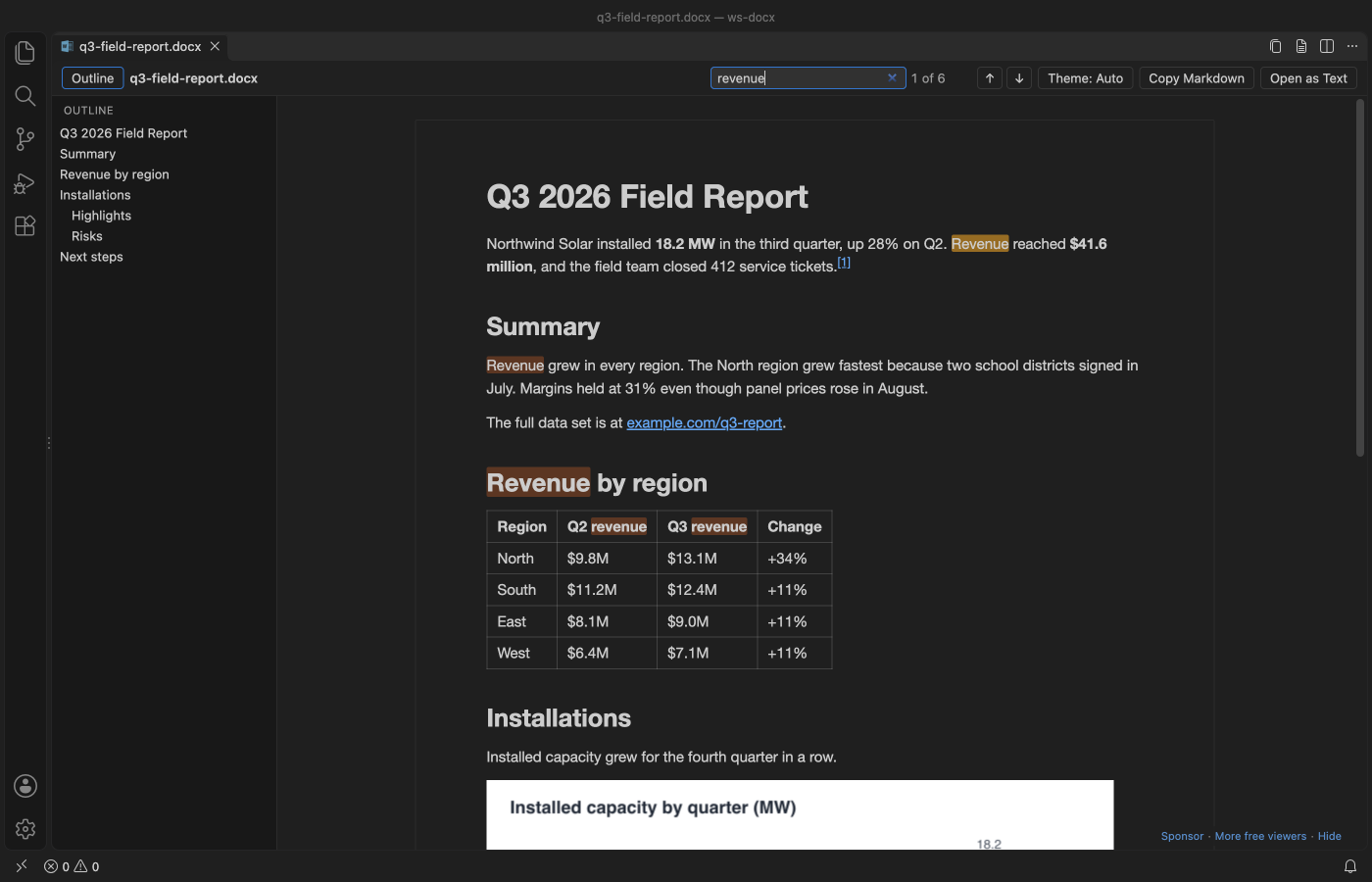
VS Code has no Word viewer, so a .docx opens with the message that the file is binary. Install the free DOCX Viewer extension and click the file again. It opens as a read-only preview that follows your theme, with an outline, search, tables, charts and equations. No Office or LibreOffice is needed.
Free, MIT license. Extension ID zovo.docx-viewer-vscode, version 0.3.0. Needs VS Code 1.90.0 or newer.
Steps in VS Code
- Install DOCX Viewer from the Marketplace, or press Ctrl+P (Cmd+P on macOS) and run
ext install zovo.docx-viewer-vscode. - Click any
.docxor.dotxfile in the Explorer. It opens as a preview. - Press Ctrl+F (Cmd+F on macOS) to search. The match counter shows where you are, and the outline jumps to any heading.
- Click the theme button in the toolbar to switch between your editor colors and white paper.
- No .docx at hand? Run
DOCX Viewer: Open Sample Documentfrom the Command Palette.
Steps in Cursor, Windsurf or VSCodium
- Open the Extensions view with Ctrl+Shift+X (Cmd+Shift+X on macOS).
- Search for
zovo.docx-viewer-vscodeand click Install. Cursor, Windsurf and VSCodium install from Open VSX, where it is published aszovo/docx-viewer-vscode. - If your editor has no gallery, download the .vsix from the Open VSX page and run "Extensions: Install from VSIX...".
- Then use it the same way as in VS Code.
What DOCX Viewer handles
- Tables with merged cells, nested lists, footnotes and endnotes.
- Equations as real math, and charts redrawn from the numbers stored in the file.
- Page view with page size, margins, headers and footers.
- Tracked changes and comments (Markup, Final and Original).
- Compare with Git HEAD, or with another document, in the VS Code diff view. Copy the whole document as Markdown.
- Also opens .odt, .docm and old .doc files (old .doc as text only).
What it does not do
- It's a viewer. It can't edit or save a document.
- SmartArt is not drawn, and EMF, WMF and TIFF pictures show as placeholders.
- Old .doc files show their text only. Macros in .docm files never run.
- Password-protected files show a message instead of the content.
Other options
- Office Viewer (
cweijan.vscode-office, 1.6 million installs, on Open VSX). Its own description: "View word, excel, powerpoint files and using WYSIWYG editor for markdown." - Docx/ODT Viewer (
ShahilKumar.docxreader, 426,551 installs, not on Open VSX). Renders .docx and .odt files inside VS Code. - Docx Renderer (
AdamRaichu.docx-viewer, 77,528 installs, on Open VSX). A read-only renderer built on the docx-preview package. - Word, LibreOffice Writer or Google Docs. Use one of these when you need to edit. DOCX Viewer has an "Open in Default App" command for that.
Install counts and Open VSX status were checked on 8 November 2026. Descriptions in quotes are the extensions' own.
Questions
Can VS Code edit a Word document?
Not with DOCX Viewer, which is read-only. To change the text, open the file in Word, LibreOffice Writer or Google Docs.
Can I see what changed in a .docx between two Git commits?
Yes. Run "Compare with Git HEAD" and VS Code shows the two versions as Markdown side by side. It compares text and structure, not font, color or picture-only changes.
Does it need Microsoft Office?
No. The extension is a 0.5 MB download. It works offline, makes no network calls and has no telemetry.
More about DOCX Viewer
Read the DOCX Viewer page for every feature and setting, or the source code on GitHub.
Related guides
- View a PowerPoint .pptx file in VS Code
- Read PDFs in dark mode in VS Code
- Open a PDF in Cursor
- Open an Excel .xlsx file in VS Code
Support this work
If this extension saves you time, you can support the work on GitHub Sponsors. Monthly tiers start at $5, and one-time tiers start at $15. Sponsorship is optional, and the tool works the same without it.