Open files in VS Code and Cursor / 3D and imaging
Open DICOM and NIfTI files in VS Code
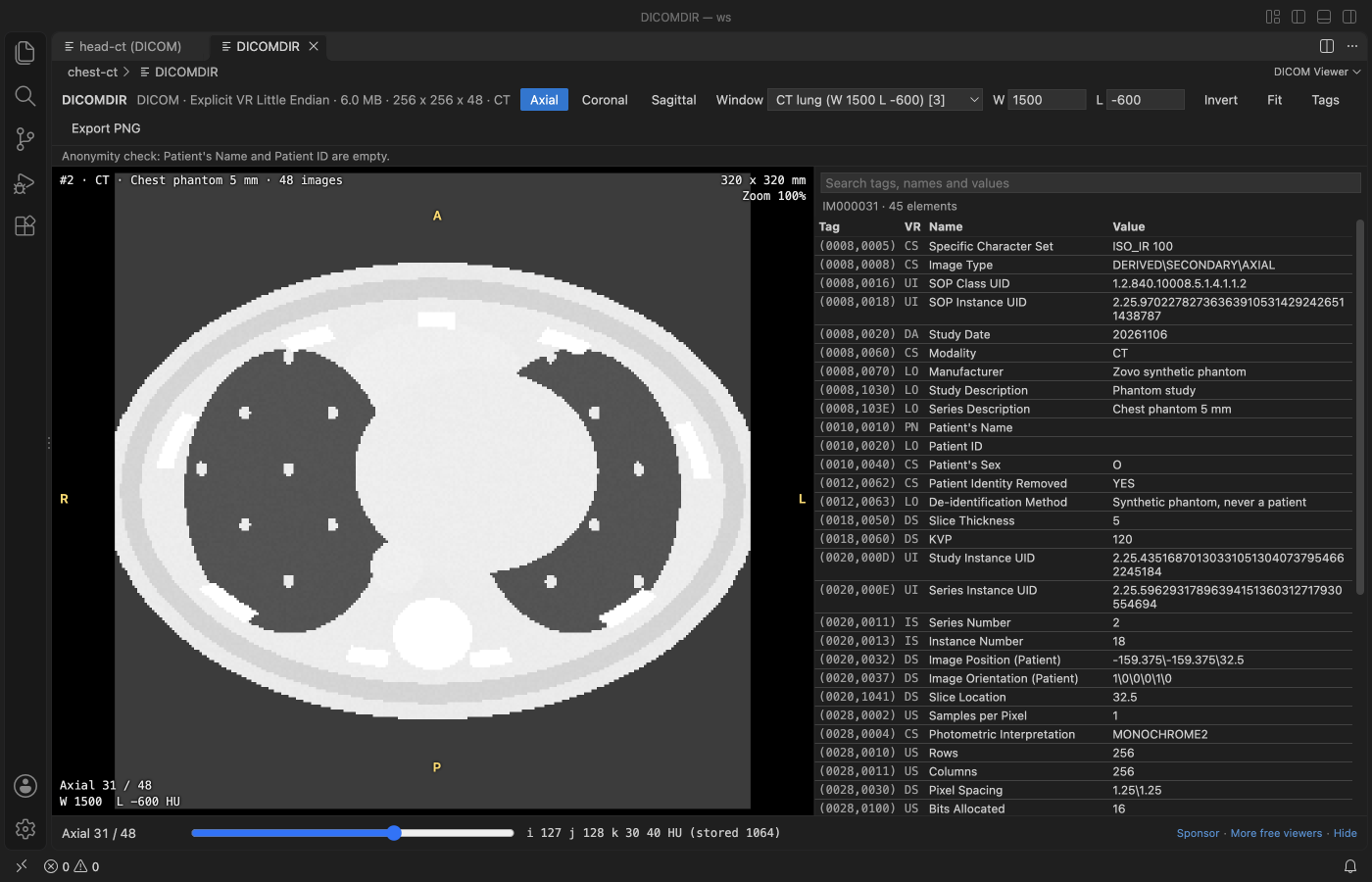
Install the free DICOM Viewer and click a .dcm, .nii or .nii.gz file, or a DICOMDIR. For a folder of slices, right-click the folder and pick "Open Folder as DICOM Series". You get window presets for CT, axial, coronal and sagittal views with real slice spacing, the value under the cursor (HU for CT) and a searchable tag table.
Free, MIT license. Extension ID zovo.dicom-nifti-viewer, version 0.1.4. Needs VS Code 1.90.0 or newer.
Steps in VS Code
- Install DICOM Viewer from the Marketplace, or press Ctrl+P (Cmd+P on macOS) and run
ext install zovo.dicom-nifti-viewer. - Click a
.dcm,.dicom,.niior.nii.gzfile, or a DICOMDIR. - Press 1 to 4 for the brain, soft tissue, lung and bone windows, or drag to set window and level.
- Press A, C or S for axial, coronal or sagittal. Press T for the tag table.
- Export the view as PNG.
Steps in Cursor, Windsurf or VSCodium
- Open the Extensions view with Ctrl+Shift+X (Cmd+Shift+X on macOS).
- Search for
zovo.dicom-nifti-viewerand click Install. Cursor, Windsurf and VSCodium install from Open VSX, where it is published aszovo/dicom-nifti-viewer. - If your editor has no gallery, download the .vsix from the Open VSX page and run "Extensions: Install from VSIX...".
- Then use it the same way as in VS Code.
What DICOM Viewer handles
- Uncompressed and RLE Lossless transfer syntaxes, 8 to 32 bit pixels, multi-frame and RGB.
- NIfTI-1 and NIfTI-2, with a volume picker for 4D files.
- A warning bar when a file still holds the patient's name or ID.
What it does not do
- JPEG, JPEG-LS, JPEG 2000 and HTJ2K compressed images are not decoded yet. The tag table still opens, with a message naming the syntax.
- Not for diagnosis. It is a developer and research viewer.
- Overlays, presentation states, segmentations, RT structures and SR are not drawn.
Other options
- DICOM Viewer & Editor (
alarm.dicom-viewer, 2,663 installs, on Open VSX). Its own description: "View DICOM images and edit metadata side-by-side, right in your VS Code editor." - Weasis. A free, open source desktop DICOM viewer.
- 3D Slicer. A free desktop platform for medical image analysis and 3D work.
Install counts and Open VSX status were checked on 8 November 2026. Descriptions in quotes are the extensions' own.
Questions
Can it open compressed DICOM?
RLE Lossless and Deflated files open. JPEG family and JPEG 2000 files show their tags and a message for now.
Does it de-identify files?
No. It warns when common patient fields are present, but it is a check, not a de-identification tool.
Does any data leave my computer?
No. It makes no network calls and has no telemetry.
More about DICOM Viewer
Read the DICOM Viewer page for every feature and setting, or the source code on GitHub.
Related guides
- View STL files in VS Code
- Open a .docx Word file in VS Code
- Open an Excel .xlsx file in VS Code
- Open an Excel file in Cursor
Support this work
If this extension saves you time, you can support the work on GitHub Sponsors. Monthly tiers start at $5, and one-time tiers start at $15. Sponsorship is optional, and the tool works the same without it.