Open files in VS Code and Cursor / 3D and imaging
DXF to CSV in VS Code
Open the drawing in DXF Viewer and run Extract drawing data. It saves a CSV with block attributes (one row per insert, one column per tag), block counts, all text with layer and position, or the layer list. Viewing, layers, measure and PNG or SVG export are free; Extract drawing data is a Zovo Pro tool with 3 free tries, then USD 19 once.
Free, MIT license. Extension ID zovo.dxf-viewer, version 0.3.2. Needs VS Code 1.90.0 or newer.
Also free from Zovo: STL Viewer, OBJ, GLB & glTF Preview, VS Code Marketplace · Open VSX (Cursor, Windsurf).
This guide is also in Français, Italiano, Português (Brasil), Polski, 简体中文.
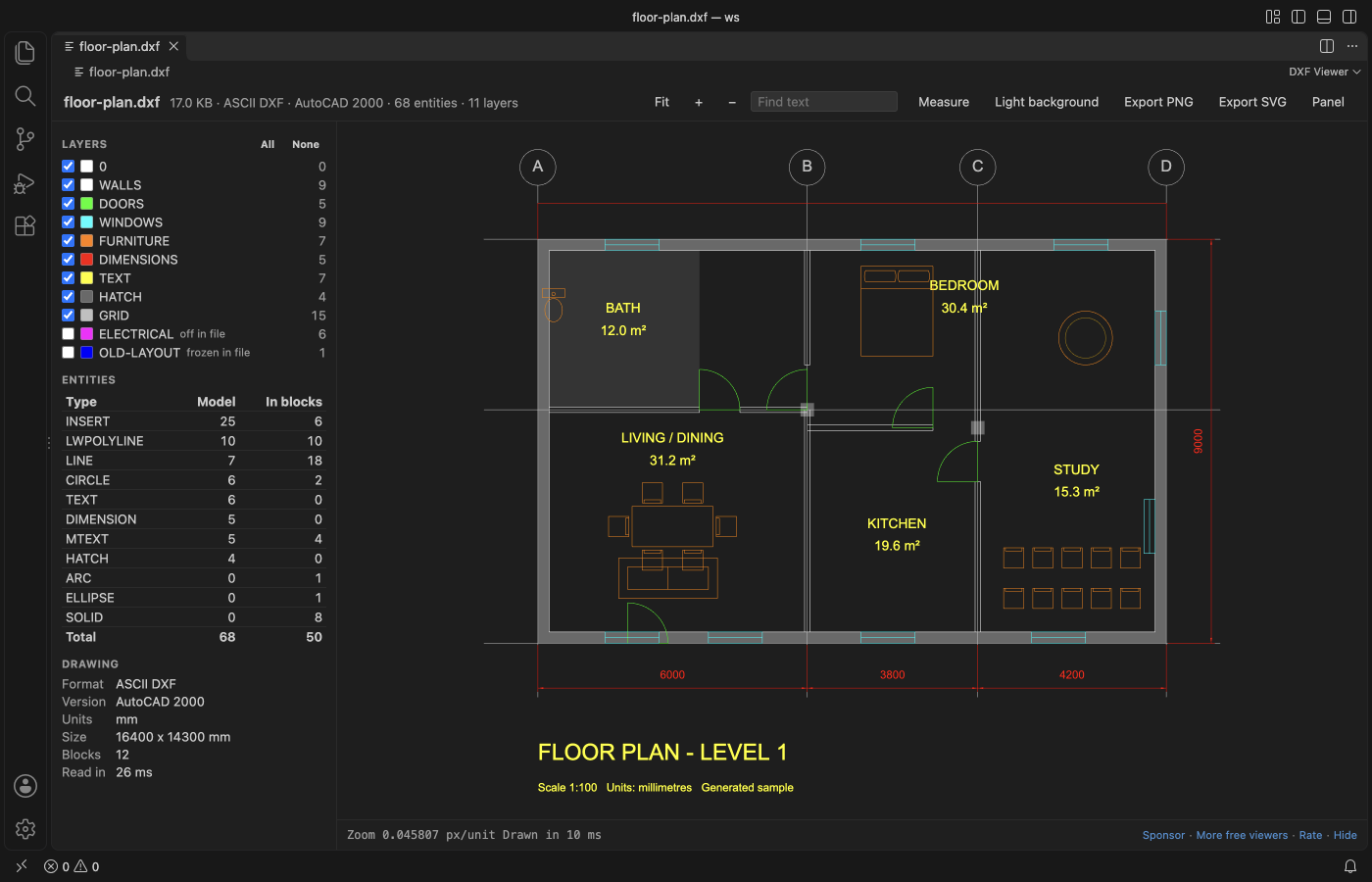
Steps in VS Code
- Install DXF Viewer from the Marketplace, or press Ctrl+P (Cmd+P on macOS) and run
ext install zovo.dxf-viewer. - Click the
.dxffile in the Explorer. The side panel lists the layers, the entity types and the block count. - Press Ctrl+F (Cmd+F on a Mac) to find a tag number or block attribute and check that the data is there.
- Run "DXF Viewer: Extract Block Attributes, Text or Layers to CSV" from the Command Palette, the
...menu of the open drawing, or right-click the .dxf file. - Pick what to export: block attributes, block counts, all text with layer and position, or the layer list.
- Save the CSV and open it in Excel. The first 3 runs are free; a try counts only when the CSV file was saved.
Where Zovo Pro saves time
Opening DXF files is free and stays free: sheets, layers, find text, measure, live reload and PNG or SVG export. The CSV export is the Pro tool Extract drawing data.
Extract drawing data works on one drawing or on every drawing in a folder. Folder inventory reads every .dxf file in a folder and its subfolders and saves one CSV row per drawing: DXF version, units, width and height, layers, entities, blocks, text and the title block fields (TITLE, DWG_NO, REV, DATE ...).
With Extract drawing data (Zovo Pro)
- Right-click a folder of drawings and run Extract drawing data to extract from every drawing in it.
- For a list of drawings, run "DXF Viewer: Inventory of a Folder of Drawings to CSV", or right-click a folder.
- Open the CSV: one row per drawing with version, units, size, layers, entities, blocks, text and the title block fields.
Extract drawing data works 3 times on your computer before it asks for a license, and a try counts only when you get a result. Opening a file shows no popup and no countdown.
Zovo Pro costs USD 19 once. It is not a subscription, and it turns on the Pro tools in every Zovo extension, not only DXF Viewer. After a card payment (Stripe) your license key shows on the next page. In VS Code, run "Zovo Pro: Enter Zovo Pro license key" from the Command Palette and paste it. The key is checked on your computer, with no network call. With GitHub Sponsors, pick the "$19 one time" tier, then run "Zovo Pro: I already paid: unlock with GitHub Sponsors" and sign in with the same GitHub account. With PayPal, send USD 19 with "Zovo Pro" in the note and the key comes by email within a day.
A team of 5: USD 59 once, by card or by PayPal. Every rule and every Pro tool is on the Zovo Pro page.
Steps in Cursor, Windsurf or VSCodium
- Open the Extensions view with Ctrl+Shift+X (Cmd+Shift+X on macOS).
- Search for
zovo.dxf-viewerand click Install. Cursor, Windsurf and VSCodium install from Open VSX, where it is published aszovo/dxf-viewer. - If your editor has no gallery, download the .vsix from the Open VSX page and run "Extensions: Install from VSIX...".
- Then use it the same way as in VS Code.
What DXF Viewer handles
- Block attributes: one row per insert, one column per tag, such as a door or equipment schedule.
- Block counts, as a bill of materials.
- All text with layer and position, and the layer list.
- One drawing or every drawing in a folder.
- Reads ASCII and binary DXF, from R12 to AutoCAD 2018 files, with blocks and nested inserts.
- Reads the files on your computer only, with no network calls and no telemetry. It refuses to write over a drawing.
What it does not do
- DWG isn't supported. Save a DXF copy first; the free ODA File Converter converts a whole folder of DWG files at once.
- The CSV types are block attributes, block counts, text and layers. It is not a dump of every line and polyline coordinate; ezdxf can do that.
- Files over 500 MB are not read (setting
dxfViewer.maxFileMB, up to 2048).
Other options
- AutoCAD Data Extraction. In AutoCAD, the DATAEXTRACTION command builds a table of block attributes and properties and exports it to Excel or CSV. It needs a paid AutoCAD license.
- ezdxf (Python). Free Python library. A short script reads every INSERT and its ATTRIB tags, or every TEXT and MTEXT, and writes them with the csv module. The better choice for custom columns and automation.
- QGIS. Free desktop GIS. It opens a DXF as point, line and polygon layers with fields such as Layer and Text, and Export, Save Features As writes CSV. Good for survey and site drawings; it does not lay block attributes out as one column per tag.
- Online upload converters. Several sites convert DXF to CSV after you upload the drawing to their server. Most give geometry or text only, not block attributes as columns. Avoid them for client drawings.
Install counts and Open VSX status were checked on 10 November 2026. Descriptions in quotes are the extensions' own.
Questions
How do I export DXF block attributes to Excel?
Run Extract drawing data and pick block attributes. You get one row per insert and one column per tag, such as a door or equipment schedule. Open the CSV in Excel.
Can I get a CSV from a DWG file?
Not directly. DWG isn't supported. Save the DWG as DXF first: Save As or DXFOUT in AutoCAD, Save As in BricsCAD, or the free ODA File Converter for a whole folder.
Is the drawing uploaded anywhere?
No. DXF Viewer makes no network calls and sends no telemetry, and the Pro tools read the files on your computer only.
Does it work in Cursor or Windsurf?
Cursor and Windsurf install extensions from Open VSX. Search for DXF Viewer in their Extensions view and install it there.
More about DXF Viewer
Read the DXF Viewer page for every feature and setting, or the source code on GitHub.
Related guides
- STL Viewer, OBJ, GLB & glTF Preview on the VS Code Marketplace (also on Open VSX). Opens STL, OBJ, PLY, GLB and glTF models in VS Code, beside the code.
- Measure a distance in a DXF drawing in VS Code
- View STL files in VS Code
- Open DICOM and NIfTI files in VS Code
- Calculate the volume of an STL file
Support this work
If this extension saves you time, you can support the work on GitHub Sponsors. Monthly tiers start at $5, and one-time tiers start at $15. Sponsorship is optional, and the tool works the same without it.
Need your format supported?
Open a format request with a sample file, and I reply there whether it can be done. For USD 299 once, through this GitHub Sponsors tier, I add your file format or a missing feature to this extension, with tests, within 7 days.