Open files in VS Code and Cursor / Tables and data
Edit a SQLite database in VS Code
SQLite Editor & Viewer opens a .db or .sqlite file in VS Code as a table, read-only. Click Enable editing to change cells and rows, run INSERT or UPDATE, or import a CSV file. Every change waits in a pending list with its SQL and Undo, and Save makes a backup copy before it replaces the file. All of that is free. Zovo Pro (USD 19 once) adds database compare with a sync script, ER diagrams and export of every table, with 3 free tries each.
Free, MIT license. Extension ID zovo.sqlite-table-viewer, version 0.4.4. Needs VS Code 1.90.0 or newer.
This guide is also in Deutsch, Español, 日本語.
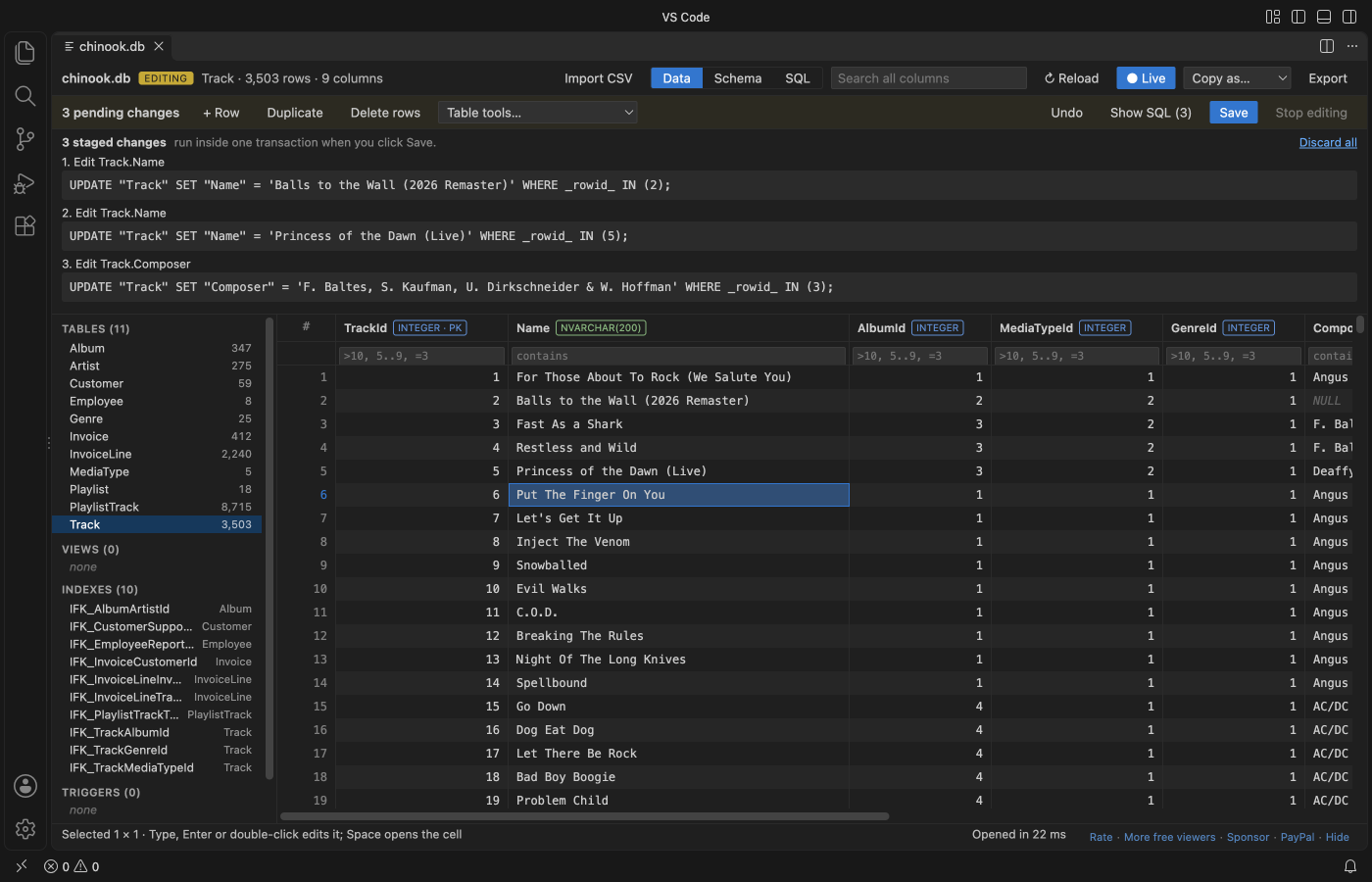
Steps in VS Code
- Install SQLite DB Viewer from the Marketplace, or press Ctrl+P (Cmd+P on macOS) and run
ext install zovo.sqlite-table-viewer. - Click a
.db,.sqlite,.sqlite3,.db3,.s3db,.sl3,.vscdbor.gpkgfile. It opens as a table, read-only. - Click Enable editing. Double-click a cell (or press Enter or F2, or just type), change it and press Enter. Each change waits in a pending list with its SQL and an Undo.
- To add data from a file, click Import CSV in the toolbar. To make a new database from a CSV, right-click the
.csvin the Explorer and pick "Import CSV into a new SQLite database". - For bigger changes, use the SQL tab. INSERT, UPDATE, DELETE, REPLACE, CREATE, DROP and ALTER go into the same pending list.
- Press Save (Ctrl+S or Cmd+S). It checks the foreign keys, copies the file to a backup such as
name.db.20261109-143000.bak, and replaces the file in one step.
Where Zovo Pro saves time
Opening, reading, the SQL tab, editing cells and rows, Save with a backup, CSV and TSV import, the table tools and export of the rows in view are free. There is no trial timer and no license banner.
When you have edited one copy of a database and need the same changes in another copy, Compare SQLite Databases reads both files and matches rows by primary key (or rowid). You get a Markdown report with counts and the first differences of each table, and a-vs-b-sync.sql, a script that makes the second database match the first. The script opens in an editor and is never run for you. The other two Pro tools are an ER diagram of the database and export of every table to Excel or CSV at once.
With Compare SQLite Databases (Zovo Pro)
- Click the DB tools button (it has a small PRO badge) in the editor, or run "Compare SQLite Databases (Pro)..." from the Command Palette, or right-click a database file in the Explorer.
- Start it from the database you edited (A), then pick the copy that should get the same changes (B).
- Pick where to save the report. The sync script is written next to it. Read it before you run it yourself.
Compare SQLite Databases works 3 times on your computer before it asks for a license, and a try counts only when you get a result. Opening a file shows no popup and no countdown.
Zovo Pro costs USD 19 once. It is not a subscription, and it turns on the Pro tools in every Zovo extension, not only SQLite DB Viewer. After a card payment (Stripe) your license key shows on the next page. In VS Code, run "Zovo Pro: Enter Zovo Pro license key" from the Command Palette and paste it. The key is checked on your computer, with no network call. With GitHub Sponsors, pick the "$19 one time" tier, then run "Zovo Pro: I already paid: unlock with GitHub Sponsors" and sign in with the same GitHub account. With PayPal, send USD 19 with "Zovo Pro" in the note and the key comes by email within a day.
A team of 5: USD 59 once, by card or by PayPal. Every rule and every Pro tool is on the Zovo Pro page.
Steps in Cursor, Windsurf or VSCodium
- Open the Extensions view with Ctrl+Shift+X (Cmd+Shift+X on macOS).
- Search for
zovo.sqlite-table-viewerand click Install. Cursor, Windsurf and VSCodium install from Open VSX, where it is published aszovo/sqlite-table-viewer. - If your editor has no gallery, download the .vsix from the Open VSX page and run "Extensions: Install from VSIX...".
- Then use it the same way as in VS Code.
What SQLite DB Viewer handles
- Cells, rows, NULL, long text, JSON and BLOB values.
- INSERT, UPDATE, DELETE, CREATE, DROP and ALTER from the SQL tab, staged with Undo.
- CSV and TSV import with the delimiter, encoding and header row guessed and changeable.
- Databases in WAL mode, including the committed transactions in the
-walfile.
What it does not do
- Editing works up to 256 MB (setting
sqliteTableViewer.editMaxFileSizeMB). Larger files, up to 512 MB, open read-only. - Files on remote or virtual file systems open read-only.
- Encrypted databases (SQLCipher, SEE) cannot be opened.
- Closing the tab with unsaved changes drops them, and the file stays as it was.
Other options
- DB Browser for SQLite. A free, open source desktop app to browse and edit SQLite files, outside VS Code.
- The sqlite3 command-line shell. Free. Run UPDATE and INSERT statements by hand. Good for scripts, with no grid.
Install counts and Open VSX status were checked on 12 November 2026. Descriptions in quotes are the extensions' own.
Questions
Is my database changed when I only open it?
No. It opens read-only. Nothing is written before you click Enable editing and then Save.
What if my app writes to the database while I edit?
If the file changed on disk since you opened it, Save refuses and keeps your changes. It also stops when the -wal file holds transactions that are not in the main file yet.
Is editing free?
Yes. Opening, editing, Save and CSV import are free, with no sign-in. Only the compare, the ER diagram and the export of all tables are Pro, with 3 free tries each.
Does it work in Cursor or Windsurf?
Yes. Cursor, Windsurf and VSCodium install extensions from Open VSX. Search for the extension in their Extensions view and install it there.
More about SQLite DB Viewer
Read the SQLite DB Viewer page for every feature and setting, or the source code on GitHub.
Related guides
- SQLite Editor & Viewer on the VS Code Marketplace (also on Open VSX). Opens .db and .sqlite files as tables, edits cells and runs SQL.
- Open a SQLite database in VS Code
- SQLite to Excel in VS Code
- Compare two SQLite databases
- Open an Excel .xlsx file in VS Code
Zovo Pro and support
Zovo Pro: USD 19 once, every Zovo viewer. It turns on the Pro tools in this extension and in the other Zovo extensions you use. The free features stay free.
After a card payment your license key shows on the next page. Paste it with the command "Zovo Pro: Enter a key".
You can also support the work with no Pro:
Need your format supported?
Open a format request with a sample file, and I reply there whether it can be done. For USD 299 once, through this GitHub Sponsors tier, I add your file format or a missing feature to this extension, with tests, within 7 days.