Open files in VS Code and Cursor / Docs and diagrams
Export an ER diagram as PNG or PDF from VS Code
DBML Viewer & ER Diagram draws a .dbml, Prisma or SQL schema file as an ER diagram beside the editor. The diagram and Copy SVG, which puts the diagram on the clipboard as an SVG image, are free with no limit. Saving the diagram as a PNG, SVG or PDF file is the Zovo Pro tool Export the diagram, with 3 free tries on your computer. Zovo Pro is USD 19 once and turns on the Pro tools in every Zovo extension. No sign-in, no network.
Free, MIT license. Extension ID zovo.zovo-dbml-viewer, version 0.1.1. Needs VS Code 1.90.0 or newer.
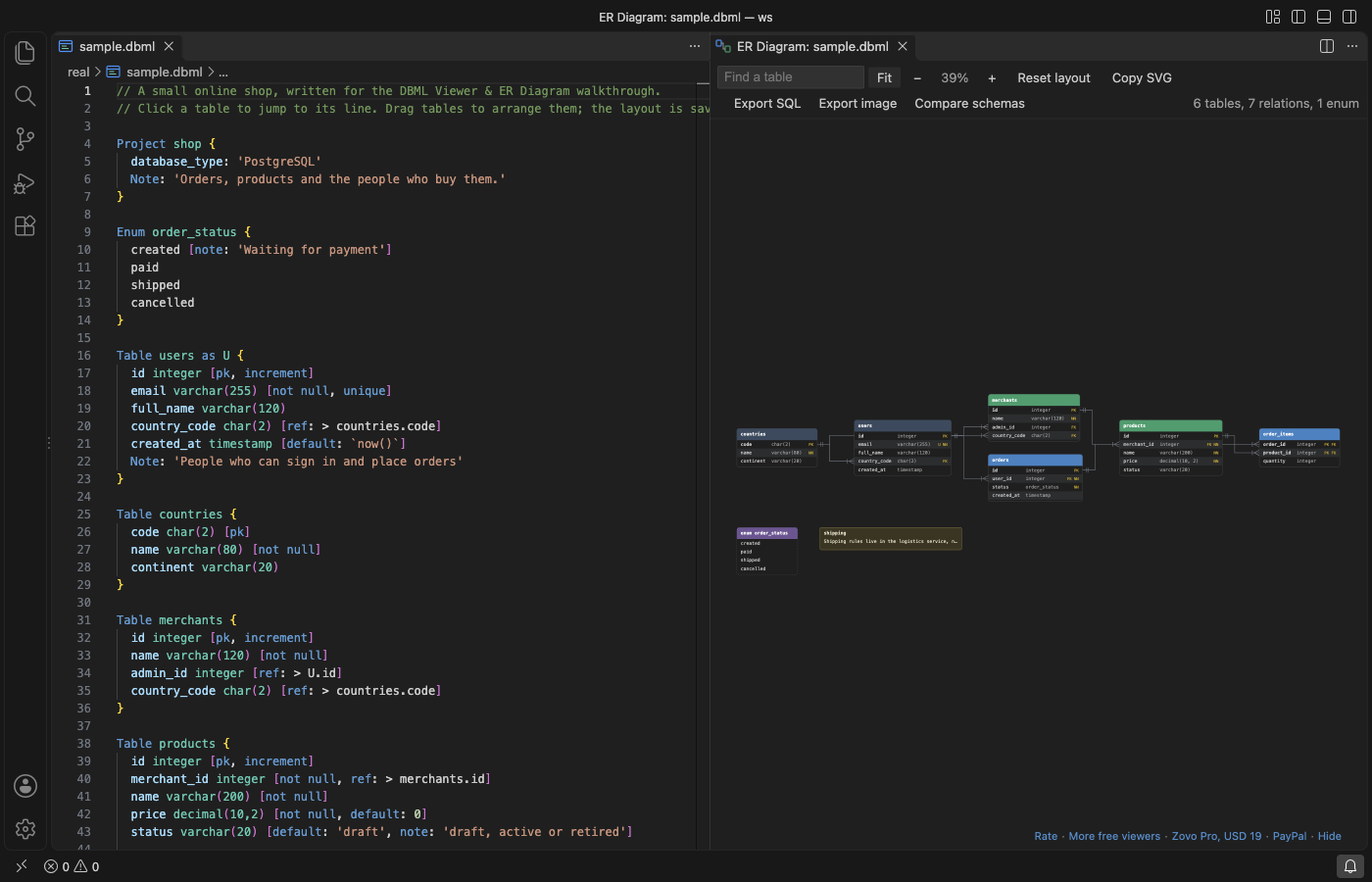
Steps in VS Code
- Install DBML Viewer from the Marketplace, or press Ctrl+P (Cmd+P on macOS) and run
ext install zovo.zovo-dbml-viewer. - Open a
.dbmlfile, a.prismaschema or a.sqlfile withCREATE TABLEstatements. Click the diagram button in the editor title bar, or run "DBML Viewer: Open ER Diagram" from the Command Palette. The diagram opens beside the editor. - Drag tables to where you want them. The positions are kept for each file, and Reset layout starts over. Fit shows the whole schema, and Ctrl or Cmd + scroll zooms.
- For a free copy, click Copy SVG in the diagram toolbar. The diagram goes to the clipboard as an SVG image in the colors of your VS Code theme, for docs and pull requests.
- For a PNG, SVG or PDF file, click Export image in the same toolbar. It is a Zovo Pro tool with 3 free tries (see below).
Where Zovo Pro saves time
The live ER diagram for DBML, SQL and Prisma, the layout, search, Copy SVG and the DBML language support (syntax colors, problems, outline and go to definition) are free, with no limit.
When the diagram has to go into a design doc, a wiki page or a slide as a file, Export the diagram saves it as a PNG at twice the screen size, an SVG file or a one-page vector PDF, on a white background and with the table positions you dragged. It can also write a Markdown data dictionary with the column, type, keys, nullable, default and note of every table. The other two Pro tools are Export SQL (DBML to CREATE TABLE scripts for PostgreSQL, MySQL, SQL Server or SQLite, and SQL DDL to DBML) and Schema diff, which compares two schema files and writes the migration SQL.
With Export the diagram (Zovo Pro)
- With the diagram open, click Export image in the toolbar, or run "DBML Viewer: Export the diagram as PNG, SVG, PDF or data dictionary (Pro)" from the Command Palette.
- Pick PNG image, SVG image, PDF document or Markdown data dictionary.
- Pick where to save. The name starts as
<schema>.erd.png(or.svg,.pdf) next to the schema file. Escape or Cancel uses no free try.
Export the diagram works 3 times on your computer before it asks for a license, and a try counts only when you get a result. Opening a file shows no popup and no countdown.
Zovo Pro costs USD 19 once. It is not a subscription, and it turns on the Pro tools in every Zovo extension, not only DBML Viewer. After a card payment (Stripe) your license key shows on the next page. In VS Code, run "Zovo Pro: Enter Zovo Pro license key" from the Command Palette and paste it. The key is checked on your computer, with no network call. With GitHub Sponsors, pick the "$19 one time" tier, then run "Zovo Pro: I already paid: unlock with GitHub Sponsors" and sign in with the same GitHub account. With PayPal, send USD 19 with "Zovo Pro" in the note and the key comes by email within a day.
A team of 5: USD 59 once, by card or by PayPal. Every rule and every Pro tool is on the Zovo Pro page.
Steps in Cursor, Windsurf or VSCodium
- Open the Extensions view with Ctrl+Shift+X (Cmd+Shift+X on macOS).
- Search for
zovo.zovo-dbml-viewerand click Install. Cursor, Windsurf and VSCodium install from Open VSX, where it is published aszovo/zovo-dbml-viewer. - If your editor has no gallery, download the .vsix from the Open VSX page and run "Extensions: Install from VSIX...".
- Then use it the same way as in VS Code.
What DBML Viewer handles
- DBML with tables, enums,
TableGroupcolors, sticky notes and references withON DELETEactions. - SQL DDL for PostgreSQL, MySQL, SQL Server and SQLite:
CREATE TABLE, keys,ALTER TABLE ... ADD FOREIGN KEY,CREATE INDEXand enums. - Prisma schemas.
- Big schemas. With 200 tables or more, the tables are laid out in a grid ordered by relation.
What it does not do
- PNG, SVG and PDF files come from a Zovo Pro tool with 3 free tries. Copy SVG to the clipboard is free with no limit.
- The SQL reader is made for schema files.
INSERTstatements, views and functions are skipped and listed under the toolbar. It does not run or check SQL. - Files up to 8 million characters are read.
- It draws from a schema file. It does not connect to a database.
Other options
- dbdiagram.io. A web app by Holistics, the makers of DBML, that draws DBML as a diagram and exports it. The schema goes into a website.
- Copy SVG and a browser. Free. Paste the copied SVG into a
.svgfile, open it in a browser and print it to PDF. You get the colors of your editor theme.
Install counts and Open VSX status were checked on 12 November 2026. Descriptions in quotes are the extensions' own.
Questions
Is Copy SVG free?
Yes. Copy SVG, the diagram and the DBML language support are free with no limit. Only the file exports, Export SQL and Schema diff are Pro tools, with 3 free tries each.
Does the export keep my layout?
Yes. The export uses the positions you dragged. A table you added after that gets its automatic place.
Do table names in Chinese or Cyrillic show in the PDF?
No. The PDF uses a built-in Courier font and writes letters outside Western European scripts as a question mark. Use the PNG or SVG export for those names.
Does it work in Cursor or Windsurf?
Yes. Cursor, Windsurf and VSCodium install extensions from Open VSX. Search for the extension in their Extensions view and install it there.
More about DBML Viewer
Read the DBML Viewer page for every feature and setting, or the source code on GitHub.
Related guides
- Draw an ER diagram from a DBML or Prisma file in VS Code
- Preview a reStructuredText (.rst) file in VS Code
- Read an RTF file in VS Code
- Preview Mermaid diagrams in VS Code
Zovo Pro and support
Zovo Pro: USD 19 once, every Zovo viewer. It turns on the Pro tools in this extension and in the other Zovo extensions you use. The free features stay free.
After a card payment your license key shows on the next page. Paste it with the command "Zovo Pro: Enter a key".
You can also support the work with no Pro:
Need your format supported?
Open a format request with a sample file, and I reply there whether it can be done. For USD 299 once, through this GitHub Sponsors tier, I add your file format or a missing feature to this extension, with tests, within 7 days.