Open files in VS Code and Cursor / Docs and diagrams
Preview Mermaid diagrams in VS Code
VS Code has no Mermaid preview of its own. Install the free Mermaid Viewer, open a .mmd file and click the preview icon at the top right of the editor, or press Ctrl+K V (Cmd+K V on macOS). The preview follows your typing, names the line of any error and keeps the last good diagram on screen. On a Markdown file it lists every mermaid block with its own export buttons. Mermaid 12.3.0 ships inside the extension, so there is no sign-in and no network.
Free, MIT license. Extension ID zovo.mermaid-viewer, version 0.3.3. Needs VS Code 1.90.0 or newer.
This guide is also in Deutsch, Español, Français, Italiano, 日本語, Polski, Português (Brasil), 简体中文.
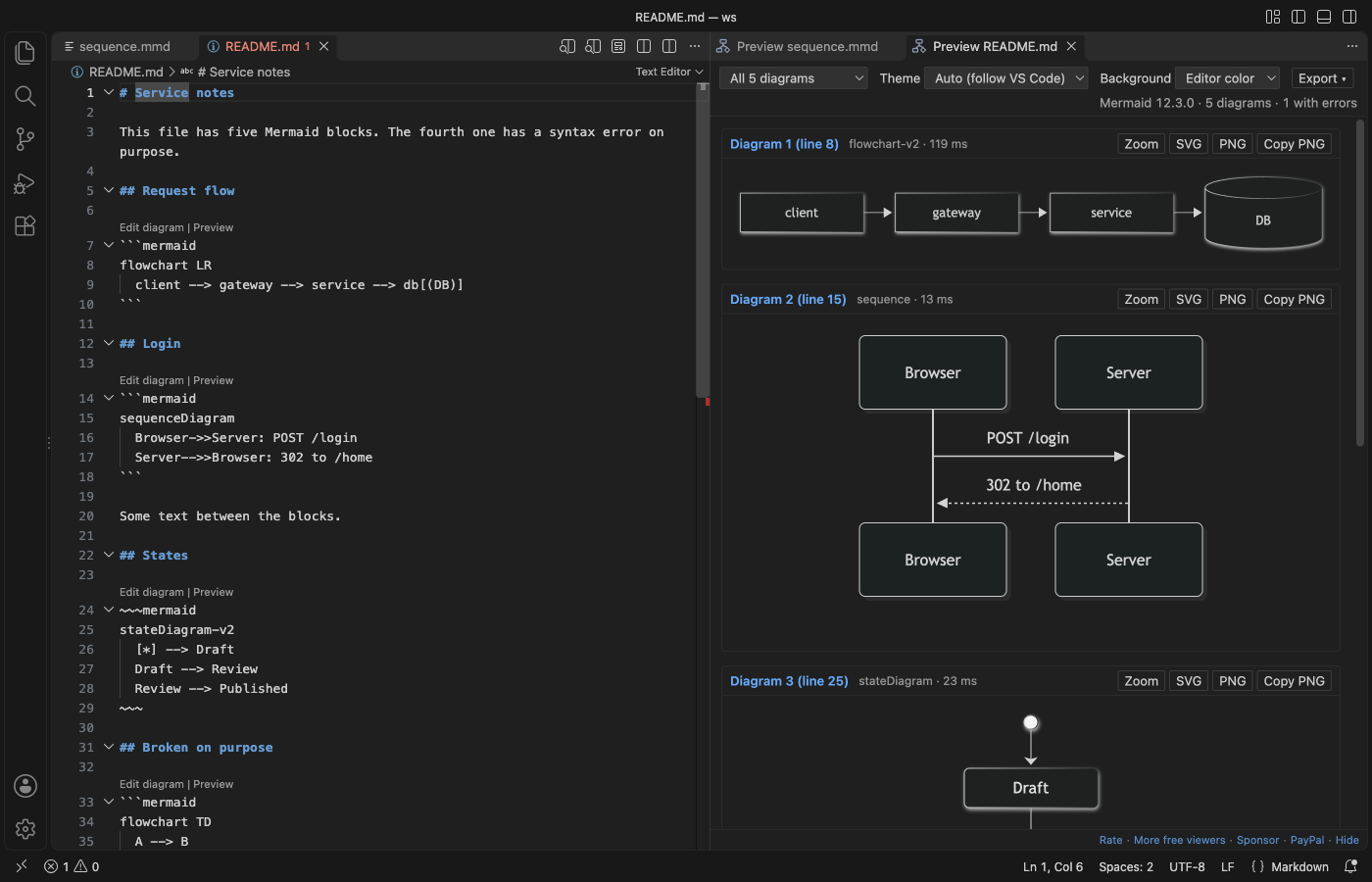
Steps in VS Code
- Install Mermaid Viewer from the Marketplace, or press Ctrl+P (Cmd+P on macOS) and run
ext install zovo.mermaid-viewer. - Open a
.mmdor.mermaidfile and click the preview icon in the editor title, or press Ctrl+K V (Cmd+K V on macOS). - For a Markdown file with
```mermaidblocks, click the same preview icon. Each diagram shows with its line number. - Scroll to zoom at the pointer and drag to pan. Fit and 100% are in the toolbar.
- Click Export for PNG at 1x, 2x or 4x, SVG, Copy PNG or Copy SVG code.
Steps in Cursor, Windsurf or VSCodium
- Open the Extensions view with Ctrl+Shift+X (Cmd+Shift+X on macOS).
- Search for
zovo.mermaid-viewerand click Install. Cursor, Windsurf and VSCodium install from Open VSX, where it is published aszovo/mermaid-viewer. - If your editor has no gallery, download the .vsix from the Open VSX page and run "Extensions: Install from VSIX...".
- Then use it the same way as in VS Code.
What Mermaid Viewer handles
- Flowcharts, sequence, class, state, ER, Gantt, pie, gitGraph, mindmap, timeline, sankey, XY charts, block, C4, architecture and the other types Mermaid 12 knows.
- Errors go to the Problems panel with the line number. One broken block in a Markdown file does not hide the others.
- Background in the editor color, white, transparent or a custom color, used for exports too. The Mermaid theme follows VS Code unless you pick one.
- Mermaid runs at its strict security level, and the preview has no network access.
What it does not do
- The preview doesn't edit the diagram. You edit the text and the preview follows.
- It does not add diagrams to VS Code's own Markdown preview. It opens its own preview panel.
- Math in labels may not look right, because the KaTeX fonts are not bundled. Icon packs loaded from the internet are not loaded.
- Diagrams over 500,000 characters or 2,000 links are not drawn until you raise the limit. On an M-series Mac, 1,600 links took about 5 seconds to lay out.
In JetBrains IDEs (IntelliJ IDEA, PyCharm, WebStorm, CLion and others)
- No Zovo plugin for JetBrains IDEs yet. Mermaid Viewer is for VS Code and the editors built on it. In IntelliJ IDEA, PyCharm and WebStorm, the "Mermaid" plugin (1,701,619 downloads) says it "Provides editing support and diagram preview for Mermaid diagramming and charting language."
- Mermaid Visualizer (JetBrains). 46,943 downloads. Its listing says it gives live preview, code intelligence and export, all offline.
Other options
- Markdown Preview Mermaid Support (
bierner.markdown-mermaid, 5.5 million installs, on Open VSX). Its own description: "Adds Mermaid diagram and flowchart support to VS Code's builtin markdown preview". Pick it if you want diagrams inside the normal Markdown preview. It has a 4.61 rating. - Mermaid (
MermaidChart.vscode-mermaid-chart, 1.2 million installs, on Open VSX). Its own description starts: "The official Mermaid Editor plugin by the Mermaid open source team". The description also mentions AI-powered diagramming. - Mermaid Preview (
vstirbu.vscode-mermaid-preview, 936,145 installs, on Open VSX). Its own description: "Mermaid diagram previewer for Visual Studio Code, now maintained by the creators of Mermaid.js" - Mermaid Live Editor. The web editor from the Mermaid project. It runs in the browser, so you need to paste the diagram there.
Install counts and Open VSX status were checked on 9 November 2026. Descriptions in quotes are the extensions' own.
Questions
Why does VS Code not show my mermaid block in the Markdown preview?
VS Code's built-in Markdown preview does not draw Mermaid. Either add Markdown Preview Mermaid Support, which draws diagrams inside that preview, or use Mermaid Viewer, which opens its own panel with zoom and export.
Can I export a diagram as PNG or SVG?
Yes. Export saves PNG at 1x, 2x or 4x, with an optional largest width or height, or SVG. Copy PNG puts the image on the clipboard.
Does it need an account or the internet?
No. Mermaid 12.3.0 is bundled, there is no sign-in and no AI, and the preview blocks every network request.
More about Mermaid Viewer
Read the Mermaid Viewer page for every feature and setting, or the source code on GitHub.
Related guides
- Mermaid Diagram Editor & Viewer on the VS Code Marketplace (also on Open VSX). Live Mermaid preview beside the code, with PNG and SVG export.
- Export a Mermaid diagram to PDF
- Preview a reStructuredText (.rst) file in VS Code
- Read an RTF file in VS Code
- Preview an SVG file in VS Code
Zovo Pro and support
Zovo Pro: USD 19 once, every Zovo viewer. It turns on the Pro tools in this extension and in the other Zovo extensions you use. The free features stay free.
After a card payment your license key shows on the next page. Paste it with the command "Zovo Pro: Enter a key".
You can also support the work with no Pro:
Need your format supported?
Open a format request with a sample file, and I reply there whether it can be done. For USD 299 once, through this GitHub Sponsors tier, I add your file format or a missing feature to this extension, with tests, within 7 days.