Open files in VS Code and Cursor / Science data
A free NetCDF viewer that runs in VS Code
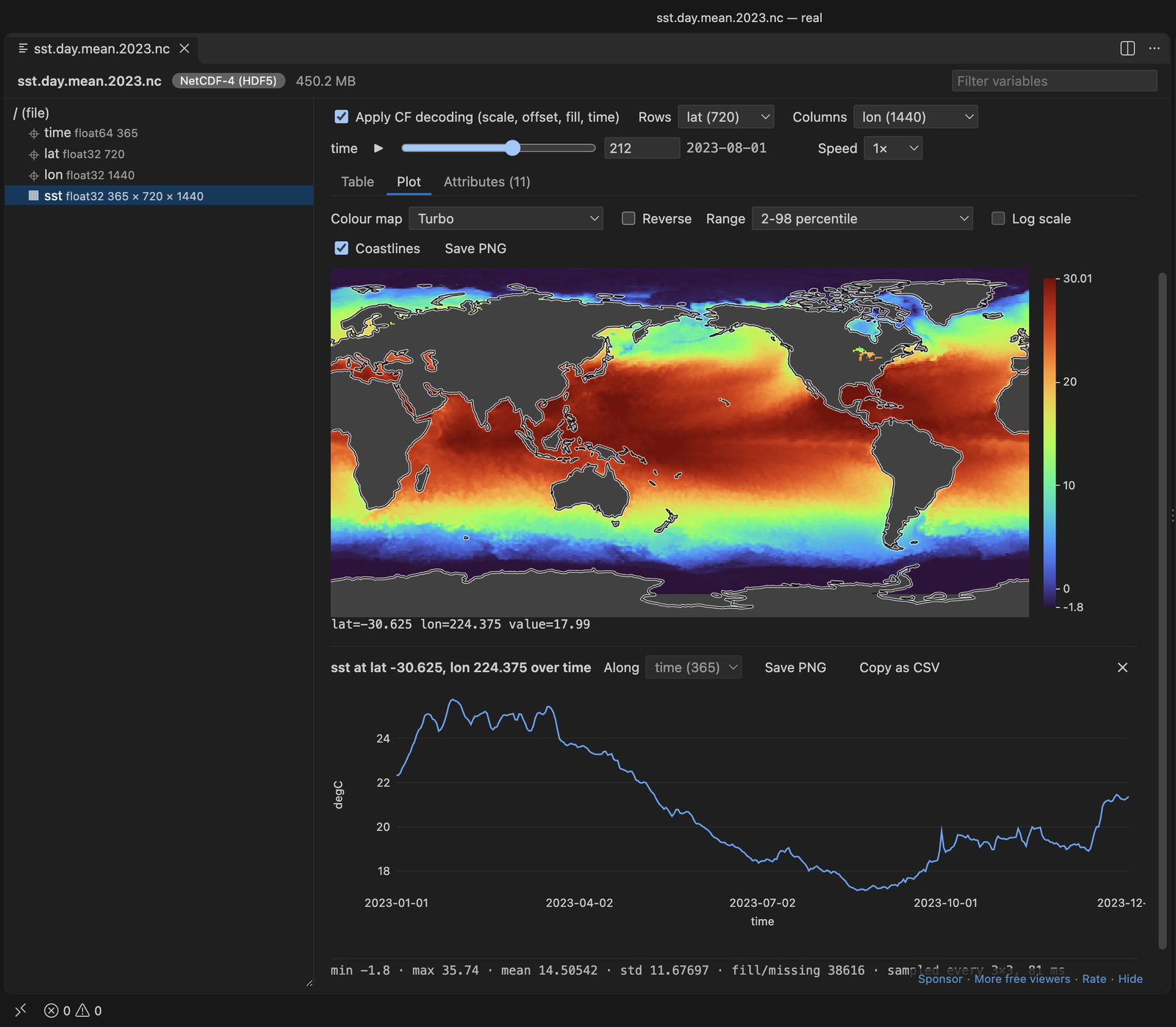
If you have VS Code, you have a NetCDF viewer on Windows, macOS and Linux. Install the free NetCDF Viewer & HDF5 Viewer extension and click a .nc file. You get the header, a variable tree, a map with coastlines, a time slider and the time series of any point you click. No Python, NCL or other setup is needed, and it also works over Remote SSH.
Free, MIT license. Extension ID zovo.hdf5-netcdf-explorer, version 0.4.0. Needs VS Code 1.90.0 or newer.
Steps in VS Code
- Install NetCDF Viewer & HDF5 Viewer from the Marketplace, or press Ctrl+P (Cmd+P on macOS) and run
ext install zovo.hdf5-netcdf-explorer. - Click a
.nc,.nc4,.netcdfor.cdffile. The overview shows dimensions, variables and attributes, much likencdump -h. - Pick a variable on the left to draw it as a map. Move the time slider, or press Play.
- Click a point on the map to plot its time series.
- Save the map as PNG, or export a slice as CSV or JSON. "Copy xarray code" gives you the Python line for the same slice.
Steps in Cursor, Windsurf or VSCodium
- Open the Extensions view with Ctrl+Shift+X (Cmd+Shift+X on macOS).
- Search for
zovo.hdf5-netcdf-explorerand click Install. Cursor, Windsurf and VSCodium install from Open VSX, where it is published aszovo/hdf5-netcdf-explorer. - If your editor has no gallery, download the .vsix from the Open VSX page and run "Extensions: Install from VSIX...".
- Then use it the same way as in VS Code.
What NetCDF Viewer & HDF5 Viewer handles
- CF decoding: scale_factor, add_offset, _FillValue and time units, including noleap and 360_day calendars.
- NetCDF-3, CDF-5 and NetCDF-4 (HDF5) with compressed chunks.
- In the README test, a 450 MB NetCDF-4 map drew in about 0.1 s.
What it does not do
- No Zarr and no HDF4.
- No coastlines on curvilinear (2D lat/lon) or projected grids.
- Arrays larger than 512 x 512 are sampled for the map. Exports stop at 1,000,000 values.
Other options
- Panoply. The NASA GISS desktop app for NetCDF, HDF and GRIB. It runs on Java.
- ncview. A quick X11 viewer for Unix systems.
- Scientific Data Viewer (
eschalk0.scientific-data-viewer, 5,049 installs, on Open VSX). Its own description lists NetCDF, Zarr, HDF5, GRIB and GeoTIFF. - NetCDF Viewer (
RichardMcDonald.netcdf-viewer, 3,286 installs, not on Open VSX). Its own description: "View NetCDF files and metadata".
Install counts and Open VSX status were checked on 8 November 2026. Descriptions in quotes are the extensions' own.
Questions
Is there a NetCDF viewer for Windows?
Yes. This extension runs wherever VS Code runs, including Windows, and needs no Python. Panoply is a desktop option that needs Java.
Can I view NetCDF files on a remote server?
Yes. Open the server with Remote SSH, WSL or a dev container and click the file there.
Can it open Zarr?
No. Scientific Data Viewer says it supports Zarr, or use xarray in Python.
More about NetCDF Viewer & HDF5 Viewer
Read the NetCDF Viewer & HDF5 Viewer page for every feature and setting, or the source code on GitHub.
Related guides
- Open an HDF5 (.h5) file in VS Code
- Open a .docx Word file in VS Code
- Open an Excel .xlsx file in VS Code
- Open an Excel file in Cursor
Support this work
If this extension saves you time, you can support the work on GitHub Sponsors. Monthly tiers start at $5, and one-time tiers start at $15. Sponsorship is optional, and the tool works the same without it.