Open files in VS Code and Cursor / Machine learning files
View .npy and .npz NumPy files in VS Code
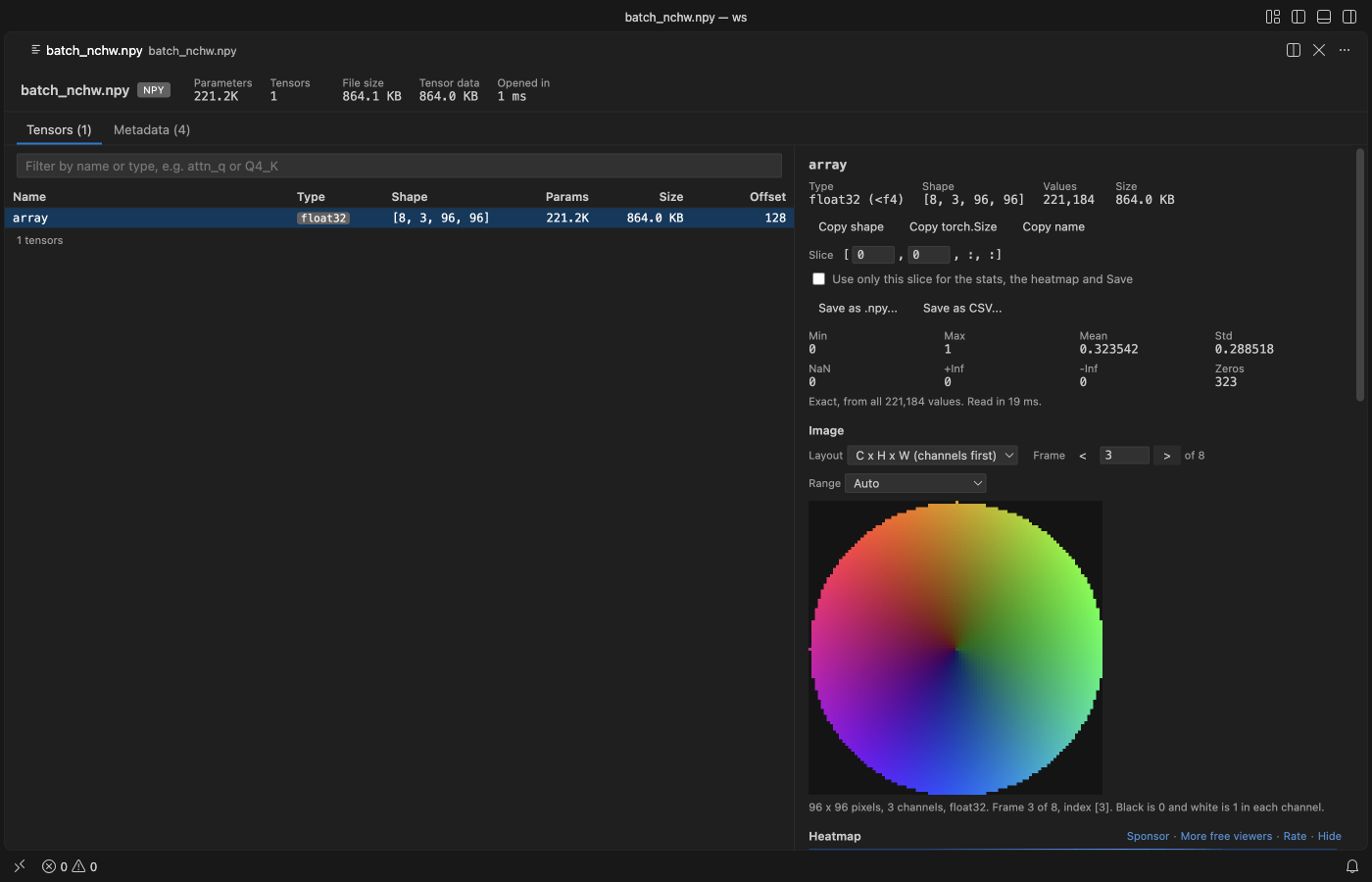
Install the free Tensor Viewer and click the .npy or .npz file. Each array is listed with its name, dtype and shape. Click one to see min, max, mean, std and NaN counts, a heatmap, a line plot or a histogram, and image-shaped arrays drawn as pictures. Python is not needed.
Free, MIT license. Extension ID zovo.tensor-viewer, version 0.4.0. Needs VS Code 1.90.0 or newer.
Steps in VS Code
- Install Tensor Viewer from the Marketplace, or press Ctrl+P (Cmd+P on macOS) and run
ext install zovo.tensor-viewer. - Click a
.npyor.npzfile. The table lists every array. - Click an array. Read the stats, then switch between heatmap, line plot and histogram.
- Type a slice such as
[5,:,:]to look at one part. - Save the array, or a slice, as .npy or CSV.
Steps in Cursor, Windsurf or VSCodium
- Open the Extensions view with Ctrl+Shift+X (Cmd+Shift+X on macOS).
- Search for
zovo.tensor-viewerand click Install. Cursor, Windsurf and VSCodium install from Open VSX, where it is published aszovo/tensor-viewer. - If your editor has no gallery, download the .vsix from the Open VSX page and run "Extensions: Install from VSIX...".
- Then use it the same way as in VS Code.
What Tensor Viewer handles
- (H,W), (H,W,3) and (3,H,W) arrays and stacks drawn as pictures.
- The same extension opens .safetensors, .gguf and PyTorch .pt files.
What it does not do
- Pickled object arrays inside .npy or .npz files are listed and refused, never run.
- Fortran-order and 2-channel arrays have no picture view. Images are drawn up to 512 px on the long side.
- int64 values above 2^53 lose digits in the table and CSV.
Other options
- vscode-numpy-viewer (
Percy.vscode-numpy-viewer, 511,774 installs, not on Open VSX). Its own description: "Display (binary) .npy or .npz files in VSCode." Not on Open VSX, so not in Cursor. - vscode-pydata-viewer (
Percy.vscode-pydata-viewer, 126,784 installs, not on Open VSX). Its own description: "Display PyData files (.npz .npy .pkl .pth) in VSCode." - NumPy in a terminal.
python -c "import numpy as np; a = np.load('x.npy'); print(a.shape, a.dtype)"prints the shape and type.
Install counts and Open VSX status were checked on 8 November 2026. Descriptions in quotes are the extensions' own.
Questions
Is it safe to open an .npy file from the internet?
Tensor Viewer never runs code from a file. Object arrays, which NumPy stores as pickles, are refused.
Can I open it in Cursor?
Yes. Tensor Viewer is on Open VSX as zovo/tensor-viewer. The most installed NumPy viewer is not on Open VSX.
Does it need Python?
No. It reads the files itself and makes no network calls.
More about Tensor Viewer
Read the Tensor Viewer page for every feature and setting, or the source code on GitHub.
Related guides
- A safetensors viewer for VS Code
- Open a .pkl pickle file in VS Code without running it
- View a JSONL file as a table in VS Code
- Open a .docx Word file in VS Code
Support this work
If this extension saves you time, you can support the work on GitHub Sponsors. Monthly tiers start at $5, and one-time tiers start at $15. Sponsorship is optional, and the tool works the same without it.