Open files in VS Code and Cursor / Tables and data
Use a Parquet viewer in VS Code
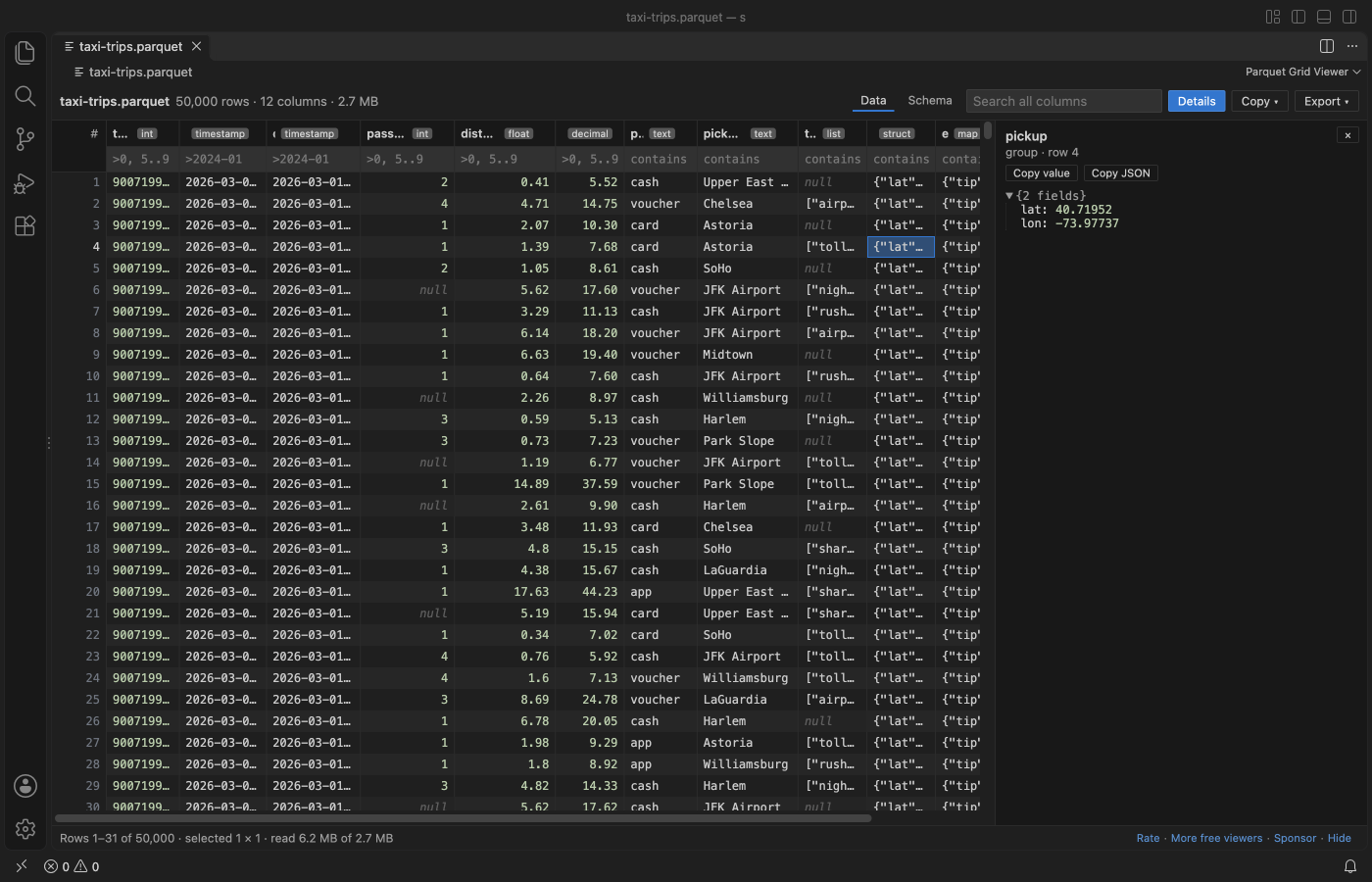
VS Code cannot show a .parquet file by itself. Install the free Parquet Grid Viewer by Zovo and click the file: it opens as a grid with column types, a filter under each header and a Schema tab. Opening reads only the footer and rows load as you scroll, so large files open at once. It needs no Python, Java or parquet-tools.
Free, MIT license. Extension ID zovo.zovo-parquet-viewer, version 0.2.2. Needs VS Code 1.90.0 or newer.
Also free from Zovo: XLSX, Excel, CSV & Parquet Viewer, VS Code Marketplace · Open VSX (Cursor, Windsurf).
Steps in VS Code
- Install Parquet Grid Viewer from the Marketplace, or press Ctrl+P (Cmd+P on macOS) and run
ext install zovo.zovo-parquet-viewer. - Click a .parquet, .parq or .pq file in the Explorer. If another editor opens it, right-click the file and pick "Open in Parquet Grid Viewer".
- Click a header to sort. Type in the box under a header to filter, for example
>100,=cash,5..9,nullor a/regex/. - Click a cell and press Enter to see the whole value. LIST, MAP and STRUCT cells open as a tree.
- Open the Schema tab for column types, row groups, compression and key-value metadata. Export saves the filtered rows as CSV or JSON Lines.
Steps in Cursor, Windsurf or VSCodium
- Open the Extensions view with Ctrl+Shift+X (Cmd+Shift+X on macOS).
- Search for
zovo.zovo-parquet-viewerand click Install. Cursor, Windsurf and VSCodium install from Open VSX, where it is published aszovo/zovo-parquet-viewer. - If your editor has no gallery, download the .vsix from the Open VSX page and run "Extensions: Install from VSIX...".
- Then use it the same way as in VS Code.
What Parquet Grid Viewer handles
- Snappy, Gzip, Zstd, Brotli, LZ4 and LZ4_RAW, data pages v1 and v2, dictionary, delta and byte-stream-split encodings.
- Exact values: DECIMAL up to 38 digits, INT64 and UINT64 above 2^53, nanosecond timestamps, and INT96 timestamps from Spark and Hive.
- Filter, sort and search on the whole file, not only the rows on screen, in a background thread with a Cancel button.
- Copy cells or rows as CSV, JSON or a Markdown table.
- Clear messages for files that are cut off, damaged, encrypted or not Parquet at all.
What it does not do
- It is read-only. To change data, use pandas, Polars, DuckDB or Spark.
- Encrypted Parquet files show a message. The viewer does not ask for keys.
- Sorting stops at 2,000,000 rows (a setting). Filter first to sort part of a bigger file.
- Files on remote and virtual file systems are read whole, up to 512 MB.
- No SQL. For SQL on a Parquet file, see XLSX Viewer & CSV Preview below.
In JetBrains IDEs (IntelliJ IDEA, PyCharm, WebStorm, CLion and others)
- Avro and Parquet Viewer. Zovo has no JetBrains plugin for Parquet. This one has 225,355 downloads. Its listing says: "A Tool Window for viewing Avro and Parquet files and their schemas."
- Parquet Viewer - Query, Inspect & More. 20,136 downloads. Its listing describes a plugin to query .parquet files with SQL-like filters and inspect the schema.
Other options
- parquet-viewer (
dvirtz.parquet-viewer, 448,191 installs, on Open VSX). Its own description: "Views Apache Parquet files as JSON". The most installed Parquet extension for VS Code. - Parquet File Viewer (
gerda.vscode-parquet-viewer, 22,580 installs, not on Open VSX). Its own description: "VS Code extension to view .parquet files". Not on Open VSX. - XLSX Viewer & CSV Preview (also by Zovo) (
zovo.table-viewer-vscode, 26 installs, on Open VSX). Our other free viewer. It opens Parquet next to Excel and CSV files, and runs SQL on one file. Pick it if you also open spreadsheets. - DuckDB.
duckdb -c "SELECT * FROM 'data.parquet' LIMIT 20"in a terminal reads Parquet with no extension.
Install counts and Open VSX status were checked on 9 November 2026. Descriptions in quotes are the extensions' own.
Questions
Do I need Python or parquet-tools?
No. The viewer is plain JavaScript, so it runs the same on Windows, macOS (Apple silicon too), Linux, Remote SSH, WSL and Codespaces.
How does it open large files?
Opening reads only the footer. Rows are then read in blocks as they scroll into view, and older blocks are dropped, so memory stays flat. Filter, sort and export read the columns they need, row group by row group.
Can it show nested columns?
Yes. LIST, MAP and STRUCT columns show as compact JSON in the grid and as a tree in the detail pane, at any depth.
More about Parquet Grid Viewer
Read the Parquet Grid Viewer page for every feature and setting, or the source code on GitHub.
Related guides
- XLSX, Excel, CSV & Parquet Viewer on the VS Code Marketplace (also on Open VSX). Opens xlsx, xls, csv and parquet files as a sortable table with SQL filters.
- Open an Excel .xlsx file in VS Code
- Open an Excel file in Cursor
- See a CSV file as a table in VS Code
- Open a Parquet file in VS Code
Support this work
If this extension saves you time, you can support the work on GitHub Sponsors. Monthly tiers start at $5, and one-time tiers start at $15. Sponsorship is optional, and the tool works the same without it.
Need your format supported?
Open a format request with a sample file, and I reply there whether it can be done. For USD 299 once, through this GitHub Sponsors tier, I add your file format or a missing feature to this extension, with tests, within 7 days.