Open files in VS Code and Cursor / Code and APIs
Reach a Redis inside your Dev Container
Redis Client & Redis GUI runs in the remote extension host, the same place as your workspace. In a Dev Container or a Remote SSH window, a Redis in that container or on that network is reachable as localhost or by its Docker Compose service name. When a connection fails, the message names the step that failed, such as DNS, TCP, TLS or AUTH. Zovo Pro (USD 19 once) adds Memory Analysis and Bulk TTL / Delete by Pattern, with 3 free tries each.
Free, MIT license. Extension ID zovo.zovo-redis-client, version 0.1.3. Needs VS Code 1.90.0 or newer.
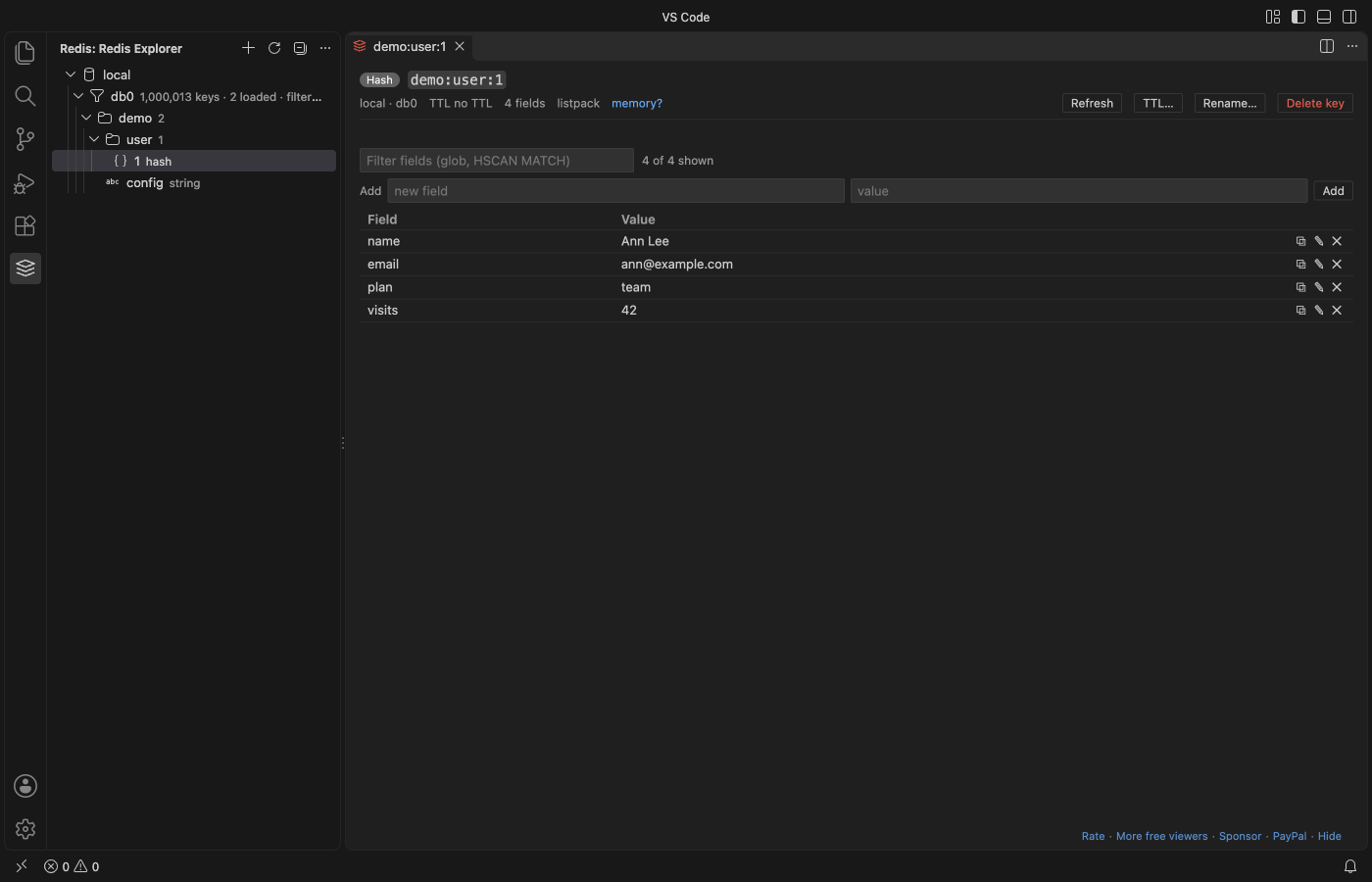
Steps in VS Code
- Install Redis Client & Redis GUI from the Marketplace, or press Ctrl+P (Cmd+P on macOS) and run
ext install zovo.zovo-redis-client. - Open your folder in the Dev Container or Remote SSH window. If the Extensions view shows the extension as installed only on your computer, install it in the container or on the remote host too.
- Click the Redis icon in the Activity Bar, then Add Connection.
- Type the host as the container sees it. Use
localhostwhen Redis runs in the same container, or the service name, such asredis, when it is its own Docker Compose service. A URL such asredis://redis:6379/0works too. - Click Test connection. It shows each step, and a failure names the step (DNS, TCP, TLS or AUTH) with a hint.
- Expand the connection and a database, then click a key. Right-click the connection for the console, server info and pub/sub.
Where Zovo Pro saves time
The key tree, every editor (strings, hashes, lists, sets, sorted sets, streams and RedisJSON), the console, cluster and sentinel, pub/sub, server info, export and import to JSON and the read-only switch are free, with no limit and no sign-in.
When the Redis in your container keeps growing, reading it key by key does not show why. Memory Analysis samples keys with MEMORY USAGE and shows the biggest keys, the key patterns that use the most memory (such as user:*:session) and the memory by type, and opens the report as Markdown. The other Pro tool is Bulk TTL / Delete by Pattern. It sets a TTL on, removes the TTL of, or deletes every key that matches a pattern, after a dry run lists the keys.
With Memory Analysis (Zovo Pro)
- Right-click a database in the Redis Explorer, or run "Redis: Memory Analysis: Biggest Keys and Patterns (Pro)" from the Command Palette.
- Wait for the sample to finish, or press Cancel.
- Click a key in the report to open it, or click Open as Markdown to keep the report.
Memory Analysis works 3 times on your computer before it asks for a license, and a try counts only when you get a result. Opening a file shows no popup and no countdown.
Zovo Pro costs USD 19 once. It is not a subscription, and it turns on the Pro tools in every Zovo extension, not only Redis Client & Redis GUI. After a card payment (Stripe) your license key shows on the next page. In VS Code, run "Zovo Pro: Enter Zovo Pro license key" from the Command Palette and paste it. The key is checked on your computer, with no network call. With GitHub Sponsors, pick the "$19 one time" tier, then run "Zovo Pro: I already paid: unlock with GitHub Sponsors" and sign in with the same GitHub account. With PayPal, send USD 19 with "Zovo Pro" in the note and the key comes by email within a day.
A team of 5: USD 59 once, by card or by PayPal. Every rule and every Pro tool is on the Zovo Pro page.
Steps in Cursor, Windsurf or VSCodium
- Open the Extensions view with Ctrl+Shift+X (Cmd+Shift+X on macOS).
- Search for
zovo.zovo-redis-clientand click Install. Cursor, Windsurf and VSCodium install from Open VSX, where it is published aszovo/zovo-redis-client. - If your editor has no gallery, download the .vsix from the Open VSX page and run "Extensions: Install from VSIX...".
- Then use it the same way as in VS Code.
What Redis Client & Redis GUI handles
- Redis, Valkey and KeyDB, on a single node, a cluster or a sentinel set.
- TLS with a CA file, and ACL users.
- Dev Containers and Remote SSH, because the extension runs where the workspace runs.
- Binary keys and values, shown as
\xNNand written back byte for byte.
What it does not do
- A cluster in Docker may announce internal IP addresses. Connect from inside the same network (a Dev Container or Remote SSH) or use the addresses the cluster announces.
- String values over 5 MB open as a size message with Show the first 64 KB and Save to a file (setting
redisClient.maxValueSizeMB). - Keys load with SCAN in pages of 10,000 (setting
redisClient.scanPageSize). Load more from the end of the list.
Other options
- redis-cli. Free and always next to Redis. Run
docker compose exec redis redis-cli. No tree view and no editors. - Redis Insight. The free desktop GUI from Redis. It runs on your computer, so a Redis inside a container needs a forwarded port.
- Redis for VS Code. The extension from Redis Ltd. A March 2025 Marketplace review says it does not support remote development (SSH, Dev Containers).
Install counts and Open VSX status were checked on 12 November 2026. Descriptions in quotes are the extensions' own.
Questions
Why does localhost work here but not in my desktop GUI?
In a Dev Container window this extension runs inside the container, so localhost is the container. A desktop app runs on your computer, where localhost is your computer.
Redis runs on my computer, not in the container. What host do I type?
Then the extension inside the container has to reach your computer. With Docker Desktop that host is usually host.docker.internal.
Is my password saved?
It is kept in VS Code's secret storage. Clear "Save the password" in the form and it is asked once per window instead.
Does it work in Cursor or Windsurf?
Yes. Cursor, Windsurf and VSCodium install extensions from Open VSX. Search for the extension in their Extensions view and install it there.
More about Redis Client & Redis GUI
Read the Redis Client & Redis GUI page for every feature and setting, or the source code on GitHub.
Related guides
- Open a SARIF file in VS Code
- Preview a Swagger or OpenAPI file in VS Code
- Preview an HTML file with its CSS and images in VS Code
- Test a regex in VS Code
Zovo Pro and support
Zovo Pro: USD 19 once, every Zovo viewer. It turns on the Pro tools in this extension and in the other Zovo extensions you use. The free features stay free.
After a card payment your license key shows on the next page. Paste it with the command "Zovo Pro: Enter a key".
You can also support the work with no Pro:
Need your format supported?
Open a format request with a sample file, and I reply there whether it can be done. For USD 299 once, through this GitHub Sponsors tier, I add your file format or a missing feature to this extension, with tests, within 7 days.