
Redis Client & Redis GUI
Redis Client & Redis GUI: Keys, TTL, Streams, Cluster & Sentinel (Redis Viewer), a VS Code extension by Zovo
Free Redis client and Redis GUI for VS Code: browse keys with SCAN, edit strings, hashes, lists, sets, sorted sets, streams and RedisJSON, set TTL. Cluster, Sentinel, TLS and ACL users; works with Valkey and KeyDB. Console, server info, pub/sub, JSON export. No sign-in, no telemetry. Not affiliated with Redis Ltd.
Free, MIT license. Needs VS Code 1.90.0 or newer. Extension ID zovo.zovo-redis-client, version 0.1.3.
Free, no sign-in, no telemetry. The extension talks only to the Redis servers you add. Works with Redis, Valkey and KeyDB, on a single node, a cluster or a sentinel set, with TLS and ACL users.
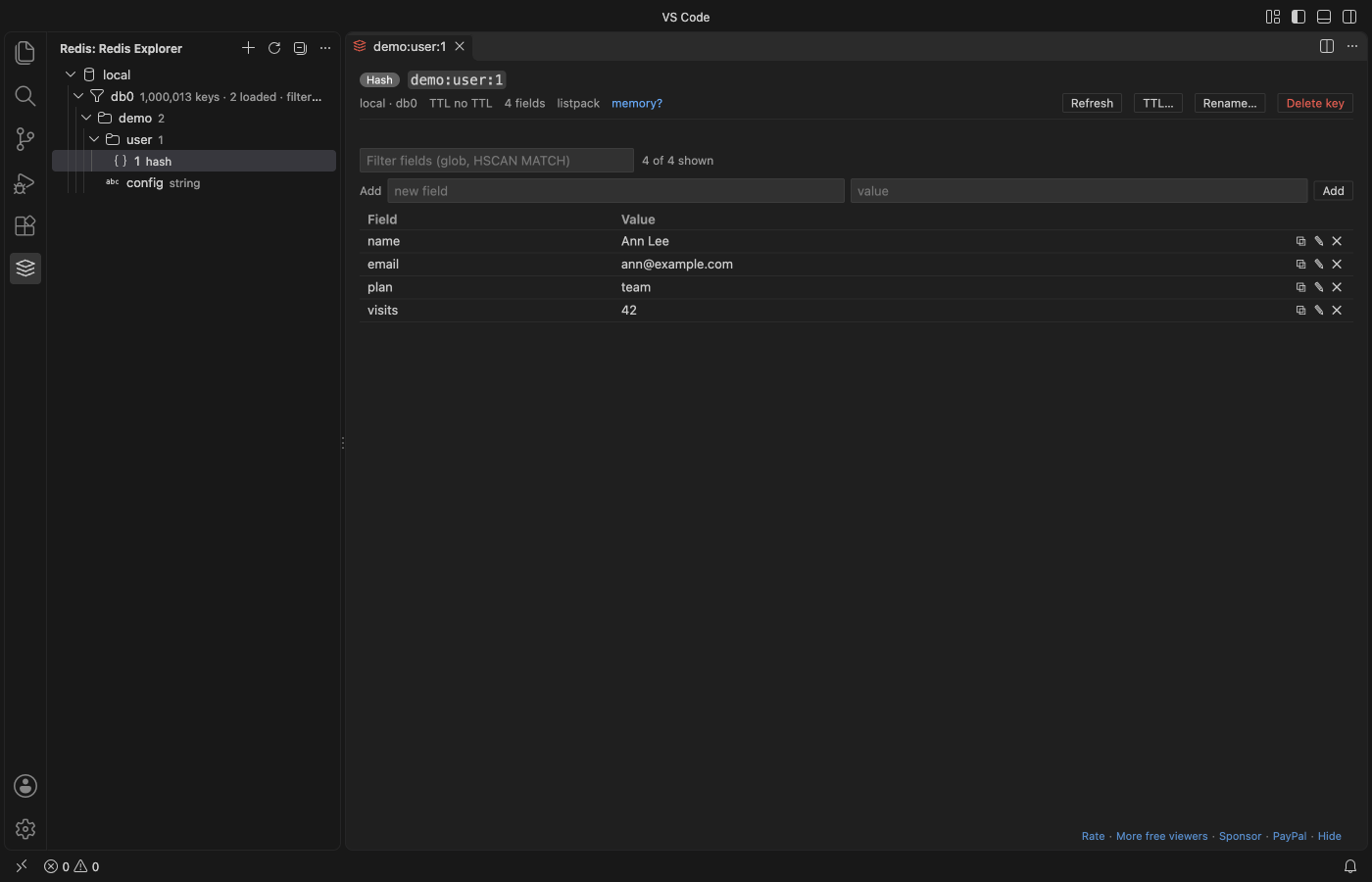
- Key tree: keys load with
SCANin pages (neverKEYS *), grouped into folders by:. Filter by pattern and by type. A database with a million keys stays responsive. - Editors for every type: strings (text, JSON view, hex for binary values), hashes, lists, sets and sorted sets in a paged grid, streams with consumer groups and pending entries, RedisJSON documents. Add, edit, delete (with a question first) and rename. Set or remove the TTL.
- Binary safe: keys and values stay bytes from the server to the editor and back. A key with bytes that are not text shows as
\xNNand every write goes to that exact key. - Big values: a string over 5 MB opens as a size message with "Show the first 64 KB" and "Save to a file", never a frozen editor. Collections load 200 rows at a time.
- Cluster and Sentinel: list the cluster nodes, or the sentinels and the primary name. After a failover the client follows the new primary.
- Clear errors: a failed connection names the step: DNS, TCP, TLS or AUTH, with a hint. No "Something was wrong".
- Console with history (↑ ↓) and Tab completion of command names.
FLUSHALL,FLUSHDB,KEYS,DEBUGandSHUTDOWNask first. - Server info: memory, hit rate, keyspace, every
INFOsection, the slow log and connected clients, per node in a cluster. - Pub/Sub: subscribe to a channel or a pattern and watch messages arrive live; publish a test message.
- Export and import: keys matching a pattern to JSON and back, binary safe, with TTLs.
- Read-only switch per connection: writes are refused before they reach the server.
- Remote SSH and Dev Containers: the extension runs where your workspace runs, so a Redis inside the container or on the remote network is reachable as
localhostor by its service name.
Redis is a registered trademark of Redis Ltd. This extension is not made by, affiliated with or endorsed by Redis Ltd.
Questions people ask
Is Redis Client & Redis GUI free?
Yes. Redis Client & Redis GUI is free and MIT licensed.
How do I install Redis Client & Redis GUI?
Click "Install in VS Code" above, or search for zovo.zovo-redis-client in the Extensions view.
Get started
- Click the Redis icon in the activity bar, then Add Connection.
- Paste a URL (
redis://user:password@host:6379/0,rediss://…for TLS,redis+sentinel://host:26379/mymaster) or fill in the form. Test connection shows each step. - Expand the connection and a database, then click a key.
Right-click a connection for the console, server info and pub/sub. Right-click a database or a folder to filter, add a key, export or import.
Why this one
Recent reviews of the most installed Redis extensions for VS Code name these problems (quotes from the Marketplace review pages):
| Review | What this extension does |
|---|---|
| "Doesn't support Redis-Sentinel. Doesn't support Redis-Cluster" (Redis for VS Code reviews, Oct 2026) | Connects to a cluster (keys are scanned on every primary) and through sentinels, and follows a failover. |
| "Doesn't support remote development (SSH, DevContainers, Tunnels, etc.) … You just get an error message that says 'Something was wrong!'" (same page, Mar 2025) | Runs in the remote extension host, and every error names the step that failed. |
| "nags you to sign up for the cloud service" (same page, Oct 2025) | No account, no sign-up prompt, no cloud service. |
| "A paid Redis client in 2022 is just an awful idea" (Redis by cweijan reviews) | Every feature above is free. Two extra tools are Zovo Pro (below), each with 3 free tries. |
It is also on Open VSX for Cursor, Windsurf and VSCodium.
Zovo Pro (optional)
Two tools for people who run Redis in production. Each can be tried 3 times for free; nothing else changes.
- Memory Analysis: samples keys with
MEMORY USAGEand shows the biggest keys, the key patterns that use the most memory (user:*:session) and the memory by type. Open the report as Markdown. - Bulk TTL / Delete by Pattern: set a TTL on, remove the TTL of, or delete every key that matches a pattern. A dry run lists the matching keys first; nothing changes until you confirm.
Zovo Pro is USD 19 once and unlocks the Pro tools in every Zovo extension: GitHub Sponsors (the "$19 one time" tier) or PayPal with a license key. Hide the Pro tools with the setting redisClient.showProFeatures.
Settings
| Setting | Default | What it does |
|---|---|---|
redisClient.scanPageSize | 10000 | Keys loaded into the tree per page |
redisClient.pageSize | 200 | Rows per page in the collection and stream editors |
redisClient.maxValueSizeMB | 5 | Larger strings open as a size message |
redisClient.connectTimeoutSeconds | 10 | Connection time limit |
redisClient.showProFeatures | true | Show the two Zovo Pro tools |
redisClient.askForRating | true | One rating question after 2 good sessions |
Privacy and network
- Connections go only to the hosts you add. Nothing connects when VS Code starts; a connection opens when you expand it.
- Passwords are kept in VS Code's secret storage. Connection settings (without passwords) are kept in VS Code's global storage on this computer.
- No telemetry, no analytics, no account. The Zovo Pro unlock asks GitHub one question, only after you click Unlock.
Guides
Install Redis Client & Redis GUI
Click the button to open VS Code and install it, or press Ctrl+P (Cmd+P on macOS) in VS Code and run ext install zovo.zovo-redis-client.
Free, MIT license. Needs VS Code 1.90.0 or newer. Extension ID zovo.zovo-redis-client, version 0.1.3.
Source code and issues are on GitHub.
Zovo Pro and support
Zovo Pro: USD 19 once, every Zovo viewer. It turns on the Pro tools in this extension and in the other Zovo extensions you use. The free features stay free.
After a card payment your license key shows on the next page. Paste it with the command "Zovo Pro: Enter a key".
You can also support the work with no Pro:
Need your format supported?
Open a format request with a sample file, and I reply there whether it can be done. For USD 299 once, through this GitHub Sponsors tier, I add your file format or a missing feature to this extension, with tests, within 7 days.