Open files in VS Code and Cursor / Tables and data
SQLite to Excel in VS Code
Open the .db file in SQLite Editor & Viewer, pick a table and click Export to save the rows in view as CSV, which Excel opens. That part is free. To get one Excel workbook with a sheet per table, run "Export All SQLite Tables to Excel or CSV", a Zovo Pro tool with 3 free tries.
Free, MIT license. Extension ID zovo.sqlite-table-viewer, version 0.4.4. Needs VS Code 1.90.0 or newer.
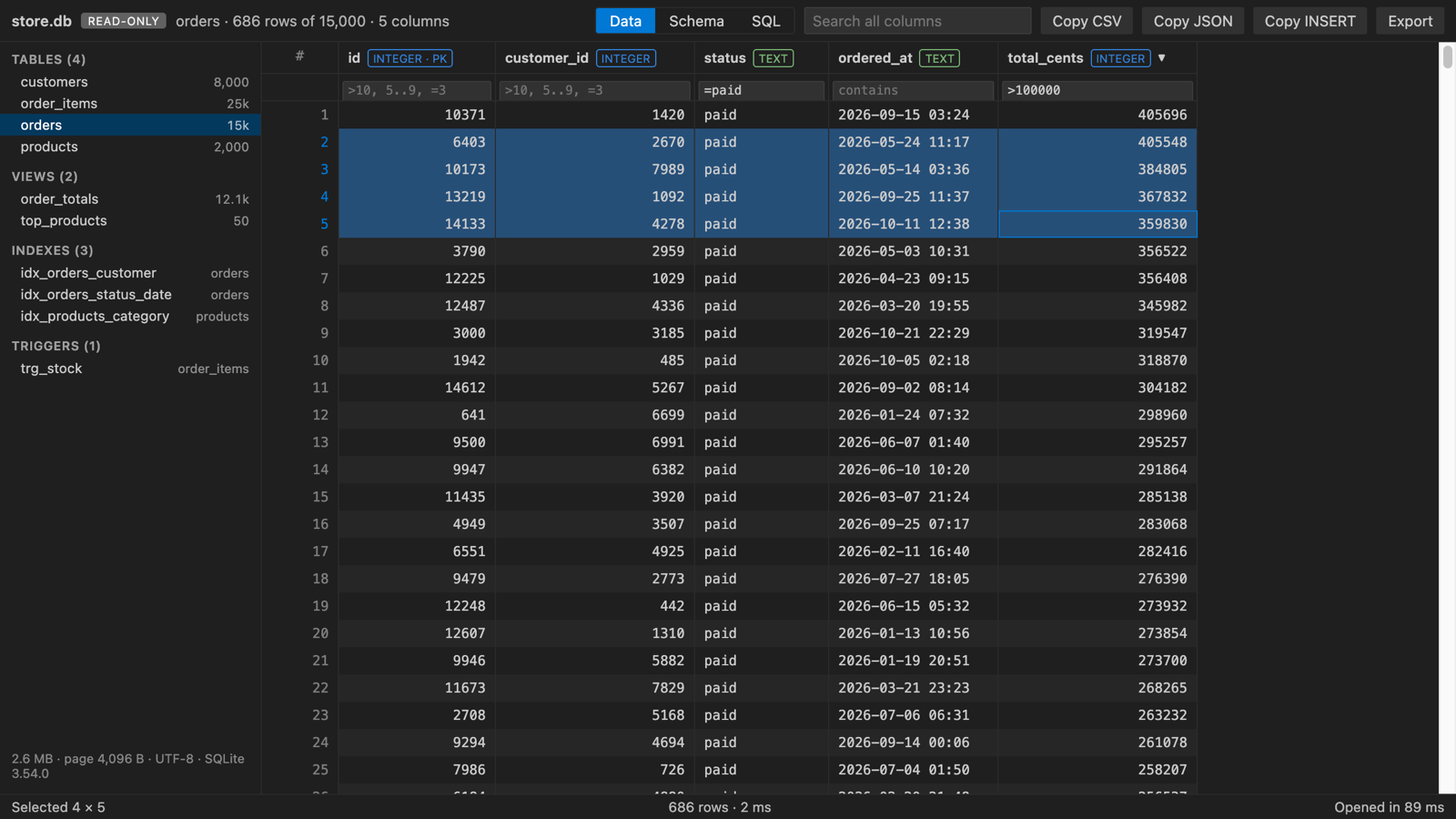
Steps in VS Code
- Install SQLite DB Viewer from the Marketplace, or press Ctrl+P (Cmd+P on macOS) and run
ext install zovo.sqlite-table-viewer. - Click the
.dbor.sqlitefile in the Explorer. It opens as a table, read-only. - Pick the table or view on the left. Sort, filter under a header or search to narrow the rows if you need to.
- Click Export and save the rows in view as CSV.
- Open the CSV file in Excel. For another query, run it in the SQL tab first and export the result the same way.
Where Zovo Pro saves time
Free: opening, the SQL tab, editing, Save with a backup, CSV import, Copy as CSV, TSV, JSON or INSERT statements, and Export of every row in view as CSV, JSON or SQL INSERT statements. A real .xlsx workbook with all tables is the Pro tool.
One run writes the whole database: one Excel workbook with a sheet per table, with a bold, frozen header row, or a folder with one CSV file per table. You do not export table by table, and the database file is only read.
With Export All SQLite Tables to Excel or CSV (Zovo Pro)
- Click the DB tools button (with the small PRO badge) in the editor, or right-click the database file in the Explorer, or use the Command Palette.
- Pick "Export All SQLite Tables to Excel or CSV (Pro)" and choose the Excel workbook or a CSV folder.
- The first 3 runs are free on each computer. A try counts only when the tool wrote its files; Escape or an error costs nothing.
Export All SQLite Tables to Excel or CSV works 3 times on your computer before it asks for a license, and a try counts only when you get a result. Opening a file shows no popup and no countdown.
Zovo Pro costs USD 19 once. It is not a subscription, and it turns on the Pro tools in every Zovo extension, not only SQLite DB Viewer. After a card payment (Stripe) your license key shows on the next page. In VS Code, run "Zovo Pro: Enter Zovo Pro license key" from the Command Palette and paste it. The key is checked on your computer, with no network call. With GitHub Sponsors, pick the "$19 one time" tier, then run "Zovo Pro: I already paid: unlock with GitHub Sponsors" and sign in with the same GitHub account. With PayPal, send USD 19 with "Zovo Pro" in the note and the key comes by email within a day.
A team of 5: USD 59 once, by card or by PayPal. Every rule and every Pro tool is on the Zovo Pro page.
Steps in Cursor, Windsurf or VSCodium
- Open the Extensions view with Ctrl+Shift+X (Cmd+Shift+X on macOS).
- Search for
zovo.sqlite-table-viewerand click Install. Cursor, Windsurf and VSCodium install from Open VSX, where it is published aszovo/sqlite-table-viewer. - If your editor has no gallery, download the .vsix from the Open VSX page and run "Extensions: Install from VSIX...".
- Then use it the same way as in VS Code.
What SQLite DB Viewer handles
- Opens
.db,.sqlite,.sqlite3,.db3,.s3db,.sl3,.vscdband.gpkgfiles, read-only until you click Enable editing. - Export saves every row in view as CSV, JSON or SQL INSERT statements, up to 1,000,000 rows per export (setting
sqliteTableViewer.exportMaxRows). - The SQL tab runs one statement at a time, so you can export the result of a query.
- Reads committed transactions from the
-walfile, so the export matches what your app wrote. - Pro: one Excel workbook with a sheet per table, or one CSV file per table.
What it does not do
- The free Export writes CSV, JSON or SQL, not .xlsx. Excel opens the CSV.
- Encrypted databases (SQLCipher, SEE) cannot be opened.
- The whole database is loaded into memory. Files up to 512 MB open (setting
sqliteTableViewer.maxFileSizeMB). - Large tables can be past what one Excel sheet holds. Check the row counts on the left first.
Other options
- sqlite3 shell. Free.
.once -xfollowed by a query opens that result in your spreadsheet app..mode csvwith.output file.csvwrites a CSV. One query at a time, not all tables. - DB Browser for SQLite. Free, open source desktop app. File, Export, Table(s) as CSV file writes tables to CSV. A good choice when you want a full desktop database app.
- pandas. In Python,
pd.read_sqlon each table andto_excelwith anExcelWritergives a sheet per table. Needs Python and openpyxl, and suits a repeated job. - Paid converters. Several desktop converters and Excel add-ins sell SQLite to Excel export. They cost more than the free options above and do the same core job.
Install counts and Open VSX status were checked on 10 November 2026. Descriptions in quotes are the extensions' own.
Questions
Can I export a SQL query result to Excel?
Yes. Run the SELECT in the SQL tab, then Export the rows in view as CSV and open it in Excel. The export is free.
Does the export change my database?
No. Export and the Pro tools only read the file. The database is written only when you click Enable editing and then Save.
Is anything sent over the network?
No. It has no network requests and no telemetry. The only exception is a click on a Zovo Pro button.
Does it work in Cursor or Windsurf?
Yes. Cursor and Windsurf install extensions from Open VSX. Search for SQLite Editor & Viewer by Zovo there.
More about SQLite DB Viewer
Read the SQLite DB Viewer page for every feature and setting, or the source code on GitHub.
Related guides
- SQLite Editor & Viewer on the VS Code Marketplace (also on Open VSX). Opens .db and .sqlite files as tables, edits cells and runs SQL.
- Open a SQLite database in VS Code
- Compare two SQLite databases
- Edit a SQLite database in VS Code
- Open an Excel .xlsx file in VS Code
Zovo Pro and support
Zovo Pro: USD 19 once, every Zovo viewer. It turns on the Pro tools in this extension and in the other Zovo extensions you use. The free features stay free.
After a card payment your license key shows on the next page. Paste it with the command "Zovo Pro: Enter a key".
You can also support the work with no Pro:
Need your format supported?
Open a format request with a sample file, and I reply there whether it can be done. For USD 299 once, through this GitHub Sponsors tier, I add your file format or a missing feature to this extension, with tests, within 7 days.