Open files in VS Code and Cursor / 3D and imaging
View STL files in VS Code
Install the free 3D Model Viewer and click the .stl file. Drag to orbit, right-drag or Shift-drag to pan, and scroll to zoom. A panel lists vertices, triangles and size, and Measure (M) shows the distance between two points with its X, Y and Z parts. The same extension opens OBJ, PLY, 3MF, GLB and glTF.
Free, MIT license. Extension ID zovo.3d-model-viewer, version 0.1.5. Needs VS Code 1.90.0 or newer.
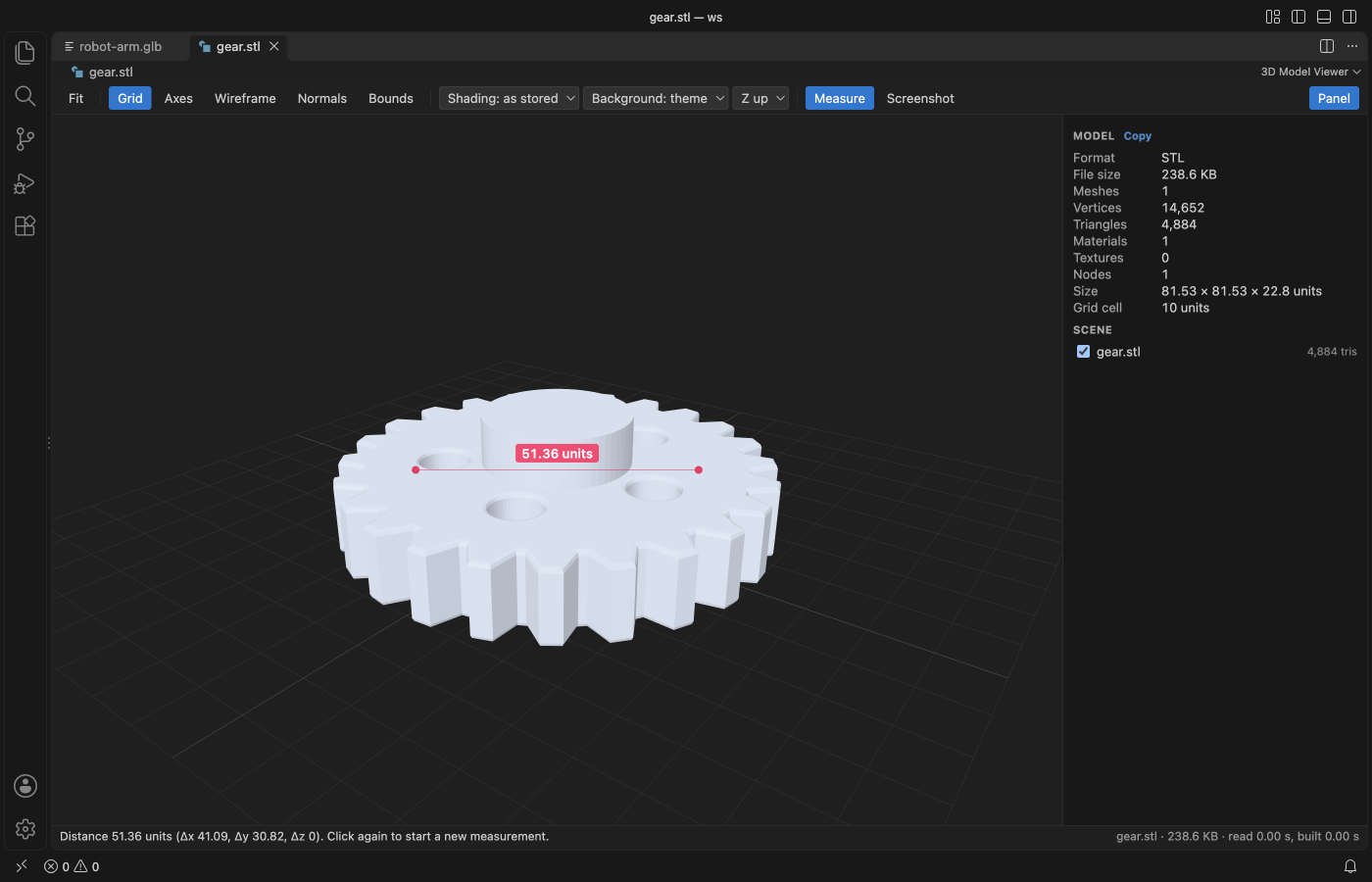
Steps in VS Code
- Install 3D Model Viewer from the Marketplace, or press Ctrl+P (Cmd+P on macOS) and run
ext install zovo.3d-model-viewer. - Click a
.stl,.obj,.ply,.3mf,.glbor.gltffile. - Orbit, pan and zoom with the mouse. Press W for wireframe, N for normals, B for the bounding box.
- Press M and click two points to measure.
- Save a screenshot as PNG.
Steps in Cursor, Windsurf or VSCodium
- Open the Extensions view with Ctrl+Shift+X (Cmd+Shift+X on macOS).
- Search for
zovo.3d-model-viewerand click Install. Cursor, Windsurf and VSCodium install from Open VSX, where it is published aszovo/3d-model-viewer. - If your editor has no gallery, download the .vsix from the Open VSX page and run "Extensions: Install from VSIX...".
- Then use it the same way as in VS Code.
What 3D Model Viewer handles
- glTF animations, PBR materials, skins and morph targets.
- PLY point clouds with vertex colors.
- A scene tree with a visibility checkbox for each part.
What it does not do
- FBX, DAE, USD, STEP, IGES and glTF 1.0 do not open.
- Draco or meshopt compressed glTF and KTX2 textures are not decoded yet.
- STL, OBJ and PLY have no unit, so distances are in raw file coordinates. glTF is in metres and 3MF in millimetres.
Other options
- 3D Viewer for VSCode (
slevesque.vscode-3dviewer, 213,032 installs, on Open VSX). Its own description: "Preview 3D models in VSCode". - vscode-stl-viewer (
mtsmfm.vscode-stl-viewer, 45,615 installs, on Open VSX). An STL viewer, also on Open VSX. - Your slicer. PrusaSlicer, Cura and other slicers show STL files when the goal is to print them.
Install counts and Open VSX status were checked on 8 November 2026. Descriptions in quotes are the extensions' own.
Questions
What unit are STL measurements in?
STL files carry no unit. The viewer shows raw coordinates, which are usually millimetres when the file came from a CAD tool for printing.
Can it open OBJ files with materials?
Yes, when the .mtl file sits next to the model.
Does it work offline?
Yes. It makes no network calls and has no telemetry.
More about 3D Model Viewer
Read the 3D Model Viewer page for every feature and setting, or the source code on GitHub.
Related guides
- Open DICOM and NIfTI files in VS Code
- Open a .docx Word file in VS Code
- Open an Excel .xlsx file in VS Code
- Open an Excel file in Cursor
Support this work
If this extension saves you time, you can support the work on GitHub Sponsors. Monthly tiers start at $5, and one-time tiers start at $15. Sponsorship is optional, and the tool works the same without it.