Open files in VS Code and Cursor / Docs and diagrams
Preview an SVG file in VS Code
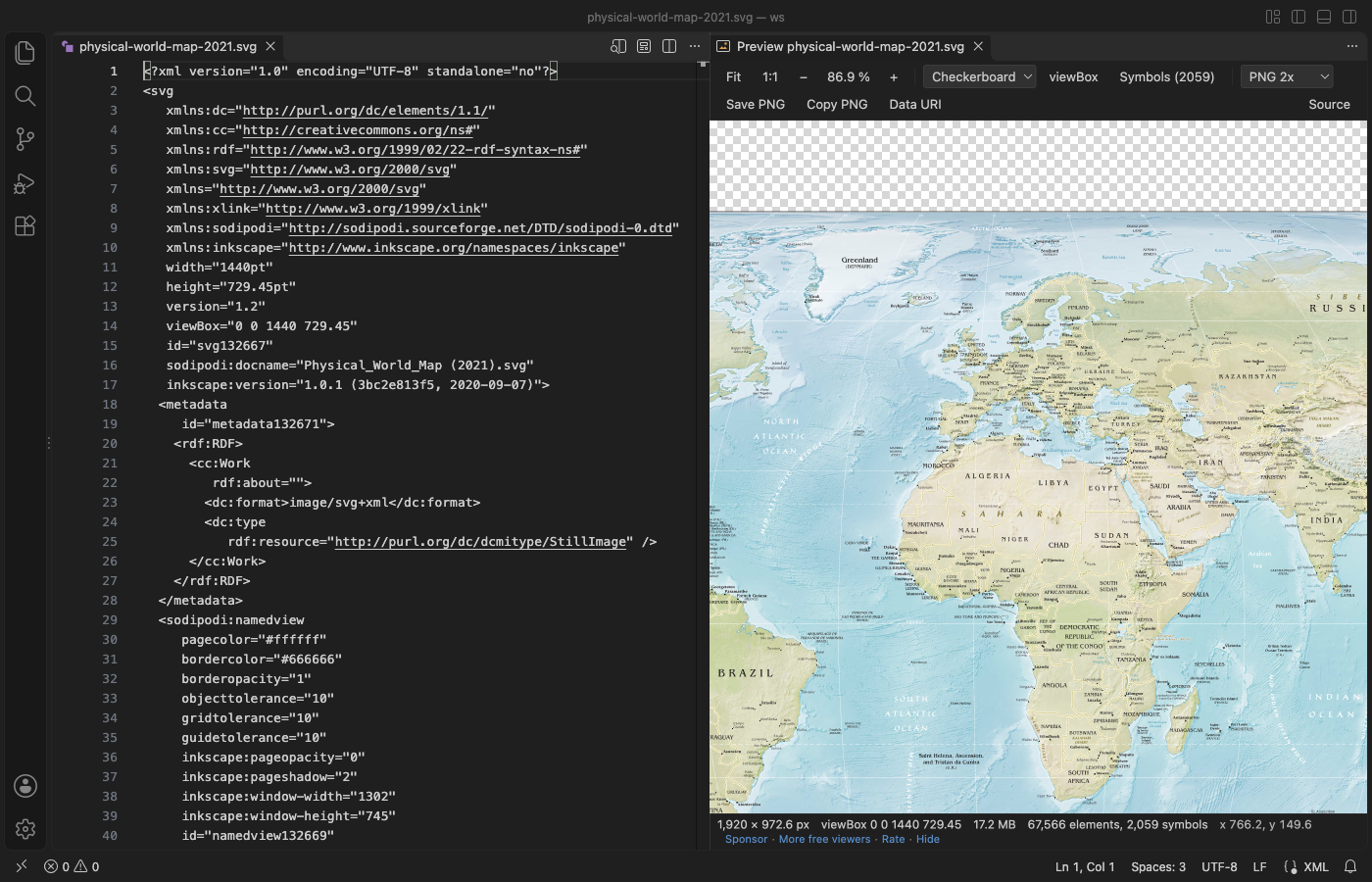
VS Code shows an .svg file as its XML text. Install the free SVG Viewer, open the file and click the preview button in the editor title (or press Ctrl+K V, Cmd+K V on macOS). The preview opens beside the code and follows your edits before you save. The wheel zooms at the pointer, the background stays the way you set it, and Save PNG exports at 1x to 8x.
Free, MIT license. Extension ID zovo.zovo-svg-viewer, version 0.2.1. Needs VS Code 1.90.0 or newer.
Also free from Zovo: Mermaid Diagram Editor & Viewer, VS Code Marketplace · Open VSX (Cursor, Windsurf).
Steps in VS Code
- Install SVG Viewer from the Marketplace, or press Ctrl+P (Cmd+P on macOS) and run
ext install zovo.zovo-svg-viewer. - Open the
.svgfile and click the preview button in the editor title, or press Ctrl+K V (Cmd+K V on macOS). - Scroll to zoom at the pointer and drag to pan. Press 0 to fit and 1 for actual size.
- Pick a checkerboard, white, black, theme or custom background. It is kept for the workspace.
- Press V for the viewBox outline. Use Save PNG or Copy PNG at 1x, 2x, 4x, 8x or a width you type.
- To see the picture without the text, right-click the file and pick "Open in SVG Viewer".
Steps in Cursor, Windsurf or VSCodium
- Open the Extensions view with Ctrl+Shift+X (Cmd+Shift+X on macOS).
- Search for
zovo.zovo-svg-viewerand click Install. Cursor, Windsurf and VSCodium install from Open VSX, where it is published aszovo/zovo-svg-viewer. - If your editor has no gallery, download the .vsix from the Open VSX page and run "Extensions: Install from VSIX...".
- Then use it the same way as in VS Code.
What SVG Viewer handles
- A status line with width, height, viewBox, file size, element and symbol count, and the pointer position in SVG units.
- Sprite sheets: a grid of every
<symbol>with its id. A click copies its<use>line. - Files rewritten by a build tool update without an error.
.svgzfiles open too. - Light or dark view for SVGs with
prefers-color-schemestyles. - Files up to 50 MB draw at once. The 17.2 MB world map in the screenshot opened in 2.1 seconds.
What it does not do
- It previews and does not edit. Edit the SVG as text and the preview follows.
- The largest PNG is 16,384 px on a side. SVGs with
<foreignObject>cannot be exported as PNG. - Fonts the SVG loads from the web are not fetched, so text falls back to a local font.
- Scripts, event handlers and remote images in the SVG are blocked on purpose, so an SVG that depends on them looks different from a browser.
In JetBrains IDEs (IntelliJ IDEA, PyCharm, WebStorm, CLion and others)
- Built into JetBrains IDEs. There is no Zovo plugin for JetBrains IDEs yet. IntelliJ IDEA, WebStorm and the other JetBrains IDEs open an .svg file with the XML text and an image preview side by side, so most people need no plugin. The link is SvgViewer (5,651 downloads), an older plugin whose listing calls it "A viewer for Scalable Vector Graphics (SVG) documents."
Other options
- SVG (
jock.svg, 2.5 million installs, on Open VSX). Its own description: "SVG Coding, Minify, Pretty, Preview All-In-One". Pick it if you also want SVG code completion and minify. - Svg Preview (
SimonSiefke.svg-preview, 1.6 million installs, not on Open VSX). Its own description: "Preview for Svg files". It has a 4.84 rating. Not on Open VSX, so Cursor and VSCodium users cannot install it from their gallery. - SVG Previewer (
vitaliymaz.vscode-svg-previewer, 357,473 installs, not on Open VSX). Its own description: "Show SVG preview to the side panel".


Install counts and Open VSX status were checked on 9 November 2026. Descriptions in quotes are the extensions' own.
Questions
Does the preview update before I save?
Yes. The side preview follows the text as you type. It also follows the file on disk when another tool rewrites it.
Can I change the background color of the preview?
Yes. Pick checkerboard, white, black, theme or a custom color in the toolbar. SVG Viewer keeps your pick for the workspace.
Is it safe to open an SVG from the internet?
Scripts and event handlers in the SVG never run, and nothing is fetched from the web. The status line lists what was blocked. The extension makes no network calls.
More about SVG Viewer
Read the SVG Viewer page for every feature and setting, or the source code on GitHub.
Related guides
- Mermaid Diagram Editor & Viewer on the VS Code Marketplace (also on Open VSX). Live Mermaid preview beside the code, with PNG and SVG export.
- Preview a reStructuredText (.rst) file in VS Code
- Read an RTF file in VS Code
- Preview Mermaid diagrams in VS Code
- Export a Mermaid diagram to PDF
Support this work
If this extension saves you time, you can support the work on GitHub Sponsors. Monthly tiers start at $5, and one-time tiers start at $15. Sponsorship is optional, and the tool works the same without it.
Need your format supported?
Open a format request with a sample file, and I reply there whether it can be done. For USD 299 once, through this GitHub Sponsors tier, I add your file format or a missing feature to this extension, with tests, within 7 days.