Open files in VS Code and Cursor / Docs and diagrams
XMind to PDF without XMind Pro
Open the .xmind file in XMind Viewer and pick the PDF export from the Export menu. You get one PDF, one page per sheet, in print colors, with a bookmark per sheet. The viewer and its PNG, SVG and Markdown exports are free, and PDF of every sheet is a Zovo Pro tool with 3 free tries. In XMind itself, PDF export needs XMind Pro (USD 4.92 a month, xmind.com/pricing, 10 Nov 2026).
Free, MIT license. Extension ID zovo.xmind-mind-map-viewer, version 0.2.2. Needs VS Code 1.90.0 or newer.
This guide is also in Français, Italiano, Português (Brasil), Polski, 简体中文.
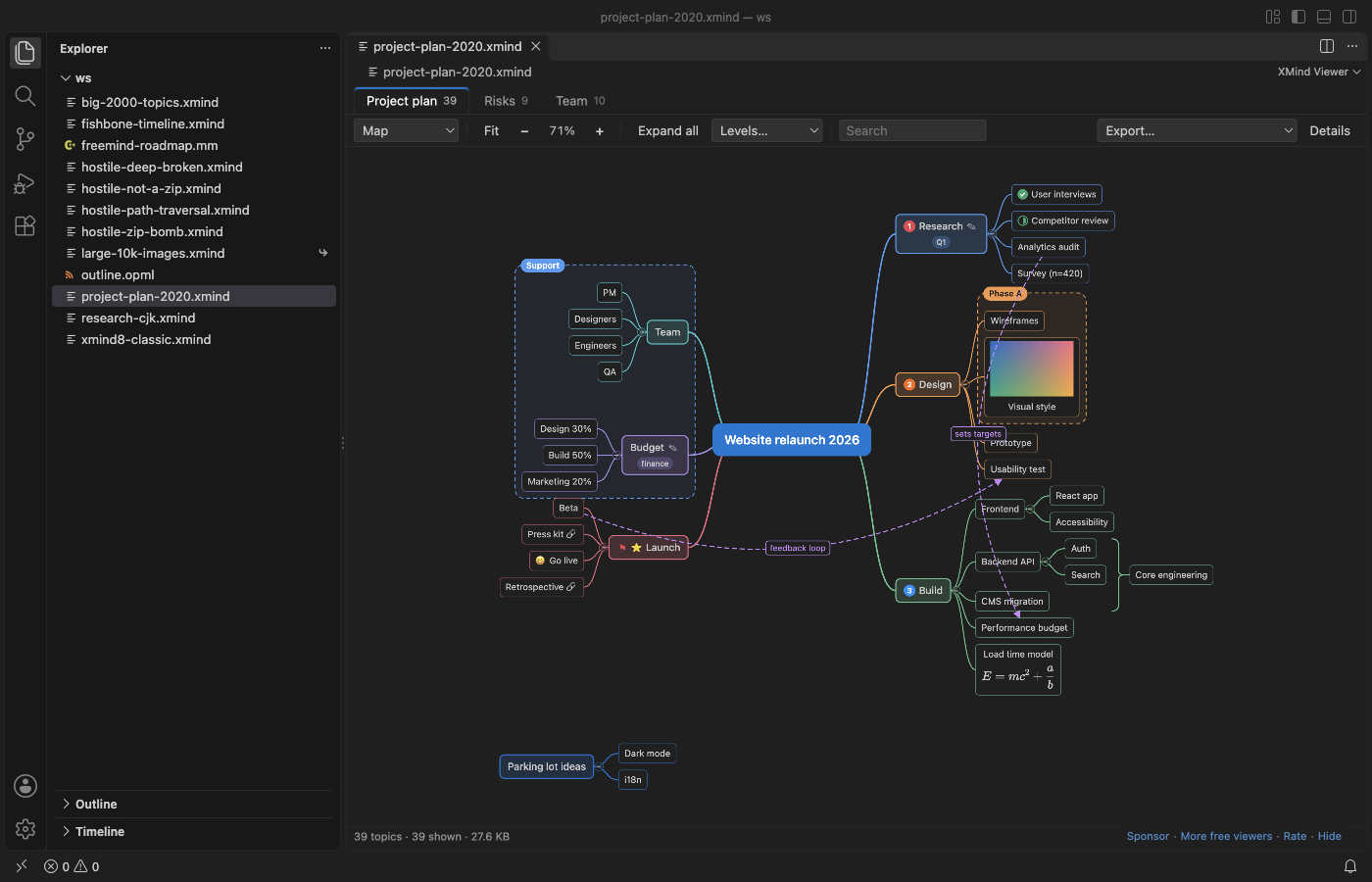
Steps in VS Code
- Install XMind Viewer from the Marketplace, or press Ctrl+P (Cmd+P on macOS) and run
ext install zovo.xmind-mind-map-viewer. - Click the
.xmindfile in the Explorer. Every sheet opens as its own tab. - Look through the sheets. Each one opens in the layout saved in the file.
- Open the Export menu above the map and pick the PDF export, or run
XMind Viewer: Export every sheet as PDFfrom the Command Palette. - The first 3 runs are free. A try counts only when a file is saved.
- Open the PDF: one page per sheet, in print colors, with a bookmark per sheet. Your map file is never changed.
Where Zovo Pro saves time
Viewing every sheet is free, and so are PNG (up to 2x) and SVG export, the sheet as a Markdown outline on the clipboard, and all sheets as one Markdown file. The PDF of every sheet is a Pro tool.
The same Pro includes CSV (Excel) and OPML export of every topic of every sheet, and Convert a folder, which turns every .xmind, .mm and .opml file in a folder and its subfolders into Markdown, CSV or OPML in one run, with a report of what could not be read.
With PDF of every sheet (Zovo Pro)
- Right-click a folder of mind maps in the Explorer, or run Convert a folder from the Command Palette.
- Choose Markdown, CSV or OPML. Existing files are never overwritten.
- Read the report for files that could not be read.
PDF of every sheet works 3 times on your computer before it asks for a license, and a try counts only when you get a result. Opening a file shows no popup and no countdown.
Zovo Pro costs USD 19 once. It is not a subscription, and it turns on the Pro tools in every Zovo extension, not only XMind Viewer. After a card payment (Stripe) your license key shows on the next page. In VS Code, run "Zovo Pro: Enter Zovo Pro license key" from the Command Palette and paste it. The key is checked on your computer, with no network call. With GitHub Sponsors, pick the "$19 one time" tier, then run "Zovo Pro: I already paid: unlock with GitHub Sponsors" and sign in with the same GitHub account. With PayPal, send USD 19 with "Zovo Pro" in the note and the key comes by email within a day.
A team of 5: USD 59 once, by card or by PayPal. Every rule and every Pro tool is on the Zovo Pro page.
Steps in Cursor, Windsurf or VSCodium
- Open the Extensions view with Ctrl+Shift+X (Cmd+Shift+X on macOS).
- Search for
zovo.xmind-mind-map-viewerand click Install. Cursor, Windsurf and VSCodium install from Open VSX, where it is published aszovo/xmind-mind-map-viewer. - If your editor has no gallery, download the .vsix from the Open VSX page and run "Extensions: Install from VSIX...".
- Then use it the same way as in VS Code.
What XMind Viewer handles
.xmindfiles from XMind 2020 to 2026 and XMind Zen (content.json), and XMind 8, XMind 7 and older 3.x files (content.xml).- Every sheet, with relationships, boundaries, summaries, markers, labels, notes, pictures from inside the file and LaTeX equations drawn with KaTeX.
- Chinese, Japanese, Korean and emoji titles, with long titles wrapped.
- Large maps: a 30 MB
.xmindwith 10,111 topics and 60 pictures opened in 0.65 seconds in the README test. - FreeMind and Freeplane
.mmfiles and.opmloutlines open too.
What it does not do
- Maps with a password cannot be opened, because XMind encrypts their content.
- Fishbone, timeline, matrix and brace sheets are drawn as logic or org charts, and topic positions you dragged by hand in XMind are not kept.
- Styles from XMind themes (fonts, line shapes, topic shapes) are not copied. Topic fill and text colors are.
- Convert a folder writes Markdown, CSV or OPML, not PDF. The PDF is made one map at a time.
Other options
- XMind (File > Export > PDF). The PDF looks exactly like the map in XMind, theme styles included. PDF export needs XMind Pro (USD 4.92 a month on xmind.com/pricing, 10 Nov 2026). The better choice if you already pay for it or need the exact XMind look.
- Print to PDF from a PNG or SVG export. Free. Export a sheet as SVG or PNG in XMind Viewer, open it in a browser and save it as PDF from the print dialog. One sheet per file and no bookmarks.
- Pandoc on the Markdown export. Free. Export all sheets as one Markdown file in XMind Viewer and convert it with Pandoc. You get an outline as text, not the drawn map. Pandoc needs a LaTeX engine for PDF output.
Install counts and Open VSX status were checked on 10 November 2026. Descriptions in quotes are the extensions' own.
Questions
Does it work in Cursor or Windsurf?
Yes. The README says the extension is also on Open VSX, so it works in Cursor, Windsurf, VSCodium and other editors based on VS Code.
Do I need XMind installed?
No. XMind Viewer opens .xmind files in VS Code without XMind.
Is the map sent anywhere?
No. There is no telemetry, no account and no network use. Nothing goes over the network until you click a buy button.
Can I turn a whole folder of XMind files into PDF?
Not in one run. Convert a folder writes Markdown, CSV or OPML. The PDF export works on the map you have open.
Does the PDF include every sheet?
Yes. It has one page per sheet and a bookmark per sheet.
More about XMind Viewer
Read the XMind Viewer page for every feature and setting, or the source code on GitHub.
Related guides
- XMind Viewer & Mind Map Viewer on the VS Code Marketplace (also on Open VSX). Opens XMind mind maps in VS Code.
- XMind to Excel (CSV)
- Preview a reStructuredText (.rst) file in VS Code
- Read an RTF file in VS Code
- Preview Mermaid diagrams in VS Code
Support this work
If this extension saves you time, you can support the work on GitHub Sponsors. Monthly tiers start at $5, and one-time tiers start at $15. Sponsorship is optional, and the tool works the same without it.
Need your format supported?
Open a format request with a sample file, and I reply there whether it can be done. For USD 299 once, through this GitHub Sponsors tier, I add your file format or a missing feature to this extension, with tests, within 7 days.