
HTML CSS Support & CSS Class Names IntelliSense (ID Completion)
HTML CSS Support & CSS Class Names IntelliSense (ID Completion), a VS Code extension by Zovo
Free and offline. CSS class names and id completion in HTML, React, Vue, Svelte, Angular, PHP and Blade, from every CSS, SCSS and Less file in your project, <style> blocks, linked style sheets and CSS modules. Go to definition and hover. Light on CPU in big monorepos.
Free, MIT license. Needs VS Code 1.90.0 or newer. Extension ID zovo.zovo-html-css-class-intellisense, version 0.2.2.
Class names and id completion from your own CSS, SCSS and Less files, in every template language. Free, no sign-in, works offline.
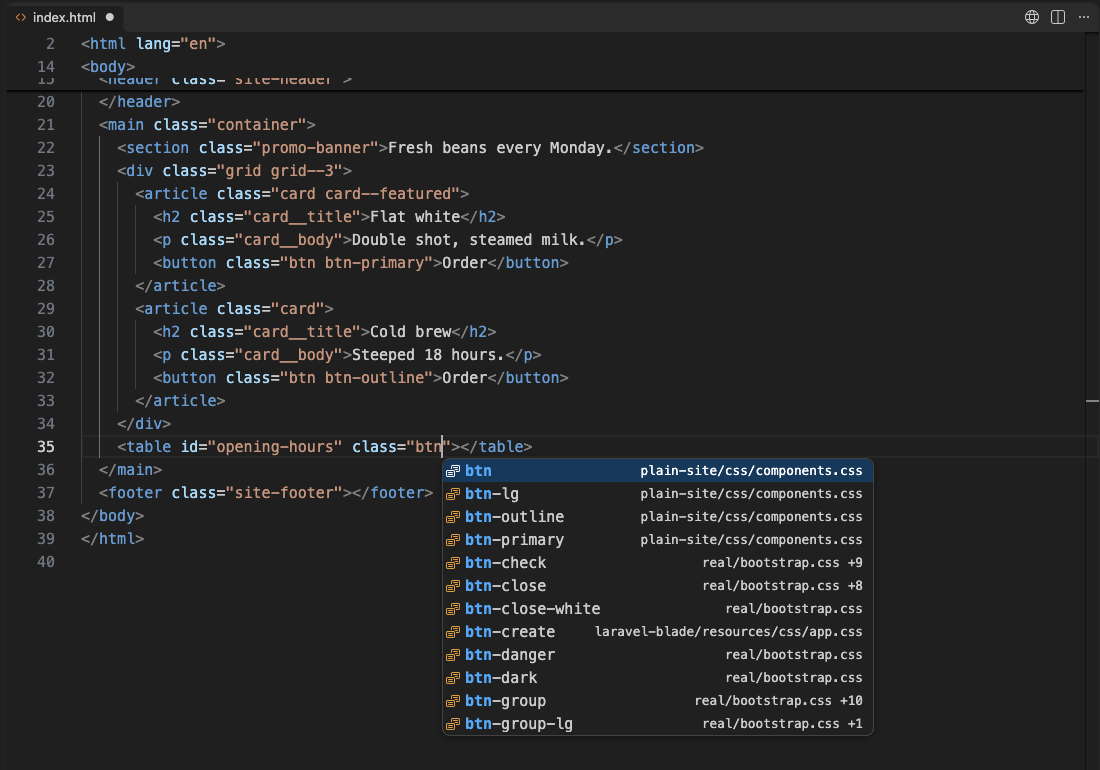
Type inside class="..." and the class names from every style sheet in your workspace show up, with the file each one comes from. Hover a name to see its CSS rule. Press F12 to jump to it.
- Works out of the box: every
.css,.scssand.lessfile in the workspace,<style>blocks in the same file and<link rel="stylesheet">sheets. No setup, no config file. - Every template language: HTML, JSX and TSX (
className,clsx(),cn(),cva()), Vue (class,:class), Svelte (class:too), Angular ([ngClass]), Astro, PHP, Blade, Twig, ERB, Razor, Jinja, Liquid and more. - CSS modules:
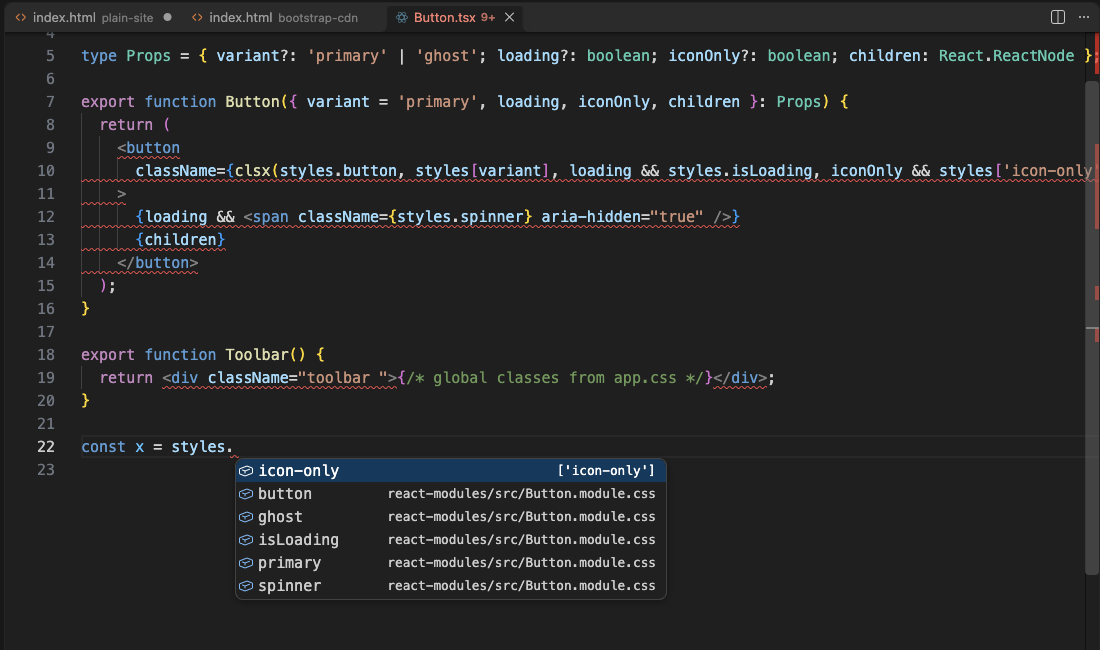
styles.completes the classes of the imported.module.css/.module.scssfile. Names with a dash becomestyles['btn-primary']. - Light on CPU: it reads style sheets once, in the background, and then only the file you change. node_modules,
files.excludeand.gitignoreare skipped. No CPU use while you type in other files. - Never changes your text: it only offers completions. Nothing is inserted or rewritten while you type.
- Nothing leaves your computer: it never downloads a remote style sheet. Bootstrap 5 and Bulma class lists ship with it, for pages that load them from a CDN.
Questions people ask
Is HTML CSS Support & CSS Class Names IntelliSense (ID Completion) free?
Yes. HTML CSS Support & CSS Class Names IntelliSense (ID Completion) is free and MIT licensed.
How do I install HTML CSS Support & CSS Class Names IntelliSense (ID Completion)?
Click "Install in VS Code" above, or search for zovo.zovo-html-css-class-intellisense in the Extensions view.
Why this one
The two most installed class completion extensions get the same complaints in their public reviews (first, second). This is a different extension, built around them:
| Complaint in reviews | What this extension does |
|---|---|
| "It does not suggest class or id names in a linked style sheet", "Tried it in a Vue3 project, but it did not work at all" (reviews) | Reads the whole workspace, <link> sheets and <style> blocks. Vue :class objects, JSX, Svelte, Blade and CSS modules work without settings. |
| "Using lots of CPU on a large monorepo crashes VS Code", "It costs all resources" (reviews) | Skips node_modules and ignored folders, stops at 5,000 sheets and 2 MB per sheet (both settings), indexes in the background, then only re-reads changed files. In our test workspace the extension host was at 0% CPU right after indexing. |
| "Breaking my code in blade files, duplicate word and letters while typing" (reviews) | Completion only. A picked name replaces the word under the cursor and nothing else. |
How it looks
Hover a class name to see the rule (selector and first declarations) and the style sheet and line it comes from. F12 opens it.
CSS modules in a React component:
Where names complete
| File | Where |
|---|---|
| HTML, PHP, Blade, Twig, ERB, Razor, Jinja, Liquid, Handlebars | class="...", id="...", also between {{ }} / <?php ?> parts of the value |
| React (JSX, TSX) | className="...", className={'...'}, ` className={...} , clsx(), cn(), cx(), classnames(), twMerge(), cva(), tv()` |
| Vue | class="...", strings in :class="{ 'is-active': on }" and :class="['a', b]", $style. for <style module> |
| Svelte | class="...", class:name={...} |
| Angular | class="...", strings in [ngClass] and [class] |
| Astro | class="...", class:list={[...]} |
| JS and TS | styles. and styles['...'] for imported CSS modules, helper functions such as clsx() |
The class names come from:
<style>blocks in the same file (Vue and Sveltelang="scss"too) and the sheets the page links. These are listed first.- Every CSS, SCSS, Less and PostCSS file in the workspace. SCSS and Less nesting is resolved:
.card { &__title {} }givescard__title. - The bundled Bootstrap 5 or Bulma list when you turn it on (setting
htmlCssClass.frameworks). When a page loads Bootstrap or Bulma from a CDN, the extension asks once.
Vue and Svelte files need their usual language extension (Vue - Official, Svelte for VS Code) so VS Code knows the file type.
Big projects and large files
- Style sheets over 2 MB (
htmlCssClass.maxFileSizeKB) are skipped without being read. The index report lists them and a single message says how many. - The index stops at 5,000 sheets (
htmlCssClass.maxFiles) and 50,000 names per sheet. - Broken SCSS or CSS does not stop it: the names before the error are indexed.
- Completion reads only the few thousand characters before the cursor, so it is as fast in a huge file as in a small one. With tens of thousands of classes it sends the best 5,000 matches and asks again as you type.
- Measured in real VS Code 1.142 on a MacBook: 16 style sheets (real Bootstrap 5.3, Bulma 1.0 and animate.css among them, 7,408 classes) indexed in 262 ms. With the size limit raised, a full re-index that included a 4.3 MB sheet with 100,000 selectors took 280 ms (32,505 classes in all). The extension host used 73 MB and 0% CPU when idle.
Run the command "Class Names IntelliSense: Show index report" to see what was indexed and what was skipped. The status bar shows the number of classes; its tooltip has the same links.
Settings
| Setting | Default | What it does |
|---|---|---|
htmlCssClass.exclude | node_modules, .git, build caches | Globs that are not indexed, on top of files.exclude and .gitignore |
htmlCssClass.includePackages | [] | node_modules packages to index anyway, such as bootstrap |
htmlCssClass.frameworks | [] | bootstrap5, bulma: bundled class lists for CDN users |
htmlCssClass.classFunctions | clsx, cn, cx, ... | Functions whose strings hold class names |
htmlCssClass.maxFiles | 5000 | The most style sheets to index |
htmlCssClass.maxFileSizeKB | 2048 | Larger sheets are skipped |
htmlCssClass.validate | false | Faint hint on class names that no sheet defines |
htmlCssClass.languages | 28 template languages | Where names complete |
Privacy
No network requests, no telemetry, no account. The index lives in memory and is gone when you close the window. Remote style sheets (https://...) are never fetched.
License
MIT. The bundled Bootstrap and Bulma class lists come from their MIT-licensed CSS; see THIRD-PARTY-NOTICES.md.
Guides
Install HTML CSS Support & CSS Class Names IntelliSense (ID Completion)
Click the button to open VS Code and install it, or press Ctrl+P (Cmd+P on macOS) in VS Code and run ext install zovo.zovo-html-css-class-intellisense.
Free, MIT license. Needs VS Code 1.90.0 or newer. Extension ID zovo.zovo-html-css-class-intellisense, version 0.2.2.
Source code and issues are on GitHub.
Support this work
If this extension saves you time, you can support the work on GitHub Sponsors. Monthly tiers start at $5, and one-time tiers start at $15. Sponsorship is optional, and the tool works the same without it.
Need your format supported?
Open a format request with a sample file, and I reply there whether it can be done. For USD 299 once, through this GitHub Sponsors tier, I add your file format or a missing feature to this extension, with tests, within 7 days.