Open files in VS Code and Cursor / 3D and imaging
Batch resize a folder of images in VS Code
Image Editor & Image Resizer is a free VS Code extension. It resizes, crops and converts one image at a time, with Undo and Save As, for free and with no limit. To do a whole folder at once, its Batch resize and convert tool fits every image in 1920, 1280 or 800 pixels, a percent or your own size, writes PNG, JPEG or WebP, and never overwrites the originals. Batch resize is a Zovo Pro tool with 3 free tries. Zovo Pro is USD 19 once and turns on the Pro tools of every Zovo extension.
Free, MIT license. Extension ID zovo.zovo-image-editor, version 0.1.1. Needs VS Code 1.90.0 or newer.
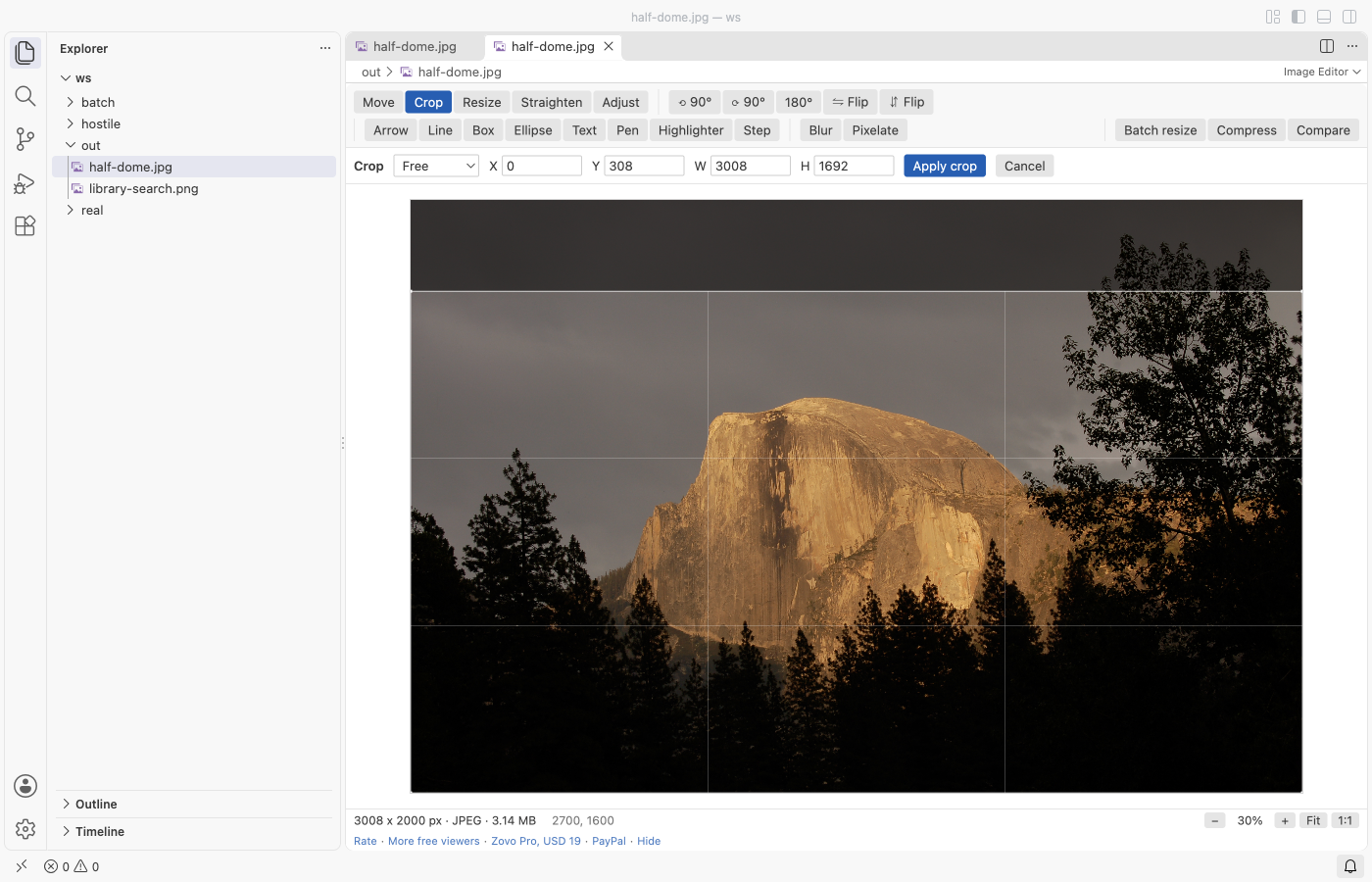
Steps in VS Code
- Install Image Editor from the Marketplace, or press Ctrl+P (Cmd+P on macOS) and run
ext install zovo.zovo-image-editor. - Click a
.png,.jpg,.webp,.gifor.bmpfile. It opens in VS Code's own preview. Click Edit Image at the top right, or right-click the file in the Explorer and pick Edit Image. - Click Resize in the toolbar. Type the width or the height, in pixels or percent. With the ratio kept, the other side follows. Press Enter or click Apply resize. Downscaling goes in steps for a sharp result.
- Press Ctrl+S (Cmd+S on macOS) to save in the same format. JPEG and WebP use the quality from the settings (92 and 90). To keep the original, run "Image Editor: Save a copy as PNG, JPEG, WebP or BMP" instead. The extension of the new name picks the format.
- Undo and Revert work as in any VS Code editor, so you can try another size before you save. For a few images, repeat these steps. For a whole folder, use the batch tool below.
Where Zovo Pro saves time
Opening, crop, resize, rotate, flip, straighten, arrows, boxes, text, blur and pixelate, brightness, contrast and saturation, Save, and Save As to PNG, JPEG, WebP or BMP are free. There is no account and no network.
When a folder holds dozens of photos or screenshots, opening each one takes too long. Batch resize and convert a folder does every image in the folder in one run. It writes new files into a subfolder named resized, or next to the originals with -resized in the name. If a name is taken, a number is added, so no file is overwritten. A panel lists each file with its new size, and the summary shows how many bytes were saved. The other two Pro tools are Compress to a target size (the highest JPEG or WebP quality that fits a size such as 200 KB) and Compare two images (slider, onion skin and pixel diff).
With Batch resize and convert a folder (Zovo Pro)
- Click Batch resize in the editor toolbar (it uses the folder of the open image), or run "Image Editor: Batch resize and convert a folder (Pro)" from the Command Palette and pick a folder.
- Pick a size (Fit in 1920 x 1920, 1280 x 1280 or 800 x 800, 50 %, 25 %, Keep the size, your own largest width x height, or a percent). Then pick Keep each format, PNG, JPEG or WebP, and the JPEG and WebP quality (85 by default).
- Pick the subfolder "resized" or "-resized" next to the originals. The panel shows each file as it is written, with Cancel, and ends with the summary.
Batch resize and convert a folder works 3 times on your computer before it asks for a license, and a try counts only when you get a result. Opening a file shows no popup and no countdown.
Zovo Pro costs USD 19 once. It is not a subscription, and it turns on the Pro tools in every Zovo extension, not only Image Editor. After a card payment (Stripe) your license key shows on the next page. In VS Code, run "Zovo Pro: Enter Zovo Pro license key" from the Command Palette and paste it. The key is checked on your computer, with no network call. With GitHub Sponsors, pick the "$19 one time" tier, then run "Zovo Pro: I already paid: unlock with GitHub Sponsors" and sign in with the same GitHub account. With PayPal, send USD 19 with "Zovo Pro" in the note and the key comes by email within a day.
A team of 5: USD 59 once, by card or by PayPal. Every rule and every Pro tool is on the Zovo Pro page.
Steps in Cursor, Windsurf or VSCodium
- Open the Extensions view with Ctrl+Shift+X (Cmd+Shift+X on macOS).
- Search for
zovo.zovo-image-editorand click Install. Cursor, Windsurf and VSCodium install from Open VSX, where it is published aszovo/zovo-image-editor. - If your editor has no gallery, download the .vsix from the Open VSX page and run "Extensions: Install from VSIX...".
- Then use it the same way as in VS Code.
What Image Editor handles
- PNG, JPEG, WebP, BMP and GIF (the first frame, written as PNG).
- Output as PNG, JPEG or WebP in the batch tool, and also BMP with Save As in the editor.
- Phone photos the right way up, because the EXIF orientation is applied first.
- Images up to 100 megapixels and 32,767 pixels a side.
What it does not do
- TIFF, HEIC, AVIF and SVG files are not opened.
- GIF animations keep only the first frame.
- The batch tool takes the images directly in the folder you pick, not those in subfolders, up to 2,000 at a time.
- Save writes pixels only. EXIF data such as the camera or the GPS location is not copied into the new file.
Other options
- ImageMagick. Free command-line tool.
magick mogrify -path resized -resize 1920x1920> *.jpgshrinks every JPEG into aresizedfolder. Good for scripts. - sips on macOS. Built into macOS.
sips -Z 1920 *.jpgfits each image in 1920 pixels, but it changes the files in place, so work on a copy. - PowerToys Image Resizer. Free from Microsoft for Windows. Select images in File Explorer, right-click and resize them to a preset size.
Install counts and Open VSX status were checked on 12 November 2026. Descriptions in quotes are the extensions' own.
Questions
Does batch resize overwrite my photos?
No. New files go into a subfolder named resized, or next to the originals with -resized in the name. If a name is taken, a number is added.
Can I resize images without Zovo Pro?
Yes. Resizing, cropping and converting one image at a time in the editor is free, with no limit. Only the folder tool is Pro, and it has 3 free tries.
Does it make small images bigger?
Not with Fit in or your own largest width and height. Images that are already smaller keep their size. A percent above 100 does make them bigger.
Does it work in Cursor or Windsurf?
Yes. Cursor, Windsurf and VSCodium install extensions from Open VSX. Search for the extension in their Extensions view and install it there.
More about Image Editor
Read the Image Editor page for every feature and setting, or the source code on GitHub.
Related guides
- Annotate a screenshot in VS Code
- View STL files in VS Code
- Open DICOM and NIfTI files in VS Code
- Calculate the volume of an STL file
Zovo Pro and support
Zovo Pro: USD 19 once, every Zovo viewer. It turns on the Pro tools in this extension and in the other Zovo extensions you use. The free features stay free.
After a card payment your license key shows on the next page. Paste it with the command "Zovo Pro: Enter a key".
You can also support the work with no Pro:
Need your format supported?
Open a format request with a sample file, and I reply there whether it can be done. For USD 299 once, through this GitHub Sponsors tier, I add your file format or a missing feature to this extension, with tests, within 7 days.