Open files in VS Code and Cursor / Developer files
Compare two folders in VS Code
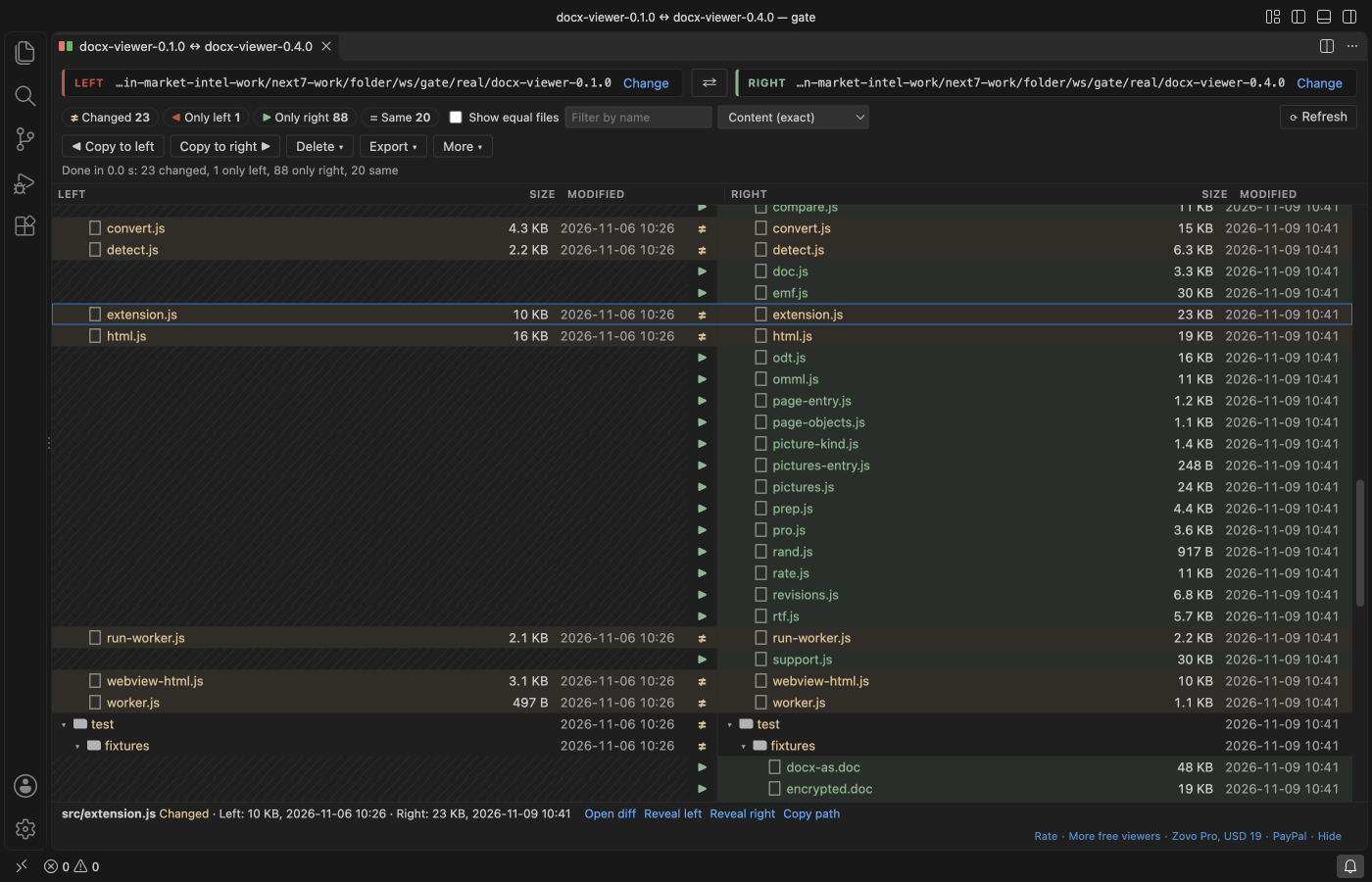
VS Code can compare two files (Select for Compare, then Compare with Selected), but not two folders. Install the free Folder Compare & Directory Diff by Zovo, select two folders in the Explorer, right-click and choose "Compare Selected Folders". You get Left and Right trees with each full path, a status per file, and the diff of any file with a double-click.
Free, MIT license. Extension ID zovo.zovo-folder-diff, version 0.1.2. Needs VS Code 1.90.0 or newer.
Also free from Zovo: Hex Viewer & Binary Viewer, VS Code Marketplace · Open VSX (Cursor, Windsurf).
Steps in VS Code
- Install Folder Compare & Directory Diff from the Marketplace, or press Ctrl+P (Cmd+P on macOS) and run
ext install zovo.zovo-folder-diff. - Select two folders in the Explorer (Ctrl+click, or Cmd+click on macOS), right-click and choose "Compare Selected Folders".
- Click a count (changed, only left, only right) to see only those rows. Equal files are hidden by default.
- Double-click a row. Text opens in the VS Code diff editor, Word and Excel files open as text side by side, and other files show the bytes that differ.
- Use Copy to right, Copy to left or Delete. The extension lists every file it will write first, and deleted files go to the Trash.
Steps in Cursor, Windsurf or VSCodium
- Open the Extensions view with Ctrl+Shift+X (Cmd+Shift+X on macOS).
- Search for
zovo.zovo-folder-diffand click Install. Cursor, Windsurf and VSCodium install from Open VSX, where it is published aszovo/zovo-folder-diff. - If your editor has no gallery, download the .vsix from the Open VSX page and run "Extensions: Install from VSIX...".
- Then use it the same way as in VS Code.
What Folder Compare & Directory Diff handles
- Code and text, Word (.docx, .doc, .odt), Excel (.xlsx, .xls, .ods), CSV, Parquet, PDF text, and a byte compare for any other file, up to 4 GB.
- 100,000 files per side: the tree shows in about 7 seconds and every file is checked in about 35 seconds, with a progress bar and Cancel.
- Compare a folder with a Git branch, tag or commit. Git runs locally with repository hooks turned off.
- Export the result as Markdown, CSV or HTML.
- Skips node_modules, .git and dist by default, and what .gitignore ignores.
What it does not do
- Folders on this computer, or on the remote machine in a Remote window. Virtual file systems are not supported.
- Word, Excel and PDF files are compared by their text, not by layout or pictures.
- Copy keeps the modified time, but not file permissions or owners.
In JetBrains IDEs (IntelliJ IDEA, PyCharm, WebStorm, CLion and others)
- Built in: Compare Directories. JetBrains IDEs compare two folders with no plugin: select both in the Project view and press Ctrl+D (Cmd+D on macOS). Zovo has no JetBrains plugin for this.
Other options
- Compare Folders (
moshfeu.compare-folders, 725,172 installs, on Open VSX). Its own description: "Compare folders by contents, present the files that have differences and display the diffs side by side". The most installed folder compare extension. - L13 Diff (
L13RARY.l13-diff, 221,890 installs, not on Open VSX). Its own description: "Compare two folders in Visual Studio Code". Not on Open VSX. - Beyond Compare (
ScooterSoftware.bcompare-vscode, 116,165 installs, not on Open VSX). Its own description: "Launch Beyond Compare with comparisons of files, folders, clipboards, and git repositories". It needs the Beyond Compare desktop app. - diff -r.
diff -rq left/ right/in a terminal lists the files that differ on macOS and Linux.
Install counts and Open VSX status were checked on 9 November 2026. Descriptions in quotes are the extensions' own.
Questions
Can VS Code compare two folders without an extension?
No. It compares two files. For folders you need an extension or a desktop tool.
Is it safe to copy or delete with it?
Nothing is written before you confirm a list of every file it will create, overwrite or delete. Deleted files go to the Trash by default.
Does it work in Cursor?
Yes. Cursor, Windsurf and VSCodium install it from Open VSX as zovo/zovo-folder-diff.
More about Folder Compare & Directory Diff
Read the Folder Compare & Directory Diff page for every feature and setting, or the source code on GitHub.
Related guides
- Hex Viewer & Binary Viewer on the VS Code Marketplace (also on Open VSX). Opens any file as hex, edits bytes and compares two files, even files of many GB.
- Read a HAR file offline in VS Code
- Read your Claude Code history in VS Code
- TTF to WOFF2 in VS Code
- Export a Claude Code conversation
Zovo Pro and support
Zovo Pro: USD 19 once, every Zovo viewer. It turns on the Pro tools in this extension and in the other Zovo extensions you use. The free features stay free.
After a card payment your license key shows on the next page. Paste it with the command "Zovo Pro: Enter a key".
You can also support the work with no Pro:
Need your format supported?
Open a format request with a sample file, and I reply there whether it can be done. For USD 299 once, through this GitHub Sponsors tier, I add your file format or a missing feature to this extension, with tests, within 7 days.