Open files in VS Code and Cursor / Binary, network and hardware
Compare two APK files in VS Code
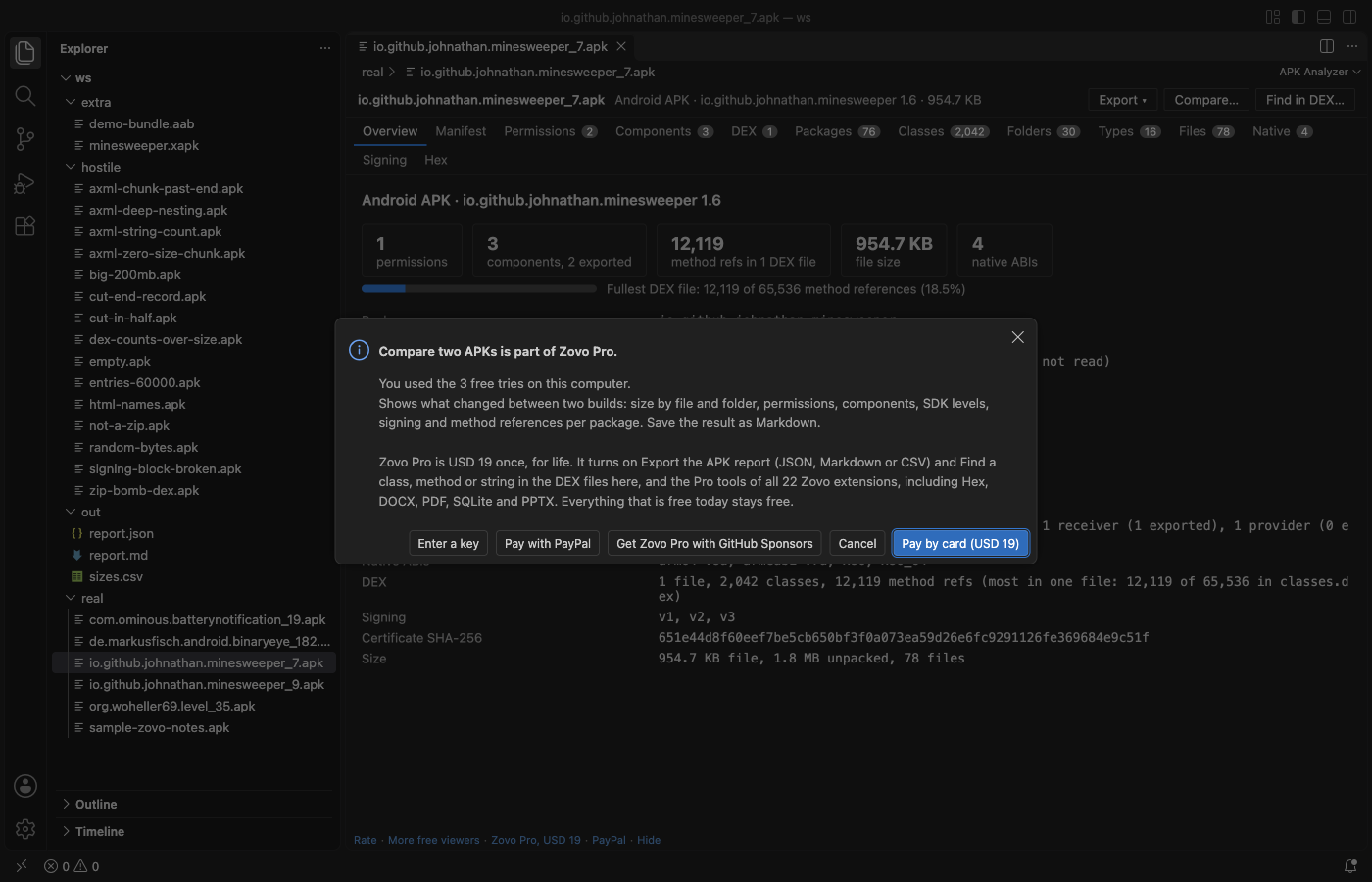
APK Analyzer opens an .apk, .aab, .apks or .xapk file in VS Code and shows the manifest, permissions, components, DEX method counts, sizes and the signing certificate. That is free and offline, with no Android SDK and no Java. To see what changed between two builds, its Compare two APKs tool lists size changes by folder and file, added and removed permissions and components, SDK level and signing changes, and method references per package. It is part of Zovo Pro (USD 19 once), with 3 free tries.
Free, MIT license. Extension ID zovo.zovo-apk-analyzer, version 0.1.0. Needs VS Code 1.90.0 or newer.
Steps in VS Code
- Install APK Analyzer from the Marketplace, or press Ctrl+P (Cmd+P on macOS) and run
ext install zovo.zovo-apk-analyzer. - Click an
.apkfile in the Explorer. It opens in APK Analyzer with the package, versions, SDK levels, permission and component counts and the signing schemes on the Overview tab. - Read one build for free: the decoded
AndroidManifest.xml, the permissions with the dangerous ones flagged, every component with its exported flag and the reason, and DEX method counts against the 65,536 limit. - Open Folders, Types or Files to see where the bytes go, largest first, and Packages for method counts as a tree.
Where Zovo Pro saves time
Opening and reading one APK, AAB, APKS or XAPK file is free: the overview, manifest, permissions, components, DEX and package counts, classes, folder, type and file sizes, native libraries, signing and the hex view. There is no sign-in and no network call.
Before a release you want to know why the APK grew, which permission came in with a new library, or whether an activity became exported. Compare two APKs reads both builds and shows the size of each changed folder and file with plus and minus, the permissions and components that were added or removed, components whose exported flag changed, changes in versions, SDK levels, native ABIs, signing schemes and the certificate, and the method references per package. One click opens it all as a Markdown report. The other two Pro tools export the report of one APK as JSON, Markdown or CSV, and find a class, method, field or string in every DEX file.
With Compare two APKs (Zovo Pro)
- Open the older build and click Compare… in the viewer toolbar, or run "APK Analyzer: Compare two APKs (Pro)" from the Command Palette.
- Pick the newer build. A plus means larger or added in the second file.
- Read the changes in the viewer, or click Open as Markdown to get a report for a pull request or the release notes.
Compare two APKs works 3 times on your computer before it asks for a license, and a try counts only when you get a result. Opening a file shows no popup and no countdown.
Zovo Pro costs USD 19 once. It is not a subscription, and it turns on the Pro tools in every Zovo extension, not only APK Analyzer. After a card payment (Stripe) your license key shows on the next page. In VS Code, run "Zovo Pro: Enter Zovo Pro license key" from the Command Palette and paste it. The key is checked on your computer, with no network call. With GitHub Sponsors, pick the "$19 one time" tier, then run "Zovo Pro: I already paid: unlock with GitHub Sponsors" and sign in with the same GitHub account. With PayPal, send USD 19 with "Zovo Pro" in the note and the key comes by email within a day.
A team of 5: USD 59 once, by card or by PayPal. Every rule and every Pro tool is on the Zovo Pro page.
Steps in Cursor, Windsurf or VSCodium
- Open the Extensions view with Ctrl+Shift+X (Cmd+Shift+X on macOS).
- Search for
zovo.zovo-apk-analyzerand click Install. Cursor, Windsurf and VSCodium install from Open VSX, where it is published aszovo/zovo-apk-analyzer. - If your editor has no gallery, download the .vsix from the Open VSX page and run "Extensions: Install from VSIX...".
- Then use it the same way as in VS Code.
What APK Analyzer handles
.apkfiles, with the manifest decoded from Android binary XML..aabbundles: files, sizes, DEX counts, native ABIs and signing..apkssets and.xapkfiles, where the base APK is read.- v1 signature files and the APK Signing Block with v2, v3 and v3.1, with the signer certificate.
What it does not do
- It shows the signature data but does not verify signatures.
- It does not read
resources.arsc, so an app label stored as a string resource shows as its resource id. - In an
.aabthe manifest is a protocol buffer, which this version does not decode. - It is read-only. It does not edit, re-sign or rebuild an APK.
Other options
- APK Analyzer in Android Studio. Free, and it can compare two APKs too. It needs the full Android Studio install.
- apkanalyzer. The command-line tool in the Android SDK.
apkanalyzer apk compare old.apk new.apkprints the size differences. - diffuse. A free, open source command-line tool that diffs two APKs, AABs or AARs.
Install counts and Open VSX status were checked on 12 November 2026. Descriptions in quotes are the extensions' own.
Questions
Do I need Android Studio or the Android SDK?
No. APK Analyzer reads the files itself, with no Android SDK, no Java and no network calls.
Does it open app bundles (.aab)?
Yes, for files, sizes, DEX counts, native ABIs and signing. The manifest inside a bundle is a protocol buffer, which this version does not decode.
Is comparing free?
Reading one APK is free. Compare two APKs is a Zovo Pro tool with 3 free tries on your computer, and a try is used only when the comparison is shown.
Does it work in Cursor or Windsurf?
Yes. Cursor, Windsurf and VSCodium install extensions from Open VSX. Search for the extension in their Extensions view and install it there.
More about APK Analyzer
Read the APK Analyzer page for every feature and setting, or the source code on GitHub.
Related guides
- Use a hex editor in VS Code
- Open a binary file in VS Code
- Open a PCAP file in VS Code
- View VCD waveforms in VS Code
Zovo Pro and support
Zovo Pro: USD 19 once, every Zovo viewer. It turns on the Pro tools in this extension and in the other Zovo extensions you use. The free features stay free.
After a card payment your license key shows on the next page. Paste it with the command "Zovo Pro: Enter a key".
You can also support the work with no Pro:
Need your format supported?
Open a format request with a sample file, and I reply there whether it can be done. For USD 299 once, through this GitHub Sponsors tier, I add your file format or a missing feature to this extension, with tests, within 7 days.