Open files in VS Code and Cursor / Code and APIs
Get CSS class name completion in VS Code
VS Code's built-in HTML support does not read the style sheets in your workspace, so it does not suggest your class names in class="...". Install the free Class Names IntelliSense by Zovo. It reads every .css, .scss and .less file in the workspace, plus <style> blocks and linked sheets, and lists each name with the file it comes from. Hover a name to see its rule, or press F12 to jump to it.
Free, MIT license. Extension ID zovo.zovo-html-css-class-intellisense, version 0.2.2. Needs VS Code 1.90.0 or newer.
Also free from Zovo: Auto Rename Tag & Close Tag Sync, VS Code Marketplace · Open VSX (Cursor, Windsurf).
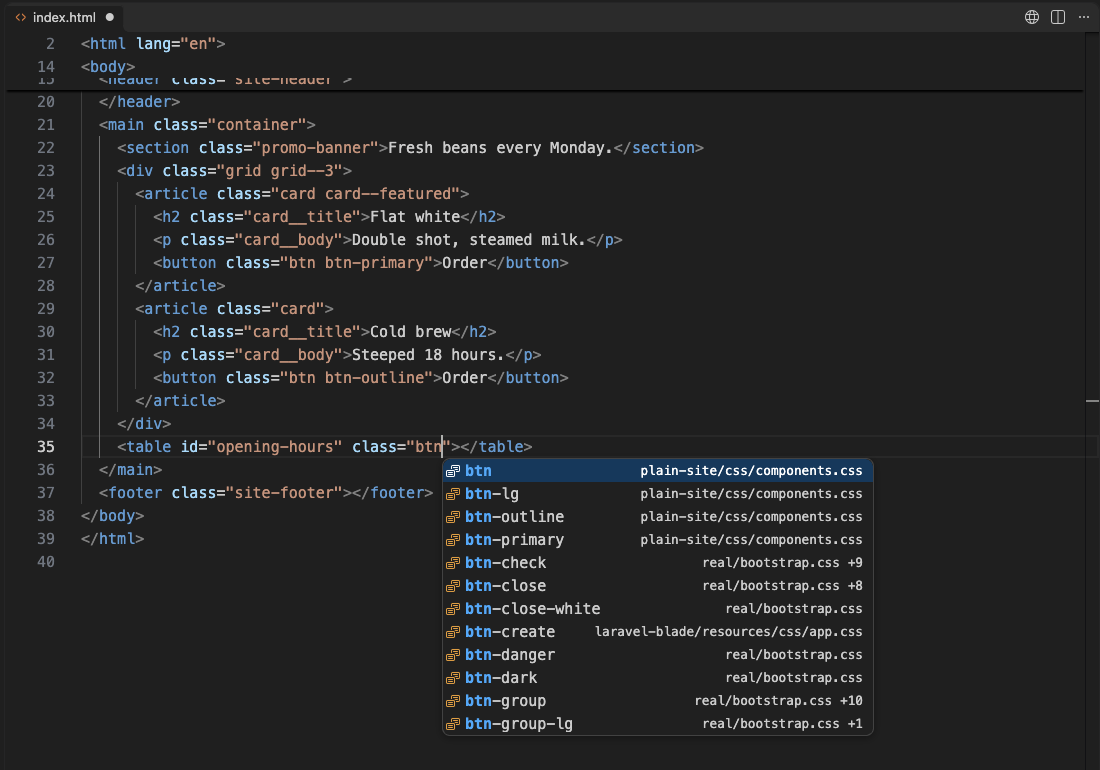
Steps in VS Code
- Install Class Names IntelliSense from the Marketplace, or press Ctrl+P (Cmd+P on macOS) and run
ext install zovo.zovo-html-css-class-intellisense. - Open any HTML, JSX, Vue, Svelte, Angular, PHP or Blade file. The style sheets are read once in the background, and the status bar shows the number of classes.
- Type inside
class="...",className,:classorclsx()and pick a name from the list. - Hover a class name to see its CSS rule and file. Press F12 to open the rule.
- If a page loads Bootstrap 5 or Bulma from a CDN, turn on the bundled class list with the
htmlCssClass.frameworkssetting.
Steps in Cursor, Windsurf or VSCodium
- Open the Extensions view with Ctrl+Shift+X (Cmd+Shift+X on macOS).
- Search for
zovo.zovo-html-css-class-intellisenseand click Install. Cursor, Windsurf and VSCodium install from Open VSX, where it is published aszovo/zovo-html-css-class-intellisense. - If your editor has no gallery, download the .vsix from the Open VSX page and run "Extensions: Install from VSIX...".
- Then use it the same way as in VS Code.
What Class Names IntelliSense handles
- CSS, SCSS, Less and PostCSS files in the workspace, with nesting resolved:
.card { &__title {} }givescard__title. - Completion for ids as well as class names.
- CSS modules:
styles.completes the classes of the imported .module.css or .module.scss file. - node_modules,
files.excludeand .gitignore are skipped. In the release test, 7,408 classes from 16 sheets were indexed in 262 ms, with 0% CPU when idle. - Completion only. Nothing is inserted or rewritten while you type.
What it does not do
- Remote style sheets are never downloaded. Classes from a CDN sheet other than Bootstrap 5 or Bulma are unknown. If the package is in node_modules, add it to
htmlCssClass.includePackages. - It does not generate Tailwind utility classes from a Tailwind config. For Tailwind, use Tailwind CSS IntelliSense.
- Sheets over 2 MB are skipped, and indexing stops at 5,000 sheets. Both are settings.
- Vue and Svelte files need their usual language extension so VS Code knows the file type.
In JetBrains IDEs (IntelliJ IDEA, PyCharm, WebStorm, CLion and others)
- Built in (WebStorm, IntelliJ IDEA Ultimate). JetBrains web IDEs complete CSS class names from your project in HTML class attributes, with no plugin. Zovo has no JetBrains plugin for this.
- React CSS Modules. 163,469 downloads. Its listing says it adds "Completion and error highlighting for CSS classes" used through CSS modules in React components.
Other options
- HTML CSS Support (
ecmel.vscode-html-css, 30.1 million installs, on Open VSX). Its own description: "CSS Intellisense for HTML". The most installed choice. - IntelliSense for CSS class names in HTML (
Zignd.html-css-class-completion, 10 million installs, on Open VSX). Its own description: "CSS class name completion for the HTML class attribute based on the definitions found in your workspace." - Tailwind CSS IntelliSense (
bradlc.vscode-tailwindcss, 14.9 million installs, on Open VSX). Its own description: "Intelligent Tailwind CSS tooling for VS Code". The one to use for Tailwind projects.
Install counts and Open VSX status were checked on 9 November 2026. Descriptions in quotes are the extensions' own.
Questions
Why does VS Code not suggest my CSS classes?
Its HTML support suggests tags and attributes, but it does not read the style sheets in your workspace. An extension has to read them first.
Will it slow down VS Code in a big project?
It reads the sheets once in the background and then only the files you change. node_modules and ignored folders are skipped, and it uses no CPU while you type in other files.
Does it work with React and CSS modules?
Yes. It completes className, clsx(), cn() and cva(), and styles. for an imported CSS module.
More about Class Names IntelliSense
Read the Class Names IntelliSense page for every feature and setting, or the source code on GitHub.
Related guides
- Auto Rename Tag & Close Tag Sync on the VS Code Marketplace (also on Open VSX). Renames the matching HTML, JSX or Vue tag as you type.
- Open a SARIF file in VS Code
- Preview a Swagger or OpenAPI file in VS Code
- Preview an HTML file with its CSS and images in VS Code
- Test a regex in VS Code
Support this work
If this extension saves you time, you can support the work on GitHub Sponsors. Monthly tiers start at $5, and one-time tiers start at $15. Sponsorship is optional, and the tool works the same without it.
Need your format supported?
Open a format request with a sample file, and I reply there whether it can be done. For USD 299 once, through this GitHub Sponsors tier, I add your file format or a missing feature to this extension, with tests, within 7 days.