Open files in VS Code and Cursor / Code and APIs
Format XML in VS Code and run XPath on it
XML Formatter & XPath Tools formats XML in VS Code with Shift+Alt+F and changes only the whitespace between tags: text, CDATA, comments, xml:space="preserve" and attribute values stay byte for byte, and a second format changes nothing. It also runs XPath 1.0 on the file's own namespace prefixes and shows the XPath at the cursor in the status bar. All of that is free and offline. Zovo Pro (USD 19 once) adds XPath and formatting across a whole folder and a compare that ignores formatting, with 3 free tries each.
Free, MIT license. Extension ID zovo.zovo-xml-xpath-tools, version 0.1.1. Needs VS Code 1.90.0 or newer.
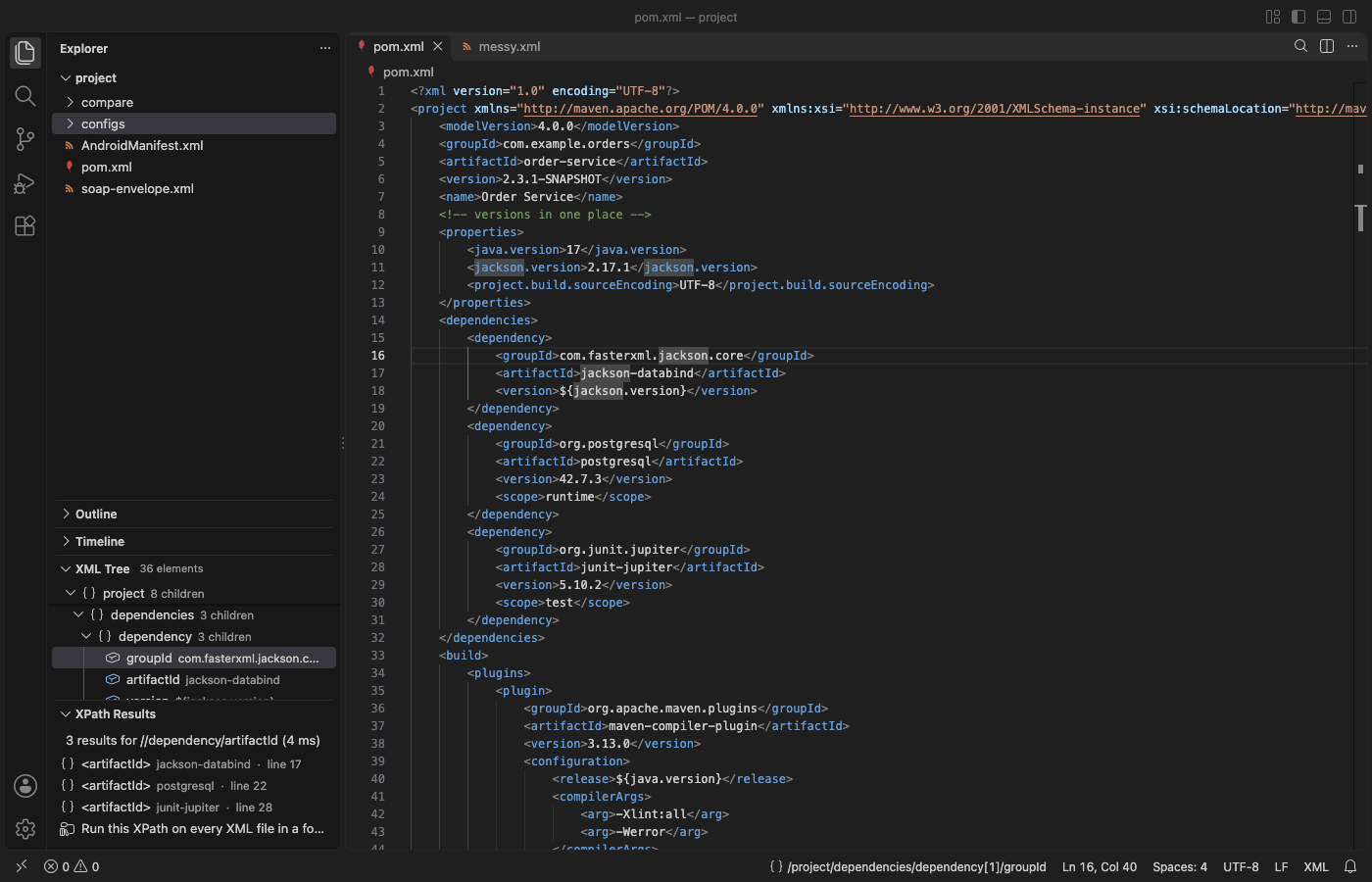
Steps in VS Code
- Install XML Formatter & XPath Tools from the Marketplace, or press Ctrl+P (Cmd+P on macOS) and run
ext install zovo.zovo-xml-xpath-tools. - Open an XML file and press Shift+Alt+F (Shift+Option+F on macOS). If you have more than one XML formatter, VS Code asks which one to use. Format Selection works too.
- The formatter uses your tab size and tabs or spaces, and keeps the line endings, the byte order mark and the final newline. A file that is not well formed is never changed: you get the error with its line and column.
- To make the file small instead, run "XML: Minify XML". Comments stay unless you turn on
xmlXpathTools.minify.removeComments. - To run an XPath, click the search button in the editor title or run "XML: Evaluate XPath...". Results list with their line; click one to select it in the editor.
- Click the XPath in the status bar to copy the path of the element under the cursor, with positions, with id or name attributes, or in a portable
local-name()form.
Where Zovo Pro saves time
Format Document, Format Selection, Minify, XPath, Copy XPath, the XML Tree view and the well-formedness errors in Problems are free, with no sign-in and no network code. There is no trial timer and no license banner.
When you need the same value from many files (every artifactId in a set of pom.xml files, every setting in a folder of configs), Run XPath on Every XML File in a Folder runs one XPath over every .xml, .xsd, .csproj, .svg, .kml and similar file under the folder, each with its own namespace prefixes. The results open as CSV (file, line, kind, name, value), as JSON or as a Markdown report. The other two Pro tools are Format All XML Files in a Folder, which says how many files would change and then formats them or writes a report for a review or a CI check, and Compare Two XML Files Ignoring Formatting, which ignores indentation, attribute order and quote style so the diff shows only real changes.
With Run XPath on Every XML File in a Folder (Zovo Pro)
- Right-click a folder in the Explorer and pick "Zovo Pro: Run XPath on Every XML File in a Folder", or run "XML: Run XPath on Every XML File in a Folder (Pro)". After an XPath in one file, XPath Results offers the same expression for a folder.
- Type the XPath, then pick CSV, JSON or a Markdown report.
- The results open in an editor. A try counts only when you get a result: Escape, an XPath typo or a folder with no XML files uses none.
Run XPath on Every XML File in a Folder works 3 times on your computer before it asks for a license, and a try counts only when you get a result. Opening a file shows no popup and no countdown.
Zovo Pro costs USD 19 once. It is not a subscription, and it turns on the Pro tools in every Zovo extension, not only XML Formatter & XPath Tools. After a card payment (Stripe) your license key shows on the next page. In VS Code, run "Zovo Pro: Enter Zovo Pro license key" from the Command Palette and paste it. The key is checked on your computer, with no network call. With GitHub Sponsors, pick the "$19 one time" tier, then run "Zovo Pro: I already paid: unlock with GitHub Sponsors" and sign in with the same GitHub account. With PayPal, send USD 19 with "Zovo Pro" in the note and the key comes by email within a day.
A team of 5: USD 59 once, by card or by PayPal. Every rule and every Pro tool is on the Zovo Pro page.
Steps in Cursor, Windsurf or VSCodium
- Open the Extensions view with Ctrl+Shift+X (Cmd+Shift+X on macOS).
- Search for
zovo.zovo-xml-xpath-toolsand click Install. Cursor, Windsurf and VSCodium install from Open VSX, where it is published aszovo/zovo-xml-xpath-tools. - If your editor has no gallery, download the .vsix from the Open VSX page and run "Extensions: Install from VSIX...".
- Then use it the same way as in VS Code.
What XML Formatter & XPath Tools handles
- Big files: formatting, the tree and XPath run in a worker thread. In its tests a 49 MB file with about 1 million elements formatted in 1.6 seconds, and the editor never paused for more than 0.1 seconds.
- Files over 50 MB, which VS Code does not pass to extensions: right-click and pick "Format Large XML File on Disk" to write
name.formatted.xmlnext to it. - Plain names also match a default namespace, so
//dependency/artifactIdworks in apom.xml, SVG, XAML or.csprojfile. - Attribute layout: keep as written, one line, or one attribute per line (setting
xmlXpathTools.format.attributes). - Entities are never expanded and DTDs are never loaded, so an entity bomb or an external entity does no harm.
What it does not do
- XPath 1.0 only: no XPath 2.0 or 3.1, XQuery or XSLT.
- It checks that a file is well formed. It does not validate against an XSD or a DTD.
- Files over 50 MB can be formatted on disk, but the tree and XPath do not run on them.
Other options
- XML Tools (
DotJoshJohnson.xml, 8.2 million installs, on Open VSX). Its own description: "XML Formatting, XQuery, and XPath Tools for Visual Studio Code". - XML (
redhat.vscode-xml, 11 million installs, on Open VSX). Its own description: "XML Language Support by Red Hat". It also validates against XSD and DTD. - xmllint.
xmllint --format file.xmlin a terminal formats a file, andxmllint --xpathruns an XPath. It comes with libxml2 on macOS and most Linux systems.
Install counts and Open VSX status were checked on 12 November 2026. Descriptions in quotes are the extensions' own.
Questions
Can VS Code format XML without an extension?
No. VS Code has no built-in XML formatter, so Shift+Alt+F does nothing on an .xml file until you install one.
Will formatting change my text or CDATA?
No. Only the whitespace between tags in elements that hold tags and no text changes. Text, CDATA, comments and preserved content are copied as they are.
Why does my XPath select nothing in a pom.xml?
The file has a default namespace. In this extension plain names also match a default namespace, so //dependency works. Turn on xmlXpathTools.xpath.strictNamespaces for strict XPath 1.0.
Does it work in Cursor or Windsurf?
Yes. Cursor, Windsurf and VSCodium install extensions from Open VSX. Search for the extension in their Extensions view and install it there.
More about XML Formatter & XPath Tools
Read the XML Formatter & XPath Tools page for every feature and setting, or the source code on GitHub.
Related guides
- Open a SARIF file in VS Code
- Preview a Swagger or OpenAPI file in VS Code
- Preview an HTML file with its CSS and images in VS Code
- Test a regex in VS Code
Zovo Pro and support
Zovo Pro: USD 19 once, every Zovo viewer. It turns on the Pro tools in this extension and in the other Zovo extensions you use. The free features stay free.
After a card payment your license key shows on the next page. Paste it with the command "Zovo Pro: Enter a key".
You can also support the work with no Pro:
Need your format supported?
Open a format request with a sample file, and I reply there whether it can be done. For USD 299 once, through this GitHub Sponsors tier, I add your file format or a missing feature to this extension, with tests, within 7 days.