Open files in VS Code and Cursor / Binary, network and hardware
Read binary files with templates in a VS Code hex editor
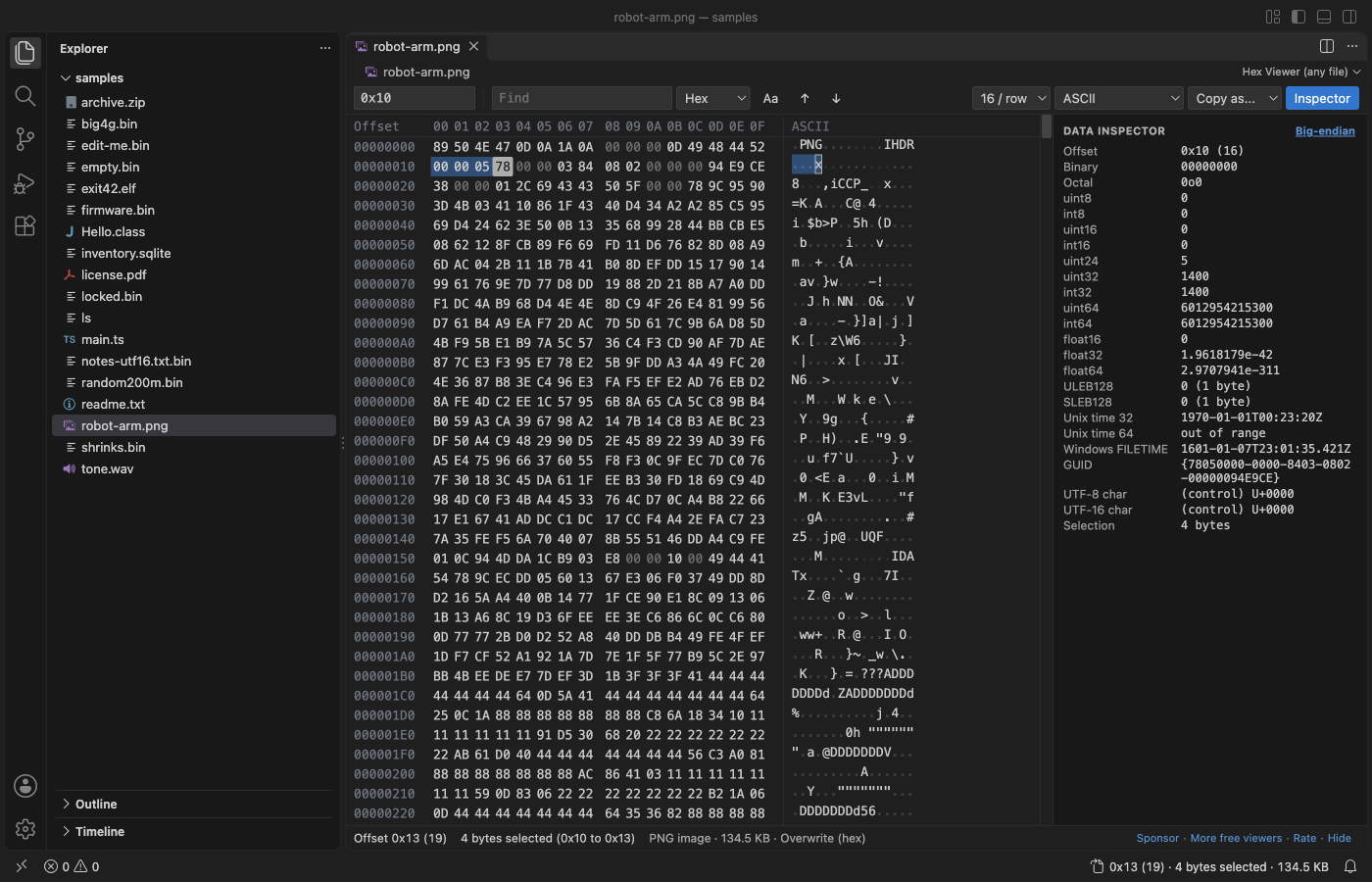
A binary template describes a file format, so the hex editor can show bytes as named fields with values instead of a wall of hex. In VS Code, install Hex Viewer by Zovo, open a file and click the Structure tab: it picks one of 20 built-in templates (PNG, ZIP, ELF, PE, Mach-O, PDF, SQLite and more) from the first bytes and shows a tree of fields. Click a field to select its bytes. The hex editor itself is free; the Structure view is part of Zovo Pro (USD 19 once) and works 3 times without a key.
Free, MIT license. Extension ID zovo.zovo-hex-viewer, version 0.3.7. Needs VS Code 1.90.0 or newer.
Steps in VS Code
- Install Hex Viewer from the Marketplace, or press Ctrl+P (Cmd+P on macOS) and run
ext install zovo.zovo-hex-viewer. - Right-click a file in the Explorer and pick "Open in Hex Viewer".
- Open the Structure tab in the side panel. Hex Viewer picks the template from the first bytes of the file and shows each field with its name, value, offset and size.
- Click a field to select its bytes in the grid. Edit a byte and the tree reads the new value.
- Click "Template..." to read the file with another template, or "JSON" or "C struct" to open the selected struct as JSON or as a packed C struct with its values.
- For your own format, put a JSON template in
.vscode/hex-templatesin your workspace. The built-in templates in the extension'stemplatesfolder are examples.
Steps in Cursor, Windsurf or VSCodium
- Open the Extensions view with Ctrl+Shift+X (Cmd+Shift+X on macOS).
- Search for
zovo.zovo-hex-viewerand click Install. Cursor, Windsurf and VSCodium install from Open VSX, where it is published aszovo/zovo-hex-viewer. - If your editor has no gallery, download the .vsix from the Open VSX page and run "Extensions: Install from VSIX...".
- Then use it the same way as in VS Code.
What Hex Viewer handles
- 20 built-in templates: PNG, JPEG, GIF, BMP, ICO and CUR, TIFF (also DNG and many camera raw files), WebP, WAV, FLAC, MP4 and MOV boxes, ZIP (also JAR, APK, DOCX, XLSX, EPUB), GZIP, TAR, PDF, the SQLite header, ELF, PE, Mach-O, Java class and PCAP.
- Your own templates as JSON: fields, types from u8 to u64 and f32 to f64, strings, LEB128, counts, conditions, switches, enums, flags, and offsets written as expressions such as
header.offset + 16. - A template is data, never code, so a template from someone else cannot run anything on your computer.
- Limits keep a broken file or template from hanging VS Code: 50,000 fields, 15 seconds and 100,000 items in one list. The tree says where it stopped.
- The free part of the editor works on files of any size: a 4 GB file opened in 0.6 s in the release check.
What it does not do
- It does not run 010 Editor
.bttemplates. Templates are JSON, and C-like scripting is not supported. - The PDF template reads classic xref tables. An xref stream (PDF 1.5 and later) is named but not unpacked.
- Templates read up to 16 MB from the end of a file when they look for a marker, as the ZIP and PDF templates do.
Free and Zovo Pro
Free, and staying free: opening files of any size, go to offset, find with ?? wildcards, copy as C, Python or base64, the data inspector, editing with insert, delete and undo, safe save, and the side-by-side compare of two files.
Zovo Pro adds these tools to Hex Viewer. Each one works 3 times on your computer before it asks for a license. Nothing about Pro shows when you open a file: no popup, no countdown, no banner.
- The Structure view: 20 built-in binary templates (PNG, JPEG, GIF, BMP, TIFF, WebP, WAV, FLAC, MP4, ZIP, GZIP, TAR, PDF, SQLite, ELF, PE, Mach-O, Java class, PCAP and ICO), your own JSON templates, and export of a struct as JSON or as a C struct.
- Bookmarks with a name, a color and a note, saved per file, with Markdown export.
- Checksums of the selection or the whole file: CRC-32, Adler-32, MD5, SHA-1, SHA-256 and SHA-512.
- A compare report: every differing range written to a text, CSV or JSON file.
- Find bytes or text in many files at once.
Zovo Pro costs USD 19 once. It is not a subscription, and one purchase covers every Zovo VS Code extension. Today it also covers the Pro tools in Postgres & MySQL Query Client and DOCX Viewer, and Pro tools added to other Zovo extensions later.
Two ways to unlock it:
- GitHub Sponsors: pick the "$19 one time" tier. Then, in VS Code, click a Pro tool and pick "Unlock with GitHub Sponsors" (or type "GitHub Sponsors" in the Command Palette) and sign in with the same GitHub account. A monthly sponsorship of USD 10 or more that is still running counts too.
- PayPal, no GitHub account needed: send USD 19 by PayPal with "Zovo Pro" in the note, then post the transaction ID with the Zovo Pro key form (a public GitHub issue, so post only the ID). The license key goes to the email address of your PayPal account within a day. Click a Pro tool and pick "I have a license key" (or type "license key" in the Command Palette) and paste it. The key is checked on your computer, with no network call.
A team of 5: USD 59 once by PayPal, with "Zovo Pro Team" in the note. Every rule and every Pro tool is on the Zovo Pro page.
In JetBrains IDEs (IntelliJ IDEA, PyCharm, WebStorm, CLion and others)
- Hex Viewer & Binary Viewer by Zovo. Our own JetBrains version. It was still waiting for JetBrains review on 9 November 2026, so the page may not offer an install yet, and it has no Structure view.
- BinEd - Binary/Hex Editor. A binary and hex editor plugin with 500,280 downloads. Use "Open In / Binary Editor" in the project files menu.
- Binary Template Support. Syntax highlighting and completion for 010 Editor
.bttemplate files (49 downloads). It edits templates; it does not run them on a file.
Other options
- Hex Editor (Microsoft) (
ms-vscode.hexeditor, 7.5 million installs, on Open VSX). Its own description: "Allows viewing and editing files in a hex editor". The most installed hex editor for VS Code. It has a data inspector but no templates. - nifty-hex (
nifty.nifty-hex, 109 installs, on Open VSX). Its own description mentions "a structure view for PNG, ZIP, WAV, ELF and PE files". Pick it if you need a free structure view for those 5 formats. - 010 Binary Template (
hearhellacopters.010-binary-template, 103 installs, not on Open VSX). Syntax highlighting, completion and an outline for writing 010 Editor.btfiles. It helps you write templates; it does not apply them to a file. - 010 Editor, ImHex or Kaitai Struct. Desktop tools. 010 Editor runs C-like Binary Templates and lists more than 330 formats in its repository (USD 59.95 home or academic use, USD 149.95 commercial use, on sweetscape.com on 9 November 2026). ImHex is a free desktop hex editor with its own pattern language. Kaitai Struct describes formats in YAML and generates parsers.
Install counts and Open VSX status were checked on 9 November 2026. Descriptions in quotes are the extensions' own.
Questions
What is a binary template in a hex editor?
A description of a file format: which fields come in which order, their types and sizes, and when a part repeats or depends on a flag. The hex editor applies it to a file and shows named fields with their values.
Is the template feature free?
The hex editor is free. The Structure view with templates is part of Zovo Pro, USD 19 once. It works 3 times on your computer first, so you can try it on your own files.
Can I write a template for my own format?
Yes. Save a JSON template in .vscode/hex-templates in your workspace or in a folder from the hexViewer.templateFolders setting. TEMPLATES.md in the GitHub repo explains the format.
More about Hex Viewer
Read the Hex Viewer page for every feature and setting, or the source code on GitHub.
Related guides
- Hex Viewer & Binary Viewer on the VS Code Marketplace (also on Open VSX). Opens any file as hex, edits bytes and compares two files, even files of many GB.
- Use a hex editor in VS Code
- Open a binary file in VS Code
- A 010 Editor alternative inside VS Code
- Compare binary files in VS Code
Zovo Pro and support
Zovo Pro: USD 19 once, every Zovo viewer. It turns on the Pro tools in this extension and in the other Zovo extensions you use. The free features stay free.
After a card payment your license key shows on the next page. Paste it with the command "Zovo Pro: Enter a key".
You can also support the work with no Pro:
Need your format supported?
Open a format request with a sample file, and I reply there whether it can be done. For USD 299 once, through this GitHub Sponsors tier, I add your file format or a missing feature to this extension, with tests, within 7 days.