Open files in VS Code and Cursor / Machine learning files
View a JSONL file as a table in VS Code
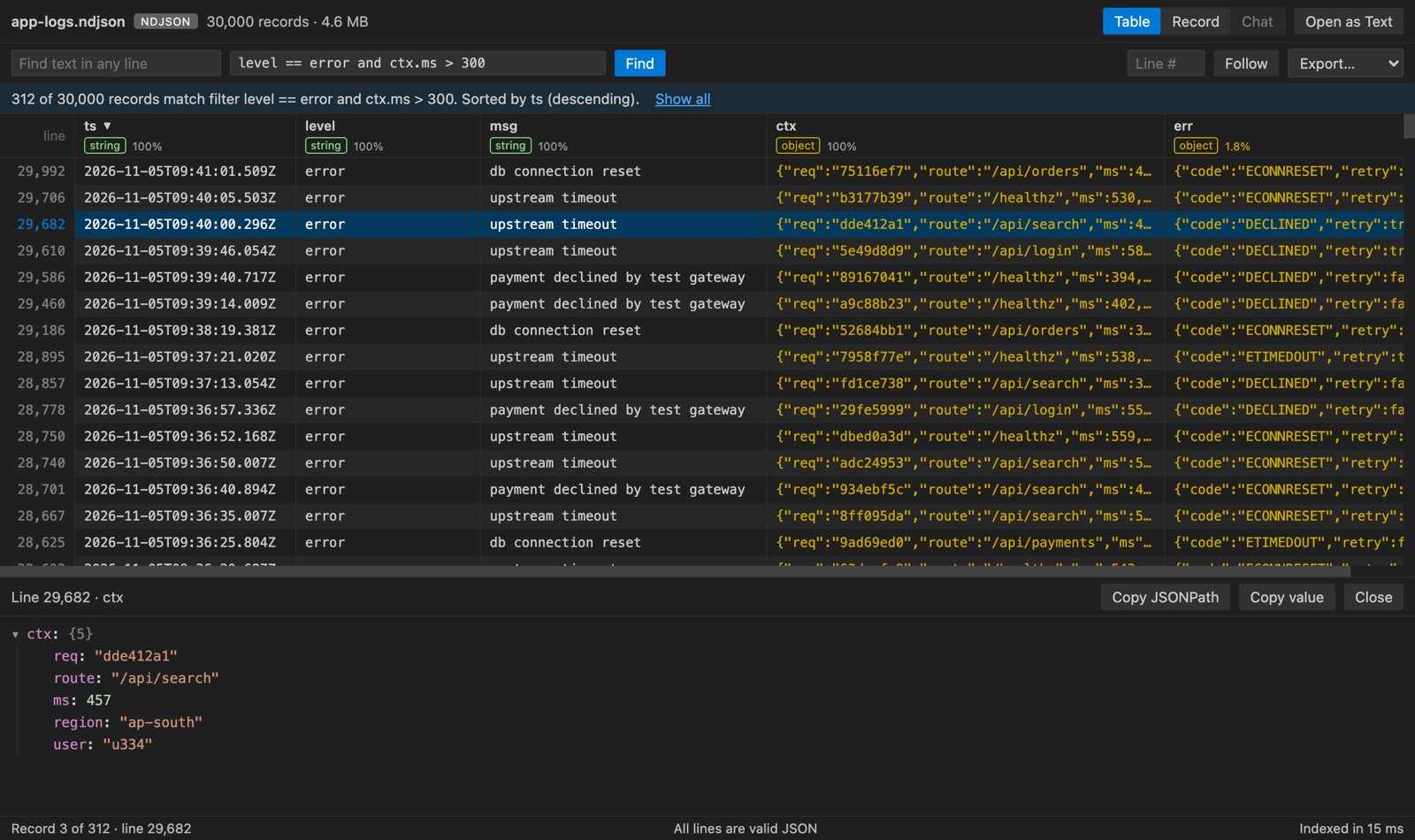
Install the free JSONL Viewer and click the .jsonl file. Each line becomes a row, with a column for each key and its type. Switch to Record view for one line as a tree, or Chat view to read fine-tuning and eval data as messages. A filter such as level == error and ctx.ms > 500 narrows the rows.
Free, MIT license. Extension ID zovo.zovo-jsonl-viewer, version 0.2.3. Needs VS Code 1.90.0 or newer.
Steps in VS Code
- Install JSONL Viewer from the Marketplace, or press Ctrl+P (Cmd+P on macOS) and run
ext install zovo.zovo-jsonl-viewer. - Click a
.jsonl,.ndjson,.jsonlinesor.jsonl.gzfile. - Switch between Table, Record and Chat at the top right.
- Type a filter and press Enter. Operators include
==,>,contains,=~(regex),existsandmissing. - Export the rows you see to CSV, a JSON array or JSON Lines.
Steps in Cursor, Windsurf or VSCodium
- Open the Extensions view with Ctrl+Shift+X (Cmd+Shift+X on macOS).
- Search for
zovo.zovo-jsonl-viewerand click Install. Cursor, Windsurf and VSCodium install from Open VSX, where it is published aszovo/zovo-jsonl-viewer. - If your editor has no gallery, download the .vsix from the Open VSX page and run "Extensions: Install from VSIX...".
- Then use it the same way as in VS Code.
What JSONL Viewer handles
- Chat formats from OpenAI (messages), ShareGPT (conversations) and Gemini (contents), with tool calls shown in boxes.
- In the test suite, a 40 MB file with 360,000 lines showed its first page in about 20 ms.
- Bad lines are marked in red with their line numbers. Follow mode tails a growing log.
What it does not do
- Files must be under 4 GB. Lines over 5 MB are cut in the table.
- .jsonl.gz files are unpacked in memory up to 512 MB.
- Use "Open as Text" to edit the raw lines.
Other options
- jsonl-viewer (
MBear.jsonl-viewer, 16,786 installs, not on Open VSX). Another JSONL viewer. Not on Open VSX. - jq.
jq -c 'select(.level == "error")' file.jsonlfilters lines in a terminal.
Install counts and Open VSX status were checked on 8 November 2026. Descriptions in quotes are the extensions' own.
Questions
Can I read OpenAI fine-tuning files as a conversation?
Yes. Chat view shows the system, user, assistant and tool messages of each record as bubbles.
How big a file can it open?
Up to 4 GB. It indexes the file as a stream and shows 200 rows at a time.
Does it work offline?
Yes. It makes no network calls and has no telemetry.
More about JSONL Viewer
Read the JSONL Viewer page for every feature and setting, or the source code on GitHub.
Related guides
- View .npy and .npz NumPy files in VS Code
- A safetensors viewer for VS Code
- Open a .pkl pickle file in VS Code without running it
- Open a .docx Word file in VS Code
Support this work
If this extension saves you time, you can support the work on GitHub Sponsors. Monthly tiers start at $5, and one-time tiers start at $15. Sponsorship is optional, and the tool works the same without it.