Open files in VS Code and Cursor / Binary, network and hardware
Open a binary file in VS Code
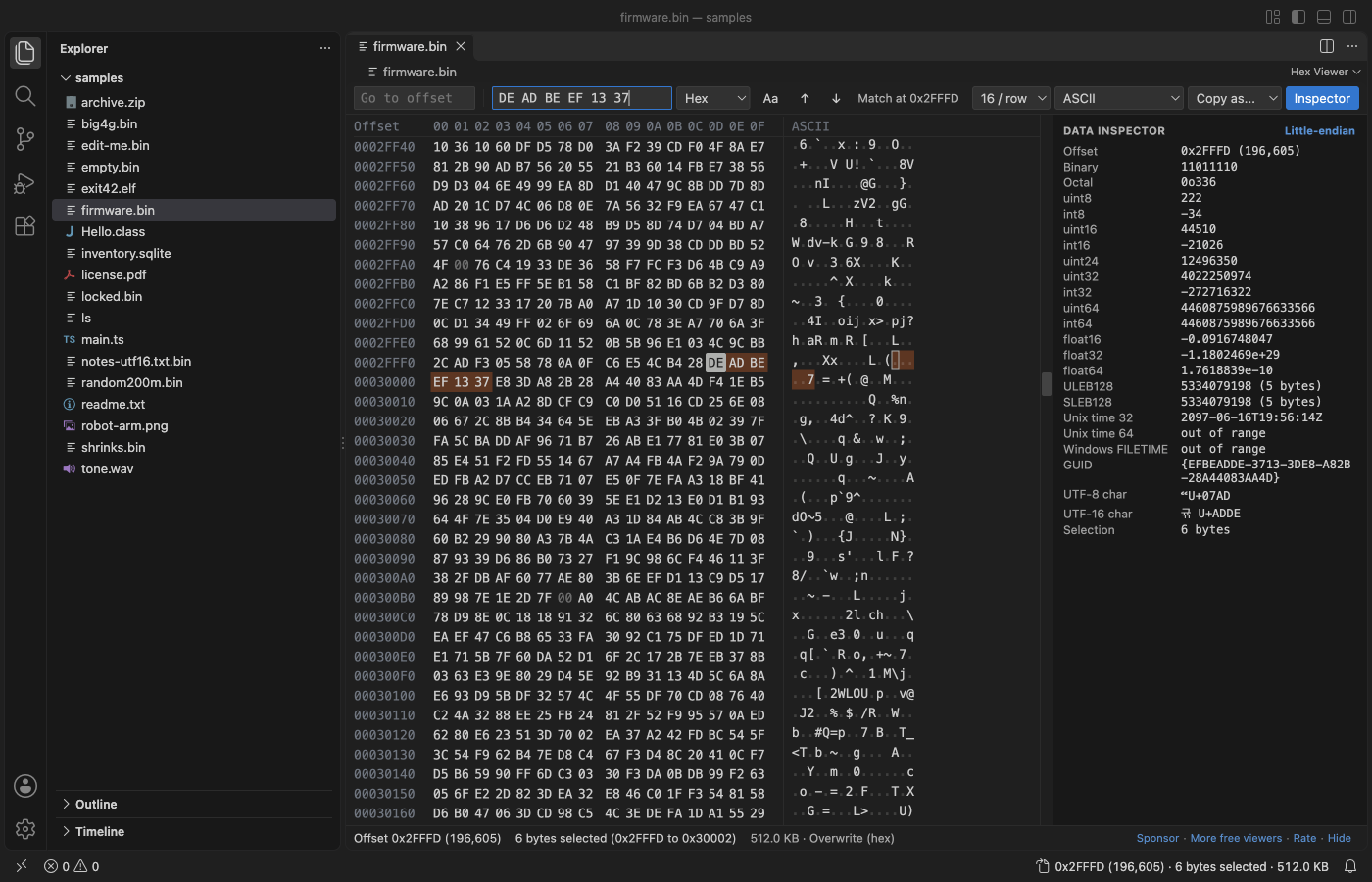
VS Code says a binary file "is not displayed in the text editor" and offers "Open Anyway", which shows the bytes as broken text. To read the bytes, open the file in a hex view. Install the free Hex Viewer by Zovo, right-click the file and pick "Open in Hex Viewer". You see every byte in hex and as text, with offsets, search and a data inspector.
Free, MIT license. Extension ID zovo.zovo-hex-viewer, version 0.3.7. Needs VS Code 1.90.0 or newer.
Steps in VS Code
- Install Hex Viewer from the Marketplace, or press Ctrl+P (Cmd+P on macOS) and run
ext install zovo.zovo-hex-viewer. - Right-click the file in the Explorer and pick "Open in Hex Viewer".
- If the file is already open in a tab, pick "Open in Hex Viewer" from the editor title menu (
...), or run "Reopen Editor With...". - To open a file type in hex every time, run "Reopen Editor With..." and pick "Configure default editor" for that file type.
.bin,.dat,.img,.rom,.dmpand.dumpfiles already open in hex. - Move the cursor to a byte and read the data inspector on the right: the same bytes as integers, floats, times and characters.
Steps in Cursor, Windsurf or VSCodium
- Open the Extensions view with Ctrl+Shift+X (Cmd+Shift+X on macOS).
- Search for
zovo.zovo-hex-viewerand click Install. Cursor, Windsurf and VSCodium install from Open VSX, where it is published aszovo/zovo-hex-viewer. - If your editor has no gallery, download the .vsix from the Open VSX page and run "Extensions: Install from VSIX...".
- Then use it the same way as in VS Code.
What Hex Viewer handles
- Any file type: firmware, disk images, memory dumps, compiled programs, images, databases.
- Large files. Only the rows on screen are read, so a 4 GB image opens in under a second.
- Search for hex bytes with
??wildcards, for text, or for UTF-16 text, across the whole file. - Read-only files open as view only. Set
hexViewer.readOnlyto turn editing off for every file.
What it does not do
- The free version shows raw bytes. Reading a format into named fields (the Structure view) is a Zovo Pro feature, with 3 free tries.
- When an edit changes the file size, the save writes a new copy and then swaps it in, so it needs free disk space for one more copy. Hex Viewer checks that first.
- Text files such as
.txt,.tsand Intel.hexstill open in the text editor unless you pick Hex Viewer.
In JetBrains IDEs (IntelliJ IDEA, PyCharm, WebStorm, CLion and others)
- Hex Viewer & Binary Viewer by Zovo. Our own JetBrains version. It was submitted to the JetBrains Marketplace and was still waiting for JetBrains review on 9 November 2026, so the page may not offer an install yet.
- BinEd - Binary/Hex Editor. A binary and hex editor plugin with 500,180 downloads. Use "Open In / Binary Editor" in the project files menu.
- HexView. Views any file in hexadecimal format from "View Hex format" in the Project View menu. 15,005 downloads.
Other options
- Hex Editor (Microsoft) (
ms-vscode.hexeditor, 7.5 million installs, on Open VSX). Not built into VS Code, but made by Microsoft and the most installed choice. Its own description: "Allows viewing and editing files in a hex editor". - binary viewer (
qiaojie.binary-viewer, 188,074 installs, not on Open VSX). Its own description: "binary viewer for vscode". Not on Open VSX. - xxd or hexdump.
xxd file.bin | lessorhexdump -C file.bin | lessin a terminal prints the bytes with offsets on macOS and Linux.
Install counts and Open VSX status were checked on 9 November 2026. Descriptions in quotes are the extensions' own.
Questions
Why does VS Code say the file is binary?
VS Code found bytes in the file that do not look like text. "Open Anyway" shows them as garbled characters. Editing and saving there can change bytes you did not touch, so use a hex view to change bytes.
Is it safe to open an unknown binary this way?
Yes. Hex Viewer only reads the bytes. It never runs the file, makes no network calls and writes to the file only when you save.
Does it work in Cursor?
Yes. Cursor, Windsurf and VSCodium install it from Open VSX as zovo/zovo-hex-viewer.
More about Hex Viewer
Read the Hex Viewer page for every feature and setting, or the source code on GitHub.
Related guides
- Hex Viewer & Binary Viewer on the VS Code Marketplace (also on Open VSX). Opens any file as hex, edits bytes and compares two files, even files of many GB.
- Use a hex editor in VS Code
- Read binary files with templates in a VS Code hex editor
- A 010 Editor alternative inside VS Code
- Compare binary files in VS Code
Zovo Pro and support
Zovo Pro: USD 19 once, every Zovo viewer. It turns on the Pro tools in this extension and in the other Zovo extensions you use. The free features stay free.
After a card payment your license key shows on the next page. Paste it with the command "Zovo Pro: Enter a key".
You can also support the work with no Pro:
Need your format supported?
Open a format request with a sample file, and I reply there whether it can be done. For USD 299 once, through this GitHub Sponsors tier, I add your file format or a missing feature to this extension, with tests, within 7 days.