Open files in VS Code and Cursor / Binary, network and hardware
Open a file inside a ZIP without extracting it
ZIP Viewer & Archive Explorer is a free VS Code extension. Click a .zip, .jar, .vsix, .tar, .tar.gz or .gz file and it lists the folders and files inside. Double-click a file and it opens in a normal read-only tab, read straight from the archive, so nothing is unpacked. Code gets syntax colors and images open in the image preview. Browsing, opening entries, name search and extraction are free. Zovo Pro (USD 19 once) adds compare two archives, export the entry list and find a file in all archives of a folder, with 3 free tries each.
Free, MIT license. Extension ID zovo.zip-archive-explorer, version 0.2.2. Needs VS Code 1.90.0 or newer.
Also free from Zovo: Hex Viewer & Binary Viewer, VS Code Marketplace · Open VSX (Cursor, Windsurf).
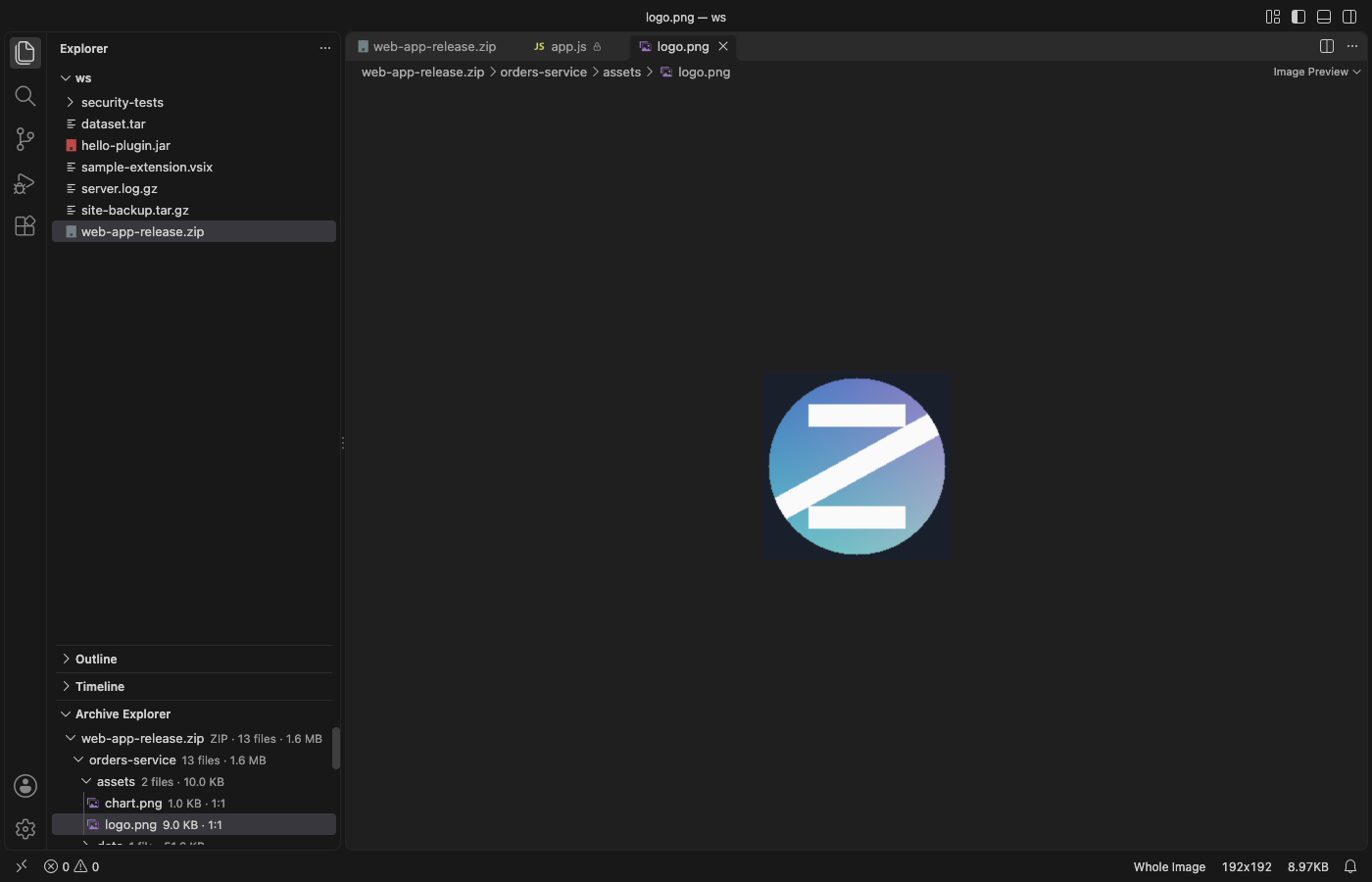
Steps in VS Code
- Install ZIP Viewer & Archive Explorer from the Marketplace, or press Ctrl+P (Cmd+P on macOS) and run
ext install zovo.zip-archive-explorer. - Click a
.zip,.jar,.vsix,.tar,.tar.gz,.tgzor.gzfile in the Explorer. It opens as a list of folders and files with size, packed size, ratio and date. For.war,.whl,.nupkg,.apkor.epub, right-click and pick Open in Archive Explorer. - Find the file. Double-click a folder, use the path bar at the top, or press Backspace to go up. Or type in the search box.
*and?work as wildcards, for example*.json. - Double-click the file or press Enter. It opens read-only in a normal tab. Open to the side puts it next to the archive. A ZIP inside the ZIP opens as another archive.
- The Archive Explorer section of the Explorer lists every archive you opened. Right-click an entry there for Open to the Side, Extract... or Copy Path.
- To change the file, select it and click Extract.... One file goes through a save dialog. Names with
..or an absolute path are never written, and the archive itself is never changed.
Where Zovo Pro saves time
Browsing archives, opening entries in tabs, name search, the side bar tree, Copy Path and extraction are free.
When you know the file name but not which build, backup or release archive holds it, opening each archive takes too long. Find a file in all archives of a folder searches the entry names of every ZIP, JAR, WAR, VSIX, TAR and GZ file under a folder, lists each match with its archive and path, and opens the one you pick in a read-only tab. It writes no files. The other two Pro tools are Compare two archives (a Markdown report of added, removed and changed files) and Export the entry list as CSV or JSON.
With Find a file in all archives of a folder (Zovo Pro)
- Run "Archive Explorer: Find a File in All Archives of a Folder... (Pro)" from the Command Palette and pick the folder to search.
- Type a file name.
*and?work as wildcards, for examplelog4j*.jaror*.properties. - Pick a match from the list. It opens read-only in a tab, like any entry. A try counts only when there is at least one match.
Find a file in all archives of a folder works 3 times on your computer before it asks for a license, and a try counts only when you get a result. Opening a file shows no popup and no countdown.
Zovo Pro costs USD 19 once. It is not a subscription, and it turns on the Pro tools in every Zovo extension, not only ZIP Viewer & Archive Explorer. After a card payment (Stripe) your license key shows on the next page. In VS Code, run "Zovo Pro: Enter Zovo Pro license key" from the Command Palette and paste it. The key is checked on your computer, with no network call. With GitHub Sponsors, pick the "$19 one time" tier, then run "Zovo Pro: I already paid: unlock with GitHub Sponsors" and sign in with the same GitHub account. With PayPal, send USD 19 with "Zovo Pro" in the note and the key comes by email within a day.
A team of 5: USD 59 once, by card or by PayPal. Every rule and every Pro tool is on the Zovo Pro page.
Steps in Cursor, Windsurf or VSCodium
- Open the Extensions view with Ctrl+Shift+X (Cmd+Shift+X on macOS).
- Search for
zovo.zip-archive-explorerand click Install. Cursor, Windsurf and VSCodium install from Open VSX, where it is published aszovo/zip-archive-explorer. - If your editor has no gallery, download the .vsix from the Open VSX page and run "Extensions: Install from VSIX...".
- Then use it the same way as in VS Code.
What ZIP Viewer & Archive Explorer handles
- ZIP, JAR and VSIX, with Stored and Deflate entries, ZIP64 and self-extracting archives.
- TAR (ustar, GNU long names and pax headers), TAR.GZ, TGZ and single GZ files.
- WAR, EAR, WHL, NUPKG, APK, AAR, XPI and EPUB through Open in Archive Explorer.
- Archives with up to 200,000 entries, read from disk with range reads, so a large ZIP is not loaded whole.
What it does not do
- Entries compressed with BZIP2, LZMA, Zstandard or Deflate64, and encrypted entries, are listed but not opened.
- 7z, RAR, XZ and BZ2 files are not supported.
- Entries are read-only. Extract a file to change it.
- Entries over 512 MB do not open in a tab but can still be extracted. A
.tar.gzis unpacked in memory, up to 2 GB by default.
Other options
- 7-Zip. Free archive manager for Windows. Its file manager lists a ZIP, 7z or RAR file and opens a file from it with a double-click.
- unzip -p. Free on most systems.
unzip -p archive.zip path/in/zip.txtprints one file from the ZIP without writing anything to disk. - tar -xOf. Free on most systems.
tar -xOf archive.tar.gz path/in/tar.txtprints one file from a TAR or TAR.GZ to the terminal.
Install counts and Open VSX status were checked on 12 November 2026. Descriptions in quotes are the extensions' own.
Questions
Is the file copied to a temp folder when I open it?
No. The entry is read from the archive into a read-only tab. Only Extract writes files to disk.
Can I edit a file inside the ZIP?
No. Entries are read-only and the archive is never changed. Extract the file, edit it, and pack the archive again with another tool.
Are my archives uploaded?
No. The extension works offline, makes no network calls and has no telemetry.
Does it work in Cursor or Windsurf?
Yes. Cursor, Windsurf and VSCodium install extensions from Open VSX. Search for the extension in their Extensions view and install it there.
More about ZIP Viewer & Archive Explorer
Read the ZIP Viewer & Archive Explorer page for every feature and setting, or the source code on GitHub.
Related guides
- Hex Viewer & Binary Viewer on the VS Code Marketplace (also on Open VSX). Opens any file as hex, edits bytes and compares two files, even files of many GB.
- Compare two ZIP files in VS Code
- Use a hex editor in VS Code
- Open a binary file in VS Code
- Open a PCAP file in VS Code
Support this work
If this extension saves you time, you can support the work on GitHub Sponsors. Monthly tiers start at $5, and one-time tiers start at $15. Sponsorship is optional, and the tool works the same without it.
Need your format supported?
Open a format request with a sample file, and I reply there whether it can be done. For USD 299 once, through this GitHub Sponsors tier, I add your file format or a missing feature to this extension, with tests, within 7 days.