Open files in VS Code and Cursor / Machine learning files
Open a .pkl pickle file in VS Code without running it
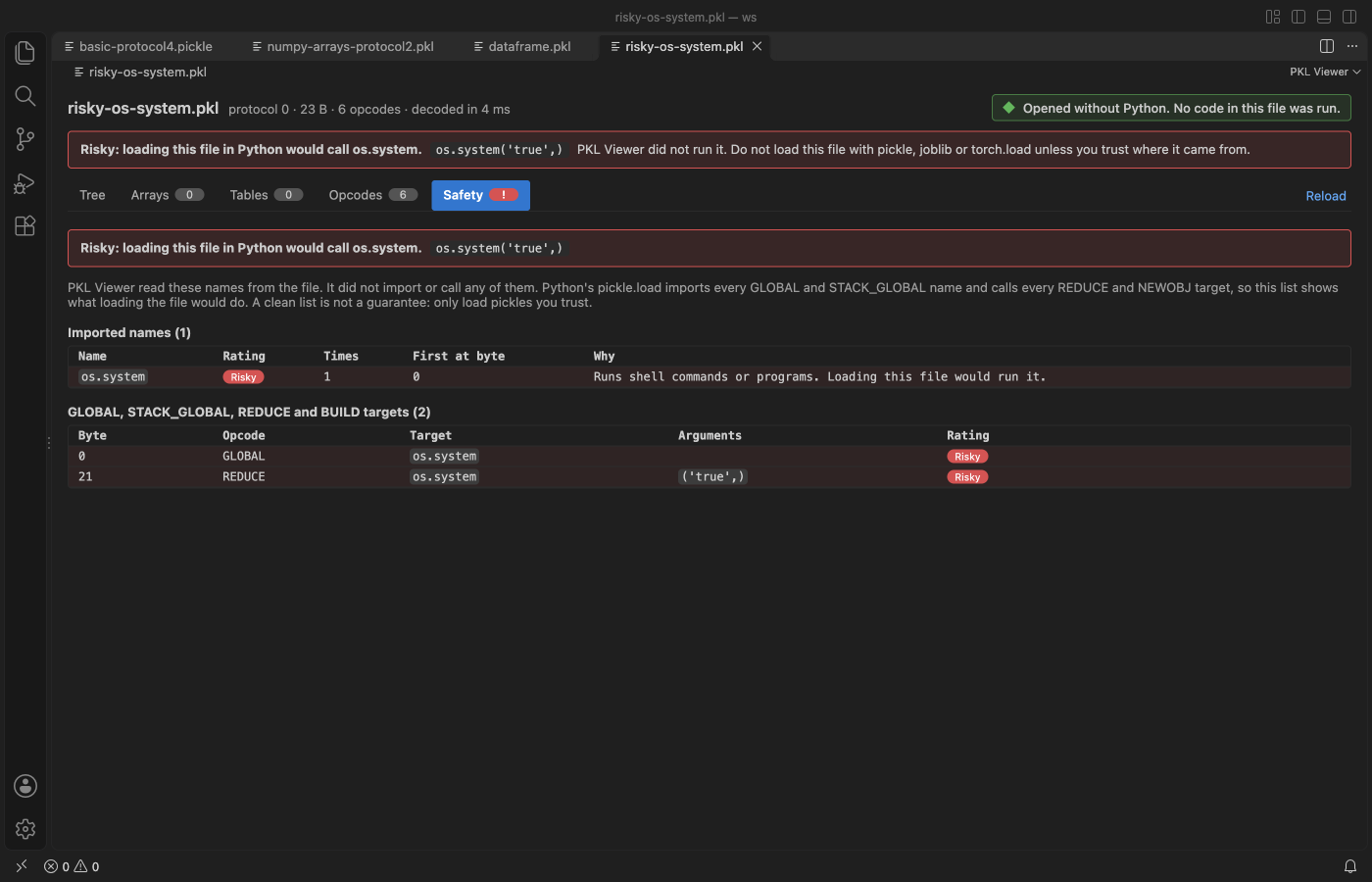
Loading a pickle with Python can run code that is inside the file. The free Pickle Viewer & PKL Viewer by Zovo reads .pkl and .pickle files without Python and without running anything. It shows the data as a tree, NumPy arrays with stats, pandas DataFrames as tables, the opcodes, and a Safety tab that lists every call the pickle would make.
Free, MIT license. Extension ID zovo.zovo-pickle-viewer, version 0.1.4. Needs VS Code 1.90.0 or newer.
Steps in VS Code
- Install Pickle Viewer & PKL Viewer from the Marketplace, or press Ctrl+P (Cmd+P on macOS) and run
ext install zovo.zovo-pickle-viewer. - Click a
.pklor.picklefile. For.pfiles, right-click and pick "Open in PKL Viewer". - Read the Tree tab. Classes that need their package show as
module.Classplaceholders. - Open Arrays for NumPy data and Tables for pandas DataFrames.
- Check the Safety tab. A red banner opens it for you when a file calls something risky such as os.system.
Steps in Cursor, Windsurf or VSCodium
- Open the Extensions view with Ctrl+Shift+X (Cmd+Shift+X on macOS).
- Search for
zovo.zovo-pickle-viewerand click Install. Cursor, Windsurf and VSCodium install from Open VSX, where it is published aszovo/zovo-pickle-viewer. - If your editor has no gallery, download the .vsix from the Open VSX page and run "Extensions: Install from VSIX...".
- Then use it the same way as in VS Code.
What Pickle Viewer & PKL Viewer handles
- Pickle protocols 0 to 5, NumPy 1.x and 2.x, pandas 2.x and older layouts.
- Ratings for every call: Risky, Check, Needs package and Data type.
What it does not do
- A clean Safety list is not a promise that a file is safe. Only load pickles you trust in Python.
- Files over 512 MB show a message. Containers show their first 1,000 items and tables their first 1,000 rows.
- PyTorch .pt archives and joblib files with compressed arrays do not open here. Use Tensor Viewer for .pt files.
Other options
- PKL Viewer (
alarm.pkl-viewer, 26,801 installs, on Open VSX). A different extension with a similar name. Its own description: "View Python pickle (.pkl) files directly in the VS Code editor." - pickle-viewer (
SDPolite.pickle-viewer, 9,859 installs, not on Open VSX). Another pickle viewer. Not on Open VSX. - pickletools.
python -m pickletools file.pkllists the opcodes without loading the objects.
Install counts and Open VSX status were checked on 8 November 2026. Descriptions in quotes are the extensions' own.
Questions
Is it dangerous to open a pickle file?
Loading it with pickle.load or pandas.read_pickle can run code from the file. Reading it with this viewer does not, because the reader never imports or calls anything.
Do I need Python installed?
No.
Can it open PyTorch .pt files?
No. Tensor Viewer opens those, also without running the pickle.
More about Pickle Viewer & PKL Viewer
Read the Pickle Viewer & PKL Viewer page for every feature and setting, or the source code on GitHub.
Related guides
- View .npy and .npz NumPy files in VS Code
- A safetensors viewer for VS Code
- View a JSONL file as a table in VS Code
- Open a .docx Word file in VS Code
Support this work
If this extension saves you time, you can support the work on GitHub Sponsors. Monthly tiers start at $5, and one-time tiers start at $15. Sponsorship is optional, and the tool works the same without it.