Open files in VS Code and Cursor / Tables and data
Use a PostgreSQL client in VS Code
VS Code cannot connect to a database on its own. Install the free Postgres & MySQL Query Client by Zovo, click Add Connection in its view and paste a URL such as postgres://me@localhost:5432/shop. Then press Ctrl+Enter (Cmd+Enter on macOS) in a .sql file to run a query. Connections are unlimited, editing rows is free, and there is no subscription.
Free, MIT license. Extension ID zovo.zovo-sql-client, version 0.2.4. Needs VS Code 1.90.0 or newer.
Also free from Zovo: SQLite Editor & Viewer, VS Code Marketplace · Open VSX (Cursor, Windsurf).
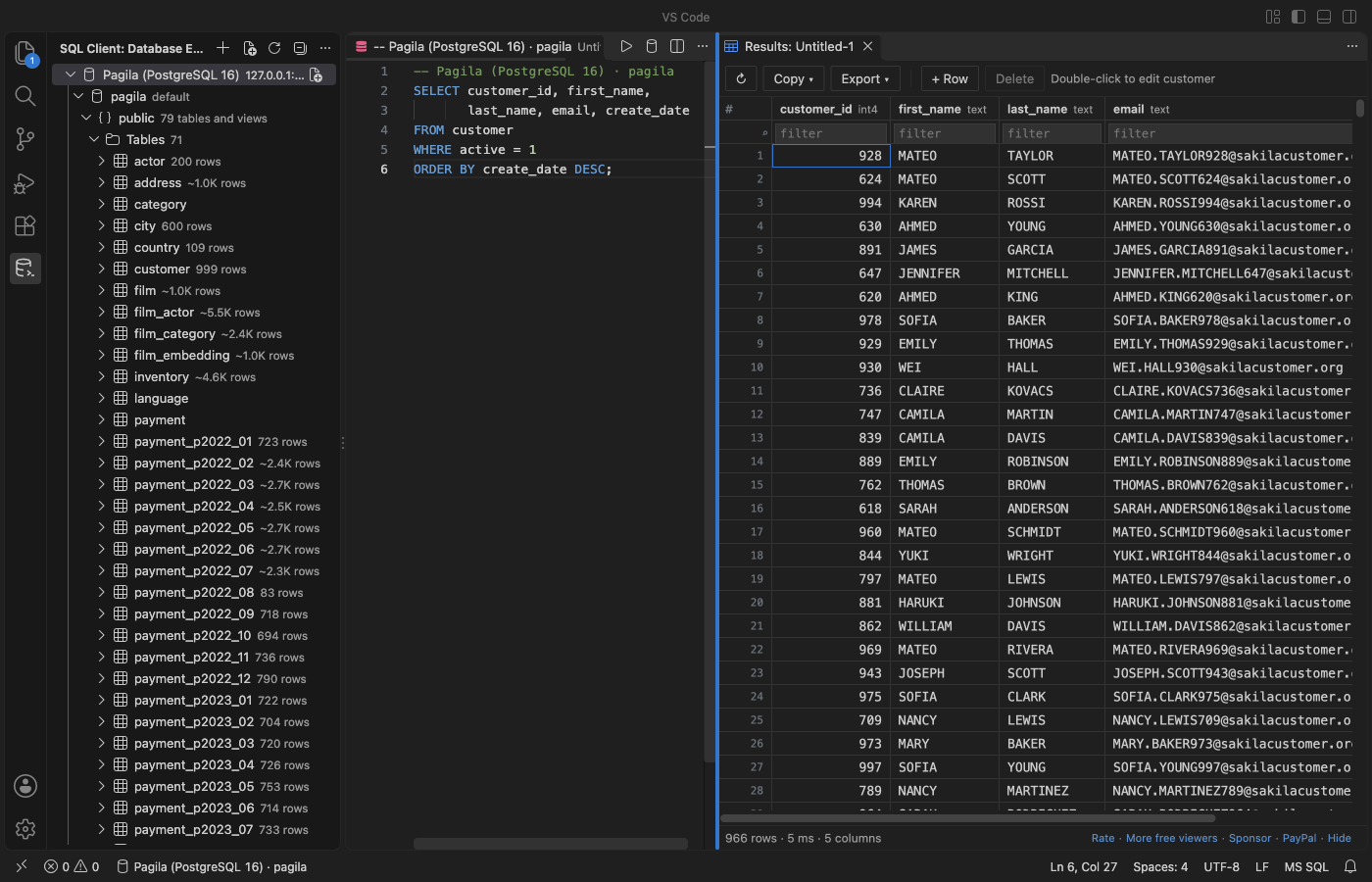
Steps in VS Code
- Install Postgres & MySQL Query Client from the Marketplace, or press Ctrl+P (Cmd+P on macOS) and run
ext install zovo.zovo-sql-client. - Open the SQL Client view in the activity bar and click Add Connection.
- Paste a
postgres://URL, or fill in host, port, user, database and SSL mode. Click Test connection, then Save. The password goes to VS Code's secret storage. - Click New Query on the connection, type SQL and press Ctrl+Enter to run the statement at the cursor. Ctrl+Alt+Enter runs the whole file.
- Click a table to browse it. Double-click a cell to edit it. Review shows the exact
UPDATE, and it runs in one transaction.
Steps in Cursor, Windsurf or VSCodium
- Open the Extensions view with Ctrl+Shift+X (Cmd+Shift+X on macOS).
- Search for
zovo.zovo-sql-clientand click Install. Cursor, Windsurf and VSCodium install from Open VSX, where it is published aszovo/zovo-sql-client. - If your editor has no gallery, download the .vsix from the Open VSX page and run "Extensions: Install from VSIX...".
- Then use it the same way as in VS Code.
What Postgres & MySQL Query Client handles
- PostgreSQL with every SSL mode from disable to verify-full, and an optional CA file. MySQL, MariaDB and SQLite files too.
- A Database Explorer with schemas, tables, views, columns with types and keys, indexes and estimated row counts. Each level loads when you open it.
- A results grid that loads 1,000 rows at a time. When not every row is loaded, sort and filter run on the server, so a 5,000,000-row table sorts correctly.
- Cancel stops the running statement on the server with
pg_cancel_backend. - Export a result or a whole table to CSV, JSON or SQL INSERT, streamed to the file. 5,000,000 rows took 5.3 seconds in the release test.
- A read-only switch per connection that the server enforces, and a question before an
UPDATEorDELETEwithoutWHERE.
What it does not do
- PostgreSQL, MySQL, MariaDB and SQLite only. No SQL Server, Oracle, MongoDB or Redis.
- A table without a primary key is read-only in the grid, and the grid says why.
- SQLite files are read into memory, up to 512 MB by default.
- The ER diagram, schema compare, CSV import and query library are Zovo Pro tools, with 3 free tries each. Everything else on this page is free.
In JetBrains IDEs (IntelliJ IDEA, PyCharm, WebStorm, CLion and others)
- Database Tools and SQL. JetBrains' own database tools, in DataGrip and IntelliJ IDEA Ultimate. They connect to PostgreSQL and MySQL, run SQL and edit table data. For WebStorm they come as this plugin (1,090,402 downloads). Zovo has no JetBrains database plugin.
- Database Navigator. A free plugin with 5,052,374 downloads. Its listing calls it "a database development and management plugin for JetBrains IDEs".
Other options
- PostgreSQL (Microsoft) (
ms-ossdata.vscode-pgsql, 805,424 installs, not on Open VSX). Its own description: "Develop, query, and manage PostgreSQL (Postgres) databases with IntelliSense, Object Explorer, schema tools, and AI-assisted workflows." PostgreSQL only. Not on Open VSX. - PostgreSQL Client (
cweijan.vscode-postgresql-client2, 920,888 installs, not on Open VSX). Its own description: "PostgreSQL Client for Visual Studio Code." The most installed result for "postgres client" on the Marketplace. Not on Open VSX. - SQLTools (
mtxr.sqltools, 7.2 million installs, on Open VSX). Its own description: "Connecting users to many of the most commonly used databases." Each database needs its own driver extension. - psql or pgAdmin.
psqlin the VS Code terminal needs no extension. pgAdmin is the free desktop tool for PostgreSQL.
Install counts and Open VSX status were checked on 9 November 2026. Descriptions in quotes are the extensions' own.
Questions
Is there a free PostgreSQL client for VS Code?
Yes. Postgres & MySQL Query Client is free, with unlimited connections, row editing and export. The PostgreSQL extension from Microsoft and SQLTools are free too.
Does it keep a connection busy while I am idle?
No. It runs no keep-alive or polling query. In the release test the PostgreSQL log showed 0 statements in 60 idle seconds while connections were open.
Where is my password stored?
In VS Code's secret storage, which uses the system keychain. Never in settings or logs.
More about Postgres & MySQL Query Client
Read the Postgres & MySQL Query Client page for every feature and setting, or the source code on GitHub.
Related guides
- SQLite Editor & Viewer on the VS Code Marketplace (also on Open VSX). Opens .db and .sqlite files as tables, edits cells and runs SQL.
- Use a MySQL client in VS Code
- See an ER diagram of your database in VS Code
- Compare two Postgres schemas
- See a Postgres EXPLAIN plan as a tree in VS Code
Zovo Pro and support
Zovo Pro: USD 19 once, every Zovo viewer. It turns on the Pro tools in this extension and in the other Zovo extensions you use. The free features stay free.
After a card payment your license key shows on the next page. Paste it with the command "Zovo Pro: Enter a key".
You can also support the work with no Pro:
Need your format supported?
Open a format request with a sample file, and I reply there whether it can be done. For USD 299 once, through this GitHub Sponsors tier, I add your file format or a missing feature to this extension, with tests, within 7 days.