Open files in VS Code and Cursor / Machine learning files
A safetensors viewer for VS Code
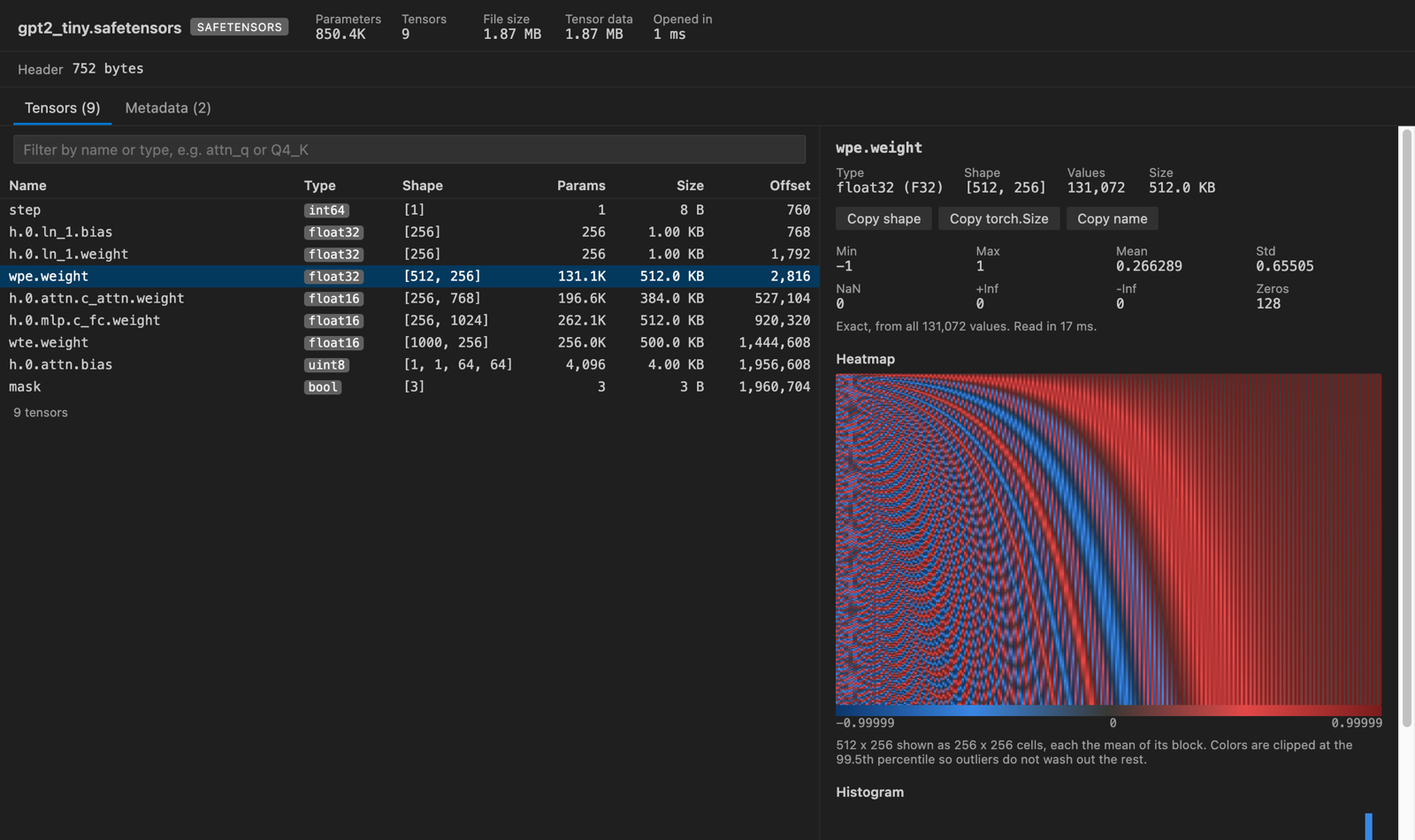
Install the free Tensor Viewer and click the .safetensors file. It reads the header first, so even a large file lists every tensor with its dtype and shape right away (a 10.7 GB file opened in under a second in our test). Click a tensor to load its values and see stats, a heatmap and a histogram.
Free, MIT license. Extension ID zovo.tensor-viewer, version 0.4.0. Needs VS Code 1.90.0 or newer.
Steps in VS Code
- Install Tensor Viewer from the Marketplace, or press Ctrl+P (Cmd+P on macOS) and run
ext install zovo.tensor-viewer. - Click a
.safetensorsfile. The table lists every tensor. - Click a tensor to see min, max, mean, std, NaN and Inf counts and a heatmap.
- Save one tensor as .npy or CSV if you want to work with it elsewhere.
Steps in Cursor, Windsurf or VSCodium
- Open the Extensions view with Ctrl+Shift+X (Cmd+Shift+X on macOS).
- Search for
zovo.tensor-viewerand click Install. Cursor, Windsurf and VSCodium install from Open VSX, where it is published aszovo/tensor-viewer. - If your editor has no gallery, download the .vsix from the Open VSX page and run "Extensions: Install from VSIX...".
- Then use it the same way as in VS Code.
What Tensor Viewer handles
- GGUF files too: metadata, plus Q8_0, Q4_0, Q4_K, Q5_K, Q6_K and other common types dequantized for stats.
- PyTorch .pt, .pth and .ckpt files, decoded as data. The header says whether torch.load with weights_only=True should accept the file.
What it does not do
- Stats come from a sample of 2,000,000 values by default, and the panel says when it is a sample.
- Sharded GGUF files show the open shard only. Some GGUF types (Q2_K, Q3_K, IQ) show no stats.
Other options
- safetensors viewer (
zhoukz.safetensors, 2,484 installs, not on Open VSX). Its own description: "A .safetensors metadata viewer." Not on Open VSX. - Hugging Face Hub. Model pages on the Hub show the tensors of hosted safetensors files in the browser.
- The safetensors Python package.
safe_open(path, "pt")lists keys and loads single tensors.
Install counts and Open VSX status were checked on 8 November 2026. Descriptions in quotes are the extensions' own.
Questions
Is safetensors safe to open?
The format holds only a JSON header and raw numbers, so there is no code to run. For pickle-based .pt files, Tensor Viewer decodes the pickle as data and never runs it.
Can I look at a GGUF model the same way?
Yes. Click the .gguf file to see its metadata and tensor table.
Does it upload anything?
No. It has no network access and no telemetry.
More about Tensor Viewer
Read the Tensor Viewer page for every feature and setting, or the source code on GitHub.
Related guides
- View .npy and .npz NumPy files in VS Code
- Open a .pkl pickle file in VS Code without running it
- View a JSONL file as a table in VS Code
- Open a .docx Word file in VS Code
Support this work
If this extension saves you time, you can support the work on GitHub Sponsors. Monthly tiers start at $5, and one-time tiers start at $15. Sponsorship is optional, and the tool works the same without it.