Open files in VS Code and Cursor / Office files
Read PDFs in dark mode in VS Code
VS Code has no PDF viewer of its own. With the free PDF Reader extension, PDF pages follow your theme, so a dark theme gives dark pages. Click the moon button, or run "PDF: Toggle Dark Pages", to switch the open file. Photos keep their real colors, because the page is inverted and each raster image is then painted back in its original pixels.
Free, MIT license. Extension ID zovo.pdf-viewer-dark, version 0.2.8. Needs VS Code 1.90.0 or newer.
Steps in VS Code
- Install PDF Reader from the Marketplace, or press Ctrl+P (Cmd+P on macOS) and run
ext install zovo.pdf-viewer-dark. - Click any
.pdffile. With a dark theme, the pages are dark. - Click the moon button, or run "PDF: Toggle Dark Pages", to switch for this file.
- To set it for every PDF, set
pdfViewer.darkModetoonoroffin Settings. - Prefer softer contrast? Run "PDF: Toggle Sepia Pages".
Steps in Cursor, Windsurf or VSCodium
- Open the Extensions view with Ctrl+Shift+X (Cmd+Shift+X on macOS).
- Search for
zovo.pdf-viewer-darkand click Install. Cursor, Windsurf and VSCodium install from Open VSX, where it is published aszovo/pdf-viewer-dark. - If your editor has no gallery, download the .vsix from the Open VSX page and run "Extensions: Install from VSIX...".
- Then use it the same way as in VS Code.
What PDF Reader handles
- Search with highlights and a match counter, an outline and page thumbnails.
- Highlights in four colors, and "Copy Highlights as Markdown" with page links.
- Reloads when LaTeX or Typst rebuilds the PDF, and stays on the same page.
What it does not do
- Charts drawn as vector lines are inverted like text, because to the PDF they are lines.
- It doesn't fill forms, edit the PDF or print. Highlights are stored in VS Code, not in the PDF.
- Files over 200 MB ask before they load.
Other options
- vscode-pdf (
tomoki1207.pdf, 14.4 million installs, on Open VSX). The most installed PDF viewer. Its own description: "Display pdf file in VSCode." - PDF Viewer (
mathematic.vscode-pdf, 2.9 million installs, on Open VSX). Another pdf.js based viewer, also on Open VSX. - LaTeX Workshop (
James-Yu.latex-workshop, 5.9 million installs, on Open VSX). If you only read PDFs that LaTeX Workshop builds, its own viewer has thelatex-workshop.view.pdf.invertsetting.
Install counts and Open VSX status were checked on 8 November 2026. Descriptions in quotes are the extensions' own.
Questions
How do I turn dark pages off for one PDF?
Click the moon button in the toolbar. Set pdfViewer.darkMode to off to turn it off everywhere.
Why are my charts inverted but photos are not?
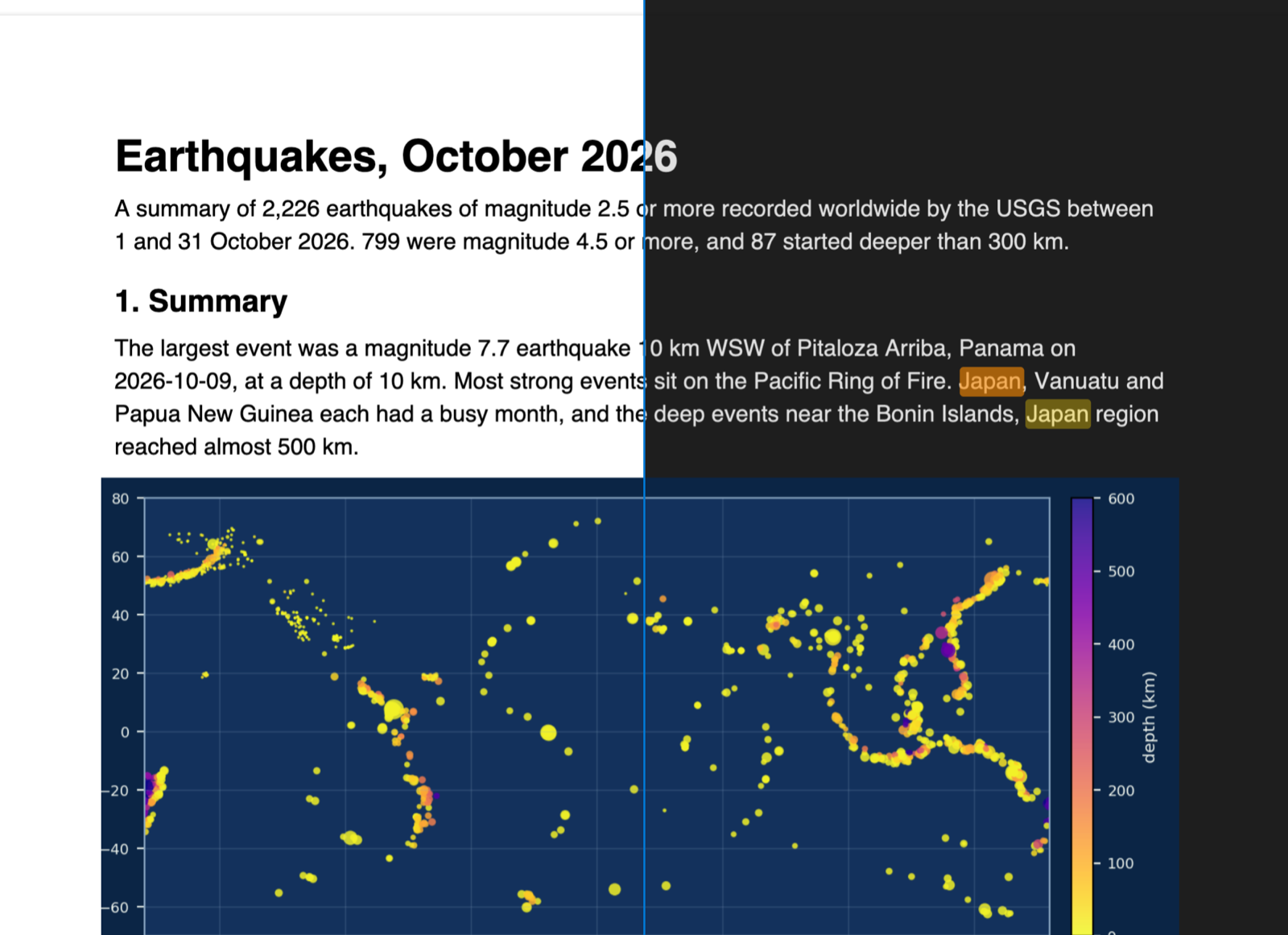
Photos are raster images, so the viewer repaints them in their original pixels. Vector charts are drawn as lines and text, so they are inverted with the page.
Does it work offline?
Yes. pdf.js is bundled. It makes no network calls and has no telemetry.
More about PDF Reader
Read the PDF Reader page for every feature and setting, or the source code on GitHub.
Related guides
- Open a PDF in Cursor
- Open a .docx Word file in VS Code
- View a PowerPoint .pptx file in VS Code
- Open an Excel .xlsx file in VS Code
Support this work
If this extension saves you time, you can support the work on GitHub Sponsors. Monthly tiers start at $5, and one-time tiers start at $15. Sponsorship is optional, and the tool works the same without it.