Open files in VS Code and Cursor / Office files
Compare two Word documents
Word has Review, Compare built in. Without Word, or when the files live in a Git repo, install the free DOCX Viewer by Zovo in VS Code, select both .docx files, right-click and pick "Compare Documents (Redline)...". You get one document with inserted words underlined, deleted words struck through, moved paragraphs, changed table cells and formatting changes marked, plus a change list. Nothing is uploaded. Exporting the result as a Word file with tracked changes is Zovo Pro.
Free, MIT license. Extension ID zovo.docx-viewer-vscode, version 0.4.7. Needs VS Code 1.90.0 or newer.
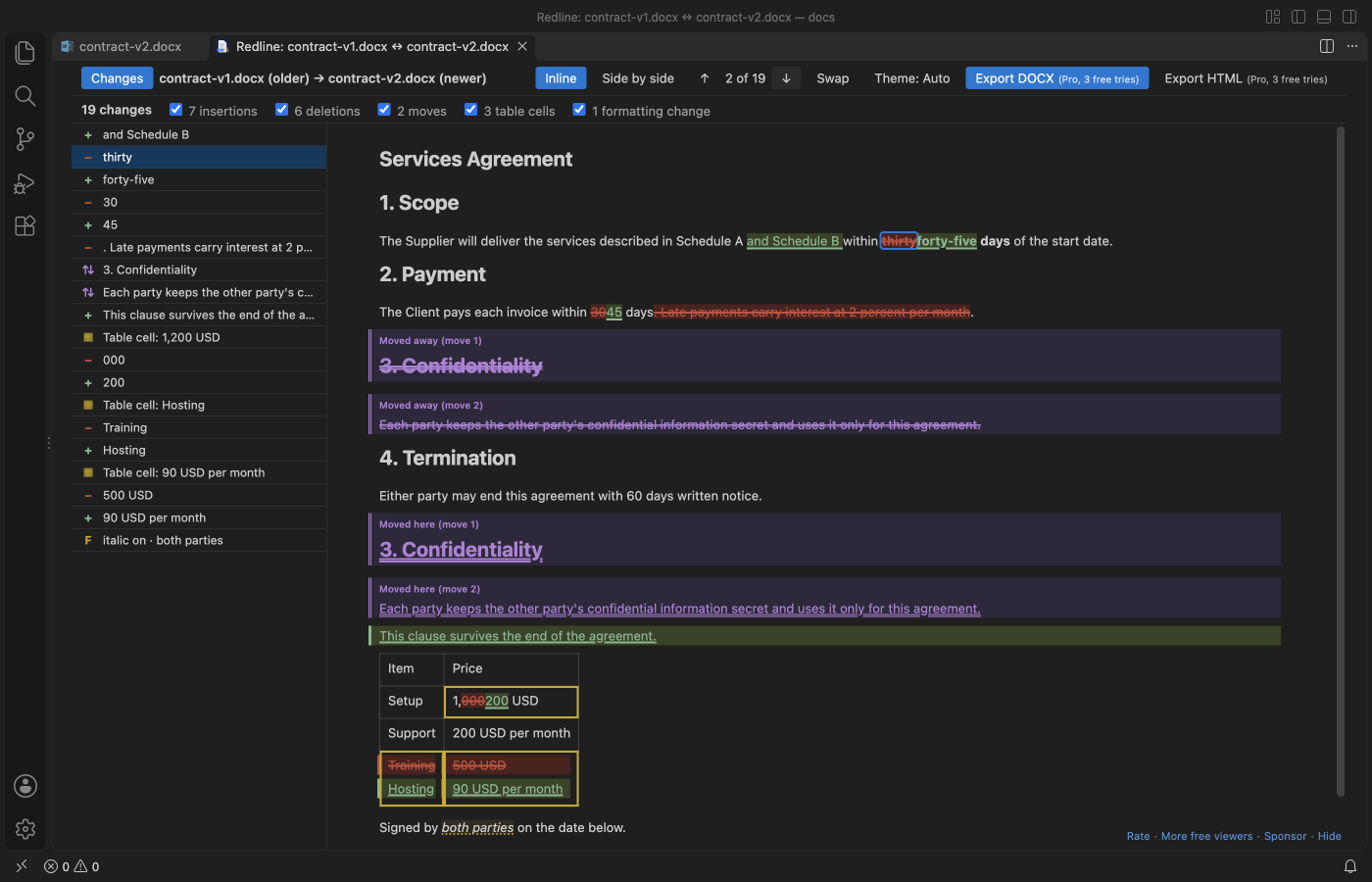
Steps in VS Code
- Install DOCX Viewer from the Marketplace, or press Ctrl+P (Cmd+P on macOS) and run
ext install zovo.docx-viewer-vscode. - Select the two files in the Explorer, right-click and pick "Compare Documents (Redline)...". The file changed longest ago goes on the left as the older version; "Swap" changes that.
- For a file in Git, right-click it in the Explorer or in Source Control and pick "Compare with Git HEAD", then Redline.
- Use the change list, the filters and F7 to go from change to change. "Side by side" shows both versions in one scrolling view.
- To send the result to someone with Word, click "Export DOCX" (Zovo Pro). Your two documents are never changed.
Steps in Cursor, Windsurf or VSCodium
- Open the Extensions view with Ctrl+Shift+X (Cmd+Shift+X on macOS).
- Search for
zovo.docx-viewer-vscodeand click Install. Cursor, Windsurf and VSCodium install from Open VSX, where it is published aszovo/docx-viewer-vscode. - If your editor has no gallery, download the .vsix from the Open VSX page and run "Extensions: Install from VSIX...".
- Then use it the same way as in VS Code.
What DOCX Viewer handles
- .docx, .odt and old .doc files.
- Word-level insertions and deletions, moved paragraphs, added and removed table rows, changed cells and formatting-only changes.
- Tracked changes already in a file are accepted first, so the compare uses the final text of both versions.
- Two 500-page documents with 200 tables compared in 0.44 s in a background worker, with progress and Cancel.
- A Markdown diff in VS Code's own diff editor, if you prefer plain text.
What it does not do
- Changes in headers, footers, footnote text, text boxes and comments are not marked.
- Pictures, charts and equations count as one object each, so a changed picture shows only when one is added or removed.
- The redline view needs desktop VS Code. In VS Code for the Web the compare opens the Markdown diff.
Free and Zovo Pro
Free, and staying free: Reading and Page view, search, the outline, tracked changes and comments, Copy as Markdown, the Markdown compare, and the on-screen redline with its change list, filters and side-by-side mode.
Zovo Pro adds these tools to DOCX Viewer. Each one works 3 times on your computer before it asks for a license. Nothing about Pro shows when you open a file: no popup, no countdown, no banner.
- Export the redline as a new
.docxwith real tracked changes that Word and LibreOffice can accept or reject one by one. - Export the redline as one HTML file that prints to PDF.
- Compare two folders of documents: one HTML redline per changed pair and an
index.htmlwith the counts.
Zovo Pro costs USD 19 once. It is not a subscription, and one purchase covers every Zovo VS Code extension. Today it also covers the Pro tools in Hex Viewer and Postgres & MySQL Query Client, and Pro tools added to other Zovo extensions later.
Two ways to unlock it:
- GitHub Sponsors: pick the "$19 one time" tier. Then, in VS Code, click a Pro tool and pick "Unlock with GitHub Sponsors" (or type "GitHub Sponsors" in the Command Palette) and sign in with the same GitHub account. A monthly sponsorship of USD 10 or more that is still running counts too.
- PayPal, no GitHub account needed: send USD 19 by PayPal with "Zovo Pro" in the note, then post the transaction ID with the Zovo Pro key form (a public GitHub issue, so post only the ID). The license key goes to the email address of your PayPal account within a day. Click a Pro tool and pick "I have a license key" (or type "license key" in the Command Palette) and paste it. The key is checked on your computer, with no network call.
A team of 5: USD 59 once by PayPal, with "Zovo Pro Team" in the note. Every rule and every Pro tool is on the Zovo Pro page.
In JetBrains IDEs (IntelliJ IDEA, PyCharm, WebStorm, CLion and others)
- DOCX & PPTX Viewer by Zovo. Our own JetBrains plugin. It was still waiting for JetBrains review on 9 November 2026. It views documents; the redline is only in the VS Code extension.
- Docx Browser. Shows the XML parts inside a Word file (1,260 downloads). It does not compare documents.
Other options
- Docx Compare (
SagasysTechnologyGroup.docx-compare, 41 installs, not on Open VSX). Its own description: "Compare Word documents side by side with formatting, across git commits, staged changes and pull requests". Not on Open VSX. - Microsoft Word. Review, Compare, Compare... in Word for Windows and Mac makes a new document with tracked changes. It needs a Word licence.
- Online compare sites. Many sites compare two uploaded documents for free. They need the files uploaded, which is often not allowed for contracts.
Install counts and Open VSX status were checked on 9 November 2026. Descriptions in quotes are the extensions' own.
Questions
Can I compare two Word documents for free?
Yes. The redline in DOCX Viewer is free, offline and has no page limit. Only the exports (DOCX with tracked changes, HTML) and the folder compare are Zovo Pro.
Can it compare a .docx with an older Git version?
Yes. Right-click the file and pick "Compare with Git HEAD". Plain git diff shows nothing useful for Word files.
Is my document uploaded anywhere?
No. DOCX Viewer makes no network calls with your files. The only network call is the optional GitHub check when you unlock Zovo Pro.
More about DOCX Viewer
Read the DOCX Viewer page for every feature and setting, or the source code on GitHub.
Related guides
- DOCX Viewer & ODT Viewer on the VS Code Marketplace (also on Open VSX). Shows Word .docx, .doc, .odt and .rtf files as pages, with a dark mode.
- Open a .docx Word file in VS Code
- Make a redline of two DOCX files
- Export Word track changes to Excel
- Open Word and PowerPoint files without Office
Zovo Pro and support
Zovo Pro: USD 19 once, every Zovo viewer. It turns on the Pro tools in this extension and in the other Zovo extensions you use. The free features stay free.
After a card payment your license key shows on the next page. Paste it with the command "Zovo Pro: Enter a key".
You can also support the work with no Pro:
Need your format supported?
Open a format request with a sample file, and I reply there whether it can be done. For USD 299 once, through this GitHub Sponsors tier, I add your file format or a missing feature to this extension, with tests, within 7 days.