Open files in VS Code and Cursor / Office files
Open Word and PowerPoint files without Office
Two free extensions open Office files in VS Code and Cursor with no Office or LibreOffice installed. DOCX Viewer shows .docx, .odt and old .doc files with an outline, search, tracked changes and comments. PPTX Viewer shows .pptx decks with thumbnails, speaker notes, search and full screen Present. Nothing is uploaded. Zovo Pro (USD 19 once) adds exports, such as the redline of two versions as one HTML file, with 3 free tries each.
Free, MIT license. Extension ID zovo.docx-viewer-vscode, version 0.4.7. Needs VS Code 1.90.0 or newer.
This guide is also in Bahasa Indonesia, Nederlands, Русский, Türkçe, Tiếng Việt.
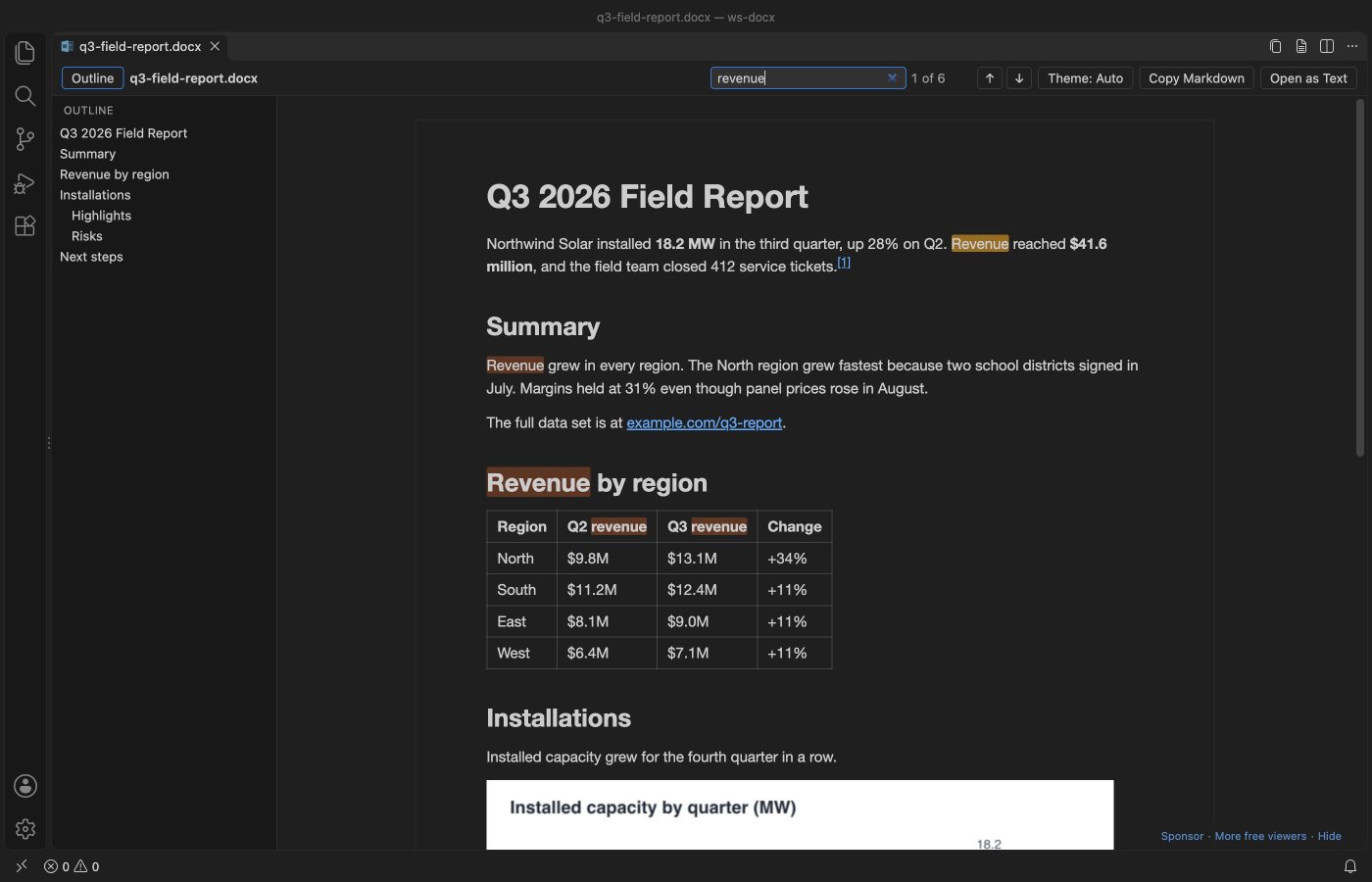
Steps in VS Code
- Install DOCX Viewer from the Marketplace, or press Ctrl+P (Cmd+P on macOS) and run
ext install zovo.docx-viewer-vscode. - Click a
.docx,.odtor.docfile in the Explorer. Word and OpenDocument files show with styles, tables, images, charts and equations. Old Word 97-2003.docfiles open as text. - Use the outline to jump to a heading, and search to find a word. Tracked changes and comments show with the author, and Copy as Markdown copies the whole document.
- For slides, install PPTX Viewer (
zovo.pptx-slide-viewer) the same way, then click a.pptx,.ppsxor.potxfile. You get slide thumbnails, speaker notes and search across the whole deck. Old.pptfiles open as text with titles, slide text and notes. - Press Present to show one slide at a time full screen. Esc brings the editor back.
- Both viewers reload when another program saves the file, so a document or deck written by a script or an AI agent shows its latest version.
Where Zovo Pro saves time
Reading and Page view, search, the outline, tracked changes and comments, Copy as Markdown and the on-screen redline of two versions are free in DOCX Viewer. Thumbnails, speaker notes, search, Present, Copy as Markdown and copying one slide as PNG are free in PPTX Viewer.
Without Word, it is hard to show someone what changed between two versions of a document. The on-screen redline is free. Export Redline as HTML saves it as one self-contained HTML file with the change list and the marked text, for people without Word. Open it in a browser and print it to PDF. The same Pro tool can save a new .docx with real tracked changes that Word and LibreOffice can accept or reject one by one. DOCX Viewer also has the change list as Excel and a compare of two folders as Pro tools. PPTX Viewer Pro exports all slides as PNG, saves the deck as one PDF, converts a folder of decks to Markdown and compresses a deck.
With Export Redline as HTML (Zovo Pro)
- Open the newer document, click Compare in the toolbar and pick "Compare with Git HEAD" or "Compare with another document". The redline is free.
- Run "DOCX Viewer Pro: Export Redline as HTML (Pro)" from the Command Palette and pick where to save.
- Open the HTML file in any browser, or print it to PDF. Your two documents are never changed.
Export Redline as HTML works 3 times on your computer before it asks for a license, and a try counts only when you get a result. Opening a file shows no popup and no countdown.
Zovo Pro costs USD 19 once. It is not a subscription, and it turns on the Pro tools in every Zovo extension, not only DOCX Viewer. After a card payment (Stripe) your license key shows on the next page. In VS Code, run "Zovo Pro: Enter Zovo Pro license key" from the Command Palette and paste it. The key is checked on your computer, with no network call. With GitHub Sponsors, pick the "$19 one time" tier, then run "Zovo Pro: I already paid: unlock with GitHub Sponsors" and sign in with the same GitHub account. With PayPal, send USD 19 with "Zovo Pro" in the note and the key comes by email within a day.
A team of 5: USD 59 once, by card or by PayPal. Every rule and every Pro tool is on the Zovo Pro page.
Steps in Cursor, Windsurf or VSCodium
- Open the Extensions view with Ctrl+Shift+X (Cmd+Shift+X on macOS).
- Search for
zovo.docx-viewer-vscodeand click Install. Cursor, Windsurf and VSCodium install from Open VSX, where it is published aszovo/docx-viewer-vscode. - If your editor has no gallery, download the .vsix from the Open VSX page and run "Extensions: Install from VSIX...".
- Then use it the same way as in VS Code.
What DOCX Viewer handles
.docx,.docm,.dotx,.odtand old.doc(as text)..pptx,.ppsx,.potx,.pptmand old.ppt(as text) in PPTX Viewer.- Tracked changes and comments, with Final and Original views.
- Remote SSH, WSL, Dev Containers and Codespaces for decks, because files are read through VS Code.
What it does not do
- Both are viewers. You cannot type into the document or edit a slide.
.rtffiles are not opened. Only RTF saved with a.docname opens, as text.- Old
.docand.pptfiles show text only, without pictures or layout.
Other options
- LibreOffice. A free office suite that opens and edits Word and PowerPoint files. A large desktop install.
- Word and PowerPoint for the web. Free with a Microsoft account. The file goes to OneDrive first.
- Google Docs and Google Slides. Free with a Google account. The file is uploaded to Google Drive.
Install counts and Open VSX status were checked on 12 November 2026. Descriptions in quotes are the extensions' own.
Questions
Do I need Microsoft Office or LibreOffice?
No. Both extensions read the files themselves, inside VS Code or Cursor.
Is my file uploaded?
No. Both read the file on your computer and do not upload it.
Can I edit the document?
No. These are viewers. For editing, use LibreOffice, Word or Word for the web.
Does it work in Cursor or Windsurf?
Yes. Cursor, Windsurf and VSCodium install extensions from Open VSX. Search for the extension in their Extensions view and install it there.
More about DOCX Viewer
Read the DOCX Viewer page for every feature and setting, or the source code on GitHub.
Related guides
- DOCX Viewer & ODT Viewer on the VS Code Marketplace (also on Open VSX). Shows Word .docx, .doc, .odt and .rtf files as pages, with a dark mode.
- Convert a PDF, Word, PowerPoint or Excel file to Markdown in VS Code
- Open a .docx Word file in VS Code
- Compare two Word documents
- Make a redline of two DOCX files
Zovo Pro and support
Zovo Pro: USD 19 once, every Zovo viewer. It turns on the Pro tools in this extension and in the other Zovo extensions you use. The free features stay free.
After a card payment your license key shows on the next page. Paste it with the command "Zovo Pro: Enter a key".
You can also support the work with no Pro:
Need your format supported?
Open a format request with a sample file, and I reply there whether it can be done. For USD 299 once, through this GitHub Sponsors tier, I add your file format or a missing feature to this extension, with tests, within 7 days.