Open files in VS Code and Cursor / Office files
Convert a PDF, Word, PowerPoint or Excel file to Markdown in VS Code
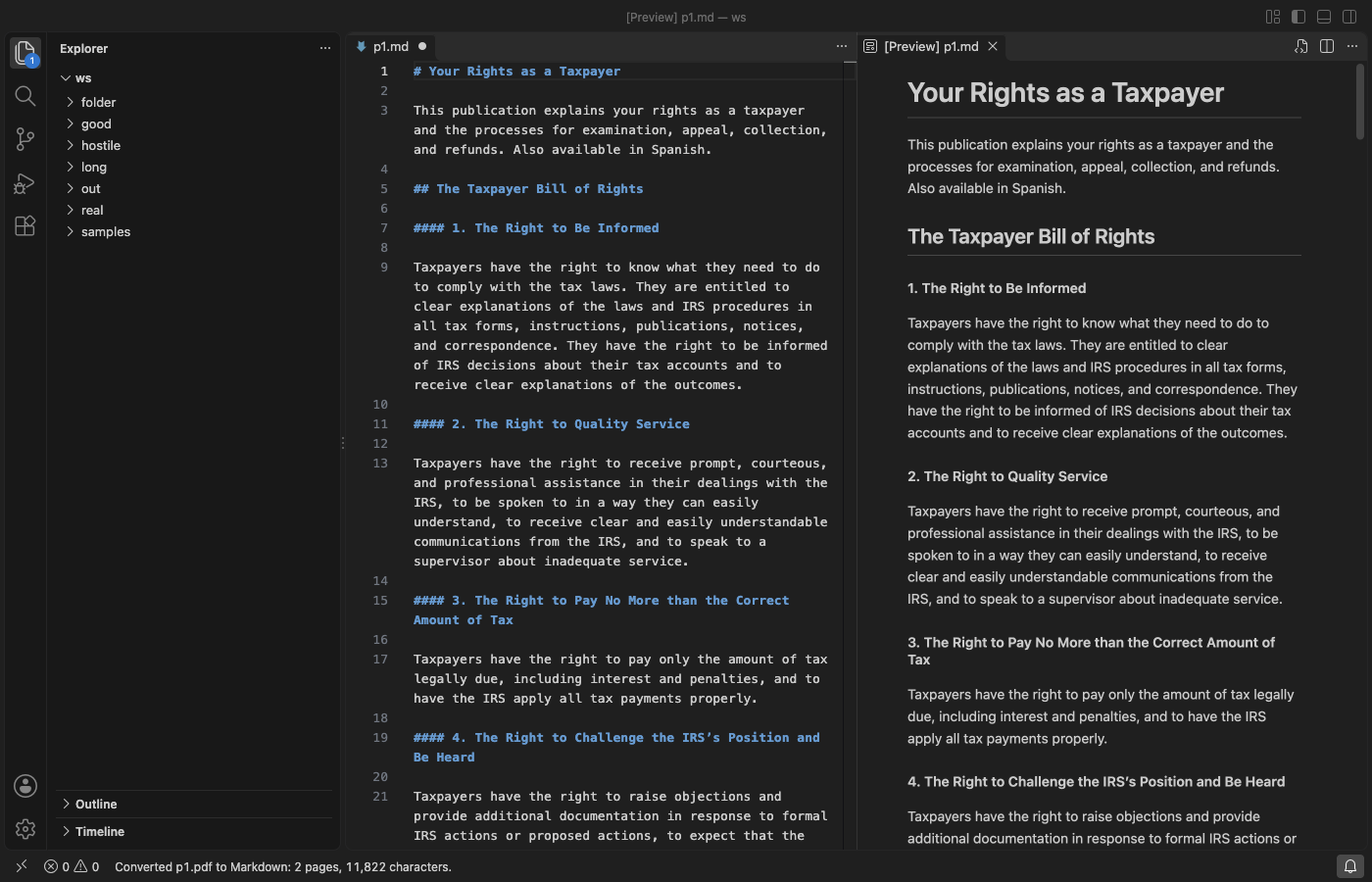
Convert to Markdown turns a PDF, Word, PowerPoint, Excel, CSV, HTML, EPUB, ODT or RTF file into Markdown inside VS Code. Right-click the file in the Explorer and pick Convert to Markdown: the Markdown opens beside it, with headings, lists, tables, links and slide notes. It needs no Python, no server and no command-line tool, and nothing leaves your computer. Converting single files is free with no limit. Zovo Pro (USD 19 once) adds whole-folder conversion, image extraction and LLM-ready chunks, with 3 free tries each.
Free, MIT license. Extension ID zovo.zovo-convert-to-markdown, version 0.1.1. Needs VS Code 1.90.0 or newer.
Steps in VS Code
- Install Convert to Markdown from the Marketplace, or press Ctrl+P (Cmd+P on macOS) and run
ext install zovo.zovo-convert-to-markdown. - In the Explorer, right-click a
.pdf,.docx,.pptx,.xlsx,.xls,.ods,.csv,.html,.epub,.odtor.rtffile and pick Convert to Markdown. You can also right-click the tab of an open file. - The Markdown opens beside the file as an unsaved document. Big files show progress with a Cancel button.
- Press Save. The file name
name.mdnext to the source is filled in for you. To skip this step every time, settoMarkdown.outputtofileand the Markdown is saved next to the source at once. - To paste the result somewhere else instead, right-click the file and pick Copy as Markdown. Select several files in the Explorer to convert them one after the other.
- No file at hand? Run "Convert to Markdown: Convert a sample file" from the Command Palette to convert a bundled Word, PDF or PowerPoint sample.
Where Zovo Pro saves time
Convert to Markdown and Copy as Markdown are free for every format, with no limit, no sign-in and no network calls. There is no trial timer and no license banner.
When a whole folder of PDFs, Word files and slides has to become Markdown (for docs, a wiki or a search index), Convert a Folder to Markdown does every supported file in the folder and its subfolders in one run. The .md files go to a mirrored folder or next to each file, existing files are skipped or overwritten as you choose, and _conversion-report.md lists what was converted. Files that share a name keep their type in the new name (report.pdf.md, report.docx.md), so none is lost. The other two Pro tools are Convert to Markdown with Images, which saves the pictures to a name_assets folder and links them, and LLM-ready Markdown Chunks, which adds YAML front matter and splits the text at headings into chunks with a token estimate, as Markdown files or one JSONL file.
With Convert a Folder to Markdown (Zovo Pro)
- Right-click a folder in the Explorer and pick "Zovo Pro: Convert a Folder to Markdown", or run "Convert to Markdown: Convert a Folder to Markdown (Pro)" from the Command Palette.
- Choose where the
.mdfiles go and what to do with files that already exist. Progress shows with a Cancel button. - Open
_conversion-report.mdto see each file that was converted or skipped.
Convert a Folder to Markdown works 3 times on your computer before it asks for a license, and a try counts only when you get a result. Opening a file shows no popup and no countdown.
Zovo Pro costs USD 19 once. It is not a subscription, and it turns on the Pro tools in every Zovo extension, not only Convert to Markdown. After a card payment (Stripe) your license key shows on the next page. In VS Code, run "Zovo Pro: Enter Zovo Pro license key" from the Command Palette and paste it. The key is checked on your computer, with no network call. With GitHub Sponsors, pick the "$19 one time" tier, then run "Zovo Pro: I already paid: unlock with GitHub Sponsors" and sign in with the same GitHub account. With PayPal, send USD 19 with "Zovo Pro" in the note and the key comes by email within a day.
A team of 5: USD 59 once, by card or by PayPal. Every rule and every Pro tool is on the Zovo Pro page.
Steps in Cursor, Windsurf or VSCodium
- Open the Extensions view with Ctrl+Shift+X (Cmd+Shift+X on macOS).
- Search for
zovo.zovo-convert-to-markdownand click Install. Cursor, Windsurf and VSCodium install from Open VSX, where it is published aszovo/zovo-convert-to-markdown. - If your editor has no gallery, download the .vsix from the Open VSX page and run "Extensions: Install from VSIX...".
- Then use it the same way as in VS Code.
What Convert to Markdown handles
- PDF: headings from the font sizes, paragraphs with broken lines and hyphenated words joined, lists, simple tables, two-column pages read column by column. Running headers, footers and page numbers are dropped.
- Word (
.docx,.docm,.dotx): headings, bold, italic, strikethrough, links, nested lists, tables, block quotes and footnotes. - PowerPoint (
.pptx,.pptm,.ppsx,.potx): one## Slide n: titlesection per slide, bullets with their levels, tables and the speaker notes. - Excel and other sheets (
.xlsx,.xlsm,.xlsb,.xls,.ods): one## Sheet: namesection with a pipe table per sheet. CSV and TSV become one table. - HTML (code blocks keep their language, scripts and styles are dropped) and EPUB (each chapter in reading order).
- Each file is converted in a worker thread with a memory cap and Cancel, so a damaged or huge file cannot freeze VS Code.
What it does not do
- Scanned PDFs (pictures of pages) have no text to convert. Text recognition (OCR) is not included.
- PDF tables are found from the gaps between columns. Tables without clear gaps come out as paragraphs.
- Images become placeholders such as
*[Image: Map of the site]*in the free conversion. Charts, SmartArt and video in slides are named, not converted. - Old Word 97-2003 files and RTF give text and tables without formatting. Password-protected files and old PowerPoint 97-2003 files get a message instead.
- Files over 200 MB are not converted (setting
toMarkdown.maxFileSizeMB), and a PDF stops after 1,000 pages (settingtoMarkdown.pdfMaxPages).
Other options
- PDF to Markdown (
KarthikDasari.pdf-to-markdown, 6,708 installs, on Open VSX). Its own description: "Convert PDF files into clean, structured Markdown inside VS Code with structure preservation, local processing, and configurable settings." PDF only. - DOCX to Markdown Converter (
focus-space.docx-markdown-converter, 9,812 installs, not on Open VSX). Its own description: "Convert Word documents (.docx) to Markdown with automatic image extraction". Word only. - MarkItDown. A free, open source Python tool from Microsoft that converts Office files and PDFs to Markdown on the command line. It needs Python.
- Pandoc. A free command-line converter between many document formats, including DOCX, HTML and EPUB to Markdown. It does not read PDF.
Install counts and Open VSX status were checked on 12 November 2026. Descriptions in quotes are the extensions' own.
Questions
Can VS Code convert a PDF or Word file to Markdown without an extension?
No. VS Code opens a PDF or a .docx as a binary file. You need an extension such as Convert to Markdown, or a separate command-line tool.
Does it upload my files?
No. The converters run on your computer, inside VS Code, with no network calls and no telemetry.
Does it convert scanned PDFs?
No. A scanned PDF holds pictures of pages, not text, and Convert to Markdown has no OCR.
Does it work in Cursor or Windsurf?
Yes. Cursor, Windsurf and VSCodium install extensions from Open VSX. Search for the extension in their Extensions view and install it there.
More about Convert to Markdown
Read the Convert to Markdown page for every feature and setting, or the source code on GitHub.
Related guides
- Open a .docx Word file in VS Code
- View a PowerPoint .pptx file in VS Code
- Read PDFs in dark mode in VS Code
- Open a PDF in Cursor
Zovo Pro and support
Zovo Pro: USD 19 once, every Zovo viewer. It turns on the Pro tools in this extension and in the other Zovo extensions you use. The free features stay free.
After a card payment your license key shows on the next page. Paste it with the command "Zovo Pro: Enter a key".
You can also support the work with no Pro:
Need your format supported?
Open a format request with a sample file, and I reply there whether it can be done. For USD 299 once, through this GitHub Sponsors tier, I add your file format or a missing feature to this extension, with tests, within 7 days.