Open files in VS Code and Cursor / Code and APIs
Squash several commits in VS Code
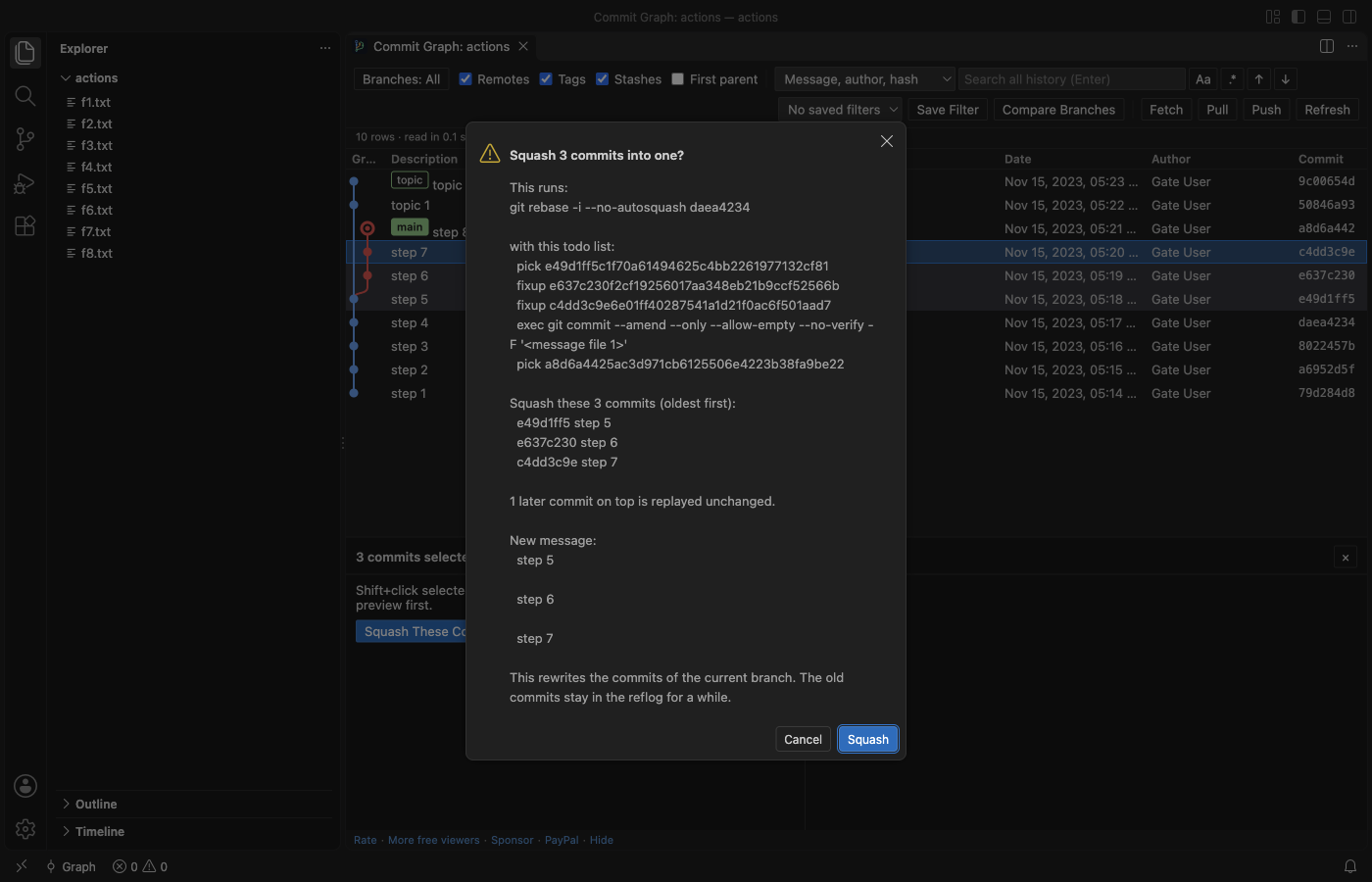
Git Commit Graph & History Log shows your repository as a graph in VS Code. Click the newest commit you want to join, Shift+click the oldest, and pick Squash These Commits…. You type the first line of the new message, then a preview shows the git rebase -i command and its todo list before anything runs. Git does the work, so the result is the same as on the command line. The graph and squash are free, with no account. Zovo Pro (USD 19 once) adds an interactive rebase editor, a branch comparison report and saved graph filters, with 3 free tries each.
Free, MIT license. Extension ID zovo.zovo-git-commit-graph, version 0.1.1. Needs VS Code 1.90.0 or newer.
Steps in VS Code
- Install Commit Graph from the Marketplace, or press Ctrl+P (Cmd+P on macOS) and run
ext install zovo.zovo-git-commit-graph. - Run "Commit Graph: Show Commit Graph" from the Command Palette, or click the Graph button in the status bar or in Source Control.
- Click the newest commit you want to join, then Shift+click the oldest. Both must be on the checked-out branch. Commit or stash uncommitted changes first.
- Click Squash These Commits… below the graph, or right-click the range and pick Squash N Selected Commits…. Type the first line of the new message. The full messages of the squashed commits follow as the body.
- Read the preview. It shows the
git rebase -i --no-autosquashcommand, the todo list, the commits and how many later commits are replayed unchanged. Click Squash. - If git stops on a conflict, a bar shows Continue, Skip and Abort.
Where Zovo Pro saves time
The graph, search over the full history, commit details, diffs, file and line history, squash and every git action are free, with no account and no time limit.
Squash of one straight range is free. When you want to clean up a branch in one pass (reorder commits, reword messages, squash or fixup several groups and drop some), the Interactive rebase editor lists the commits oldest first. Drag a row (or use Alt+Up and Alt+Down) to move it, and set each one to pick, reword, squash, fixup or drop. Start Rebase… shows the exact git todo list before git runs it, and a try counts only when git finished the rebase. The other two Pro tools are the branch comparison report (commits on each side, merge base, changed files and authors, as Markdown) and saved graph filters.
With Interactive rebase editor (Zovo Pro)
- Right-click the commit just below the ones you want to change and pick Interactive Rebase from Here…. Or run "Commit Graph: Interactive Rebase..." and type a base such as
HEAD~5. - Drag the rows into the order you want and set each one to pick, reword, squash, fixup or drop. Squash and fixup join a commit into the one above it.
- Click Start Rebase… and read the git todo list in the confirmation before git runs it.
Interactive rebase editor works 3 times on your computer before it asks for a license, and a try counts only when you get a result. Opening a file shows no popup and no countdown.
Zovo Pro costs USD 19 once. It is not a subscription, and it turns on the Pro tools in every Zovo extension, not only Commit Graph. After a card payment (Stripe) your license key shows on the next page. In VS Code, run "Zovo Pro: Enter Zovo Pro license key" from the Command Palette and paste it. The key is checked on your computer, with no network call. With GitHub Sponsors, pick the "$19 one time" tier, then run "Zovo Pro: I already paid: unlock with GitHub Sponsors" and sign in with the same GitHub account. With PayPal, send USD 19 with "Zovo Pro" in the note and the key comes by email within a day.
A team of 5: USD 59 once, by card or by PayPal. Every rule and every Pro tool is on the Zovo Pro page.
Steps in Cursor, Windsurf or VSCodium
- Open the Extensions view with Ctrl+Shift+X (Cmd+Shift+X on macOS).
- Search for
zovo.zovo-git-commit-graphand click Install. Cursor, Windsurf and VSCodium install from Open VSX, where it is published aszovo/zovo-git-commit-graph. - If your editor has no gallery, download the .vsix from the Open VSX page and run "Extensions: Install from VSIX...".
- Then use it the same way as in VS Code.
What Commit Graph handles
- A straight range of commits, also when later commits sit on top. They are replayed unchanged.
- Squash merge of a branch (
git merge --squash), which stages the changes for you to commit. - Reset soft, mixed or hard, with the git command shown first and a warning for hard.
- Continue, Skip and Abort when a rebase, merge or cherry-pick stops on a conflict.
What it does not do
- Squash works on a straight line of commits on the checked-out branch. A merge commit in the range, or between the range and HEAD, stops it with a message.
- Uncommitted changes to tracked files must be committed or stashed first.
- Push in the graph is a normal
git push. After you squash commits that are already on a remote, git refuses it, and you need a force push. - Squash rewrites the commits of the current branch. The old commits stay only in the reflog, for a while.
Other options
- git rebase -i in a terminal. Free. Mark the commits as squash or fixup in the todo list that opens in your editor.
- Git in a terminal. Free.
git reset --soft HEAD~3and thengit commitjoin the last 3 commits into one, with a new message. - GitLens. A VS Code extension with a visual editor for
git rebase -itodo lists.
Install counts and Open VSX status were checked on 12 November 2026. Descriptions in quotes are the extensions' own.
Questions
What if I already pushed the commits?
Squash rewrites them, so a normal push is refused. Run git push --force-with-lease in a terminal, or turn on git.allowForcePush and run "Git: Push (Force)" in VS Code. Do this only on a branch nobody else builds on.
Can I undo a squash?
Yes, for a while. The old commits stay in the reflog. Run git reflog, find the commit from before the squash and run git reset --hard with its hash.
Is squash free?
Yes. The graph, search, squash and every git action are free. Only the interactive rebase editor, the branch comparison report and saved graph filters are Zovo Pro, with 3 free tries each.
Does it work in Cursor or Windsurf?
Yes. Cursor, Windsurf and VSCodium install extensions from Open VSX. Search for the extension in their Extensions view and install it there.
More about Commit Graph
Read the Commit Graph page for every feature and setting, or the source code on GitHub.
Related guides
- See a git commit graph in VS Code
- Open a SARIF file in VS Code
- Preview a Swagger or OpenAPI file in VS Code
- Preview an HTML file with its CSS and images in VS Code
Zovo Pro and support
Zovo Pro: USD 19 once, every Zovo viewer. It turns on the Pro tools in this extension and in the other Zovo extensions you use. The free features stay free.
After a card payment your license key shows on the next page. Paste it with the command "Zovo Pro: Enter a key".
You can also support the work with no Pro:
Need your format supported?
Open a format request with a sample file, and I reply there whether it can be done. For USD 299 once, through this GitHub Sponsors tier, I add your file format or a missing feature to this extension, with tests, within 7 days.