Open files in VS Code and Cursor / Binary, network and hardware
Open a PCAP file in VS Code
VS Code cannot read packet captures by itself. Install the free PCAP Viewer by Zovo and click the .pcap, .pcapng or .pcap.gz file. It opens like a packet analyzer: a packet list, a protocol tree, a hex pane linked to the tree, Wireshark-style display filters and follow TCP stream. It reads the file itself, so you do not need Wireshark, tshark or sharkd.
Free, MIT license. Extension ID zovo.zovo-pcap-viewer, version 0.2.2. Needs VS Code 1.90.0 or newer.
This guide is also in Deutsch, Español, Français, Italiano, 日本語, Polski, Português (Brasil), 简体中文.
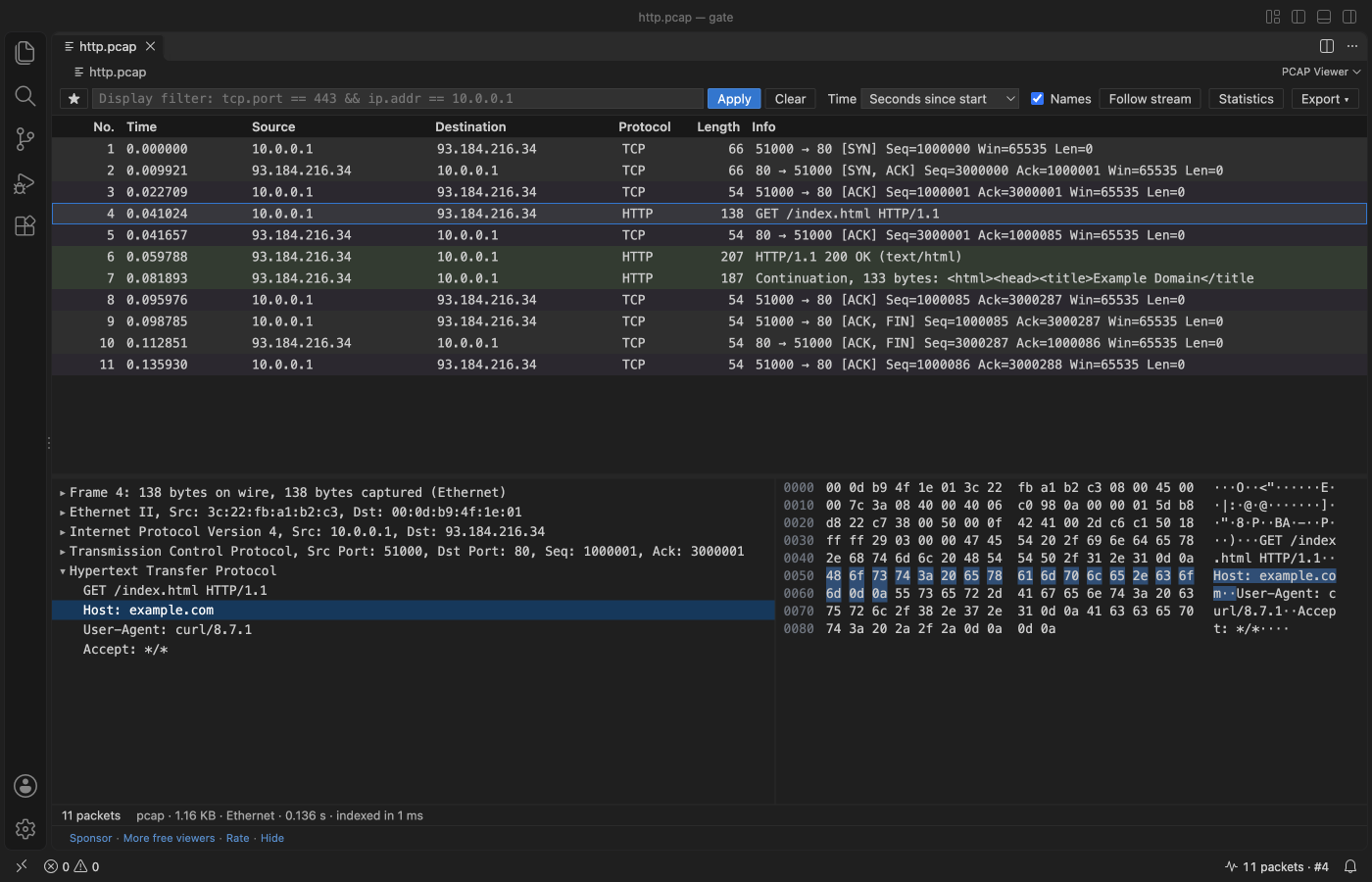
Steps in VS Code
- Install PCAP Viewer from the Marketplace, or press Ctrl+P (Cmd+P on macOS) and run
ext install zovo.zovo-pcap-viewer. - Click a
.pcap,.pcapng,.pcap.gzor.pcapng.gzfile. For.capfiles, right-click and pick "Open in PCAP Viewer". - Type a filter such as
tcp.port == 443 && ip.addr == 10.0.0.1and press Enter. - Click a field in the tree to light up its bytes, or click a byte to find its field.
- Double-click a packet to follow its TCP or UDP stream. Open Statistics for conversations and endpoints.
Steps in Cursor, Windsurf or VSCodium
- Open the Extensions view with Ctrl+Shift+X (Cmd+Shift+X on macOS).
- Search for
zovo.zovo-pcap-viewerand click Install. Cursor, Windsurf and VSCodium install from Open VSX, where it is published aszovo/zovo-pcap-viewer. - If your editor has no gallery, download the .vsix from the Open VSX page and run "Extensions: Install from VSIX...".
- Then use it the same way as in VS Code.
What PCAP Viewer handles
- Ethernet, VLAN, Linux cooked capture, raw IP, loopback and 802.11 headers.
- ARP, IPv4, IPv6, ICMP, TCP, UDP, DNS, DHCP, HTTP/1.x, TLS records with the server name (SNI) and ALPN, and QUIC long headers.
- In the release check, a 1 GB capture with 1,438,965 packets listed in about 2 s.
- Export the packets the filter shows as a new pcap file. Host names come from DNS answers in the capture, with no lookups on the network.
What it does not do
- It decodes the protocols listed here. For other protocols you see the bytes, not the fields.
- TLS stays encrypted. It shows the records, the server name and ALPN, but it does not decrypt traffic.
- Filters take the common part of the Wireshark syntax, not all of it. A
.gzcapture unpacks up to 512 MB.
In JetBrains IDEs (IntelliJ IDEA, PyCharm, WebStorm, CLion and others)
- ChatTCP. Zovo has no JetBrains plugin for packet captures. ChatTCP (341 downloads) shows TCP and UDP packets as a chat inside IntelliJ IDEA.
- Wireshark. Most JetBrains users open captures in Wireshark next to the IDE.
Other options
- Wireshark. The free desktop packet analyzer. It decodes far more protocols and can decrypt TLS with a key log file. Use it for deep analysis.
- pcapviewer (
sankooc.pcapviewer, 21,880 installs, on Open VSX). Its own description: "pcap/pcapng file analyzer". - PCAP Viewer (tshark) (
denpaz.pcap-viewer, 189 installs, on Open VSX). Its own description: "Wireshark-like packet capture viewer for VS Code, powered by tshark." It needs tshark installed. - Net Tools (
CusanzaBros.vscode-net-tools, 6,988 installs, not on Open VSX). Its own description: "Network tools, including pcap and pcapng file parser and viewer". Not on Open VSX.
Install counts and Open VSX status were checked on 9 November 2026. Descriptions in quotes are the extensions' own.
Questions
Do I need Wireshark installed?
No. PCAP Viewer reads pcap and pcapng in JavaScript inside VS Code. Nothing else is installed or started.
Does opening a capture send DNS queries?
No. Names come only from DNS answers and name blocks inside the capture. The extension makes no network requests and has no telemetry.
Can it open a damaged capture?
Yes. It shows every packet before the damage and a message that says what is wrong and at which byte.
More about PCAP Viewer
Read the PCAP Viewer page for every feature and setting, or the source code on GitHub.
Related guides
- PCAP Viewer & PCAPNG Viewer on the VS Code Marketplace (also on Open VSX). Reads packet captures as a table with protocol details.
- Convert a PCAP to CSV
- Use a hex editor in VS Code
- Open a binary file in VS Code
- View VCD waveforms in VS Code
Support this work
If this extension saves you time, you can support the work on GitHub Sponsors. Monthly tiers start at $5, and one-time tiers start at $15. Sponsorship is optional, and the tool works the same without it.
Need your format supported?
Open a format request with a sample file, and I reply there whether it can be done. For USD 299 once, through this GitHub Sponsors tier, I add your file format or a missing feature to this extension, with tests, within 7 days.